LLM 正在逐步改变人们的生活,而对于开发者,如何基于 LLM 提供的 API 快速、便捷地开发一些具备更强能力、集成LLM 的应用,来便捷地实现一些更新颖、更实用的能力,是一个急需学习的重要能力。要高效地基于 API 开发集成 LLM 的应用,首要便是学会如何合理、高效地使用 LLM,即如何构建 Prompt Engineering。第一部分 面向开发者的提示工程,源于由吴恩达老师与 OpenAI 合作推出的 《ChatGPT Prompt Engineering for Developers》教程,其面向入门 LLM 的开发者,深入浅出地介绍了对于开发者,如何构造 Prompt 并基于 OpenAI 提供的 API 实现包括总结、推断、转换等多种常用功能,是入门 LLM 开发的第一步。对于想要入门 LLM 的开发者,你需要充分掌握本部分的 Prompt Engineering 技巧,并能基于上述技巧实现个性化定制功能。
简介 Introduction
欢迎来到面向开发者的提示工程部分,本部分内容基于吴恩达老师的《Prompt Engineering for Developer》课程进行编写。《Prompt Engineering for Developer》课程是由吴恩达老师与 OpenAI 技术团队成员 Isa Fulford 老师合作授课,Isa 老师曾开发过受欢迎的 ChatGPT 检索插件,并且在教授 LLM (Large Language Model, 大语言模型)技术在产品中的应用方面做出了很大贡献。她还参与编写了教授人们使用 Prompt 的 OpenAI cookbook。我们希望通过本模块的学习,与大家分享使用提示词开发 LLM 应用的最佳实践和技巧。
网络上有许多关于提示词(Prompt, 本教程中将保留该术语)设计的材料,例如《30 prompts everyone has to know》之类的文章,这些文章主要集中在 ChatGPT 的 Web 界面上,许多人在使用它执行特定的、通常是一次性的任务。但我们认为,对于开发人员,大语言模型(LLM) 的更强大功能是能通过 API 接口调用,从而快速构建软件应用程序。实际上,我们了解到 DeepLearning.AI 的姊妹公司 AI Fund 的团队一直在与许多初创公司合作,将这些技术应用于诸多应用程序上。很兴奋能看到 LLM API 能够让开发人员非常快速地构建应用程序。
prompt 1: 1-两个兄妹在山上打水时发生意外,但最终平安回家。 2-In a charming village, siblings Jack and Jill set off to fetch water from a well on top of a hill. While singing joyfully, they climbed up, but unfortunately, Jack tripped on a stone and rolled down the hill, with Jill following closely behind. Despite some minor injuries, they made it back to their cozy home. Despite the mishap, their adventurous spirit remained undiminished as they continued to explore with delight. 3-Jack, Jill 4-{"english_summary": "In a charming village, siblings Jack and Jill set off to fetch water from a well on top of a hill. While singing joyfully, they climbed up, but unfortunately, Jack tripped on a stone and rolled down the hill, with Jill following closely behind. Despite some minor injuries, they made it back to their cozy home. Despite the mishap, their adventurous spirit remained undiminished as they continued to explore with delight.", "num_names": 2}
Translation: In a charming village, siblings Jack and Jill set off to fetch water from a well on top of a hill. Unfortunately, Jack tripped on a rock and tumbled down the hill, with Jill following closely behind. Despite some minor injuries, they made it back home safely. Despite the mishap, their adventurous spirit remained strong as they continued to explore joyfully.
Names: Jack, Jill
JSON Output: {"English_summary": "In a charming village, siblings Jack and Jill set off to fetch water from a well on top of a hill. Unfortunately, Jack tripped on a rock and tumbled down the hill, with Jill following closely behind. Despite some minor injuries, they made it back home safely. Despite the mishap, their adventurous spirit remained strong as they continued to explore joyfully.", "num_names": 2}
text = f""" You should express what you want a model to do by \ providing instructions that are as clear and \ specific as you can possibly make them. \ This will guide the model towards the desired output, \ and reduce the chances of receiving irrelevant \ or incorrect responses. Don't confuse writing a \ clear prompt with writing a short prompt. \ In many cases, longer prompts provide more clarity \ and context for the model, which can lead to \ more detailed and relevant outputs. """ prompt = f""" Summarize the text delimited by triple backticks \ into a single sentence. ```{text}``` """ response = get_completion(prompt) print(response)
1
To guide a model towards the desired output and reduce irrelevant or incorrect responses, it is important to provide clear and specific instructions, which can be achieved through longer prompts that offer more clarity and context.
寻求结构化的输出**
1 2 3 4 5 6 7 8 9
prompt = f""" Generate a list of three made-up book titles along \ with their authors and genres. Provide them in JSON format with the following keys: book_id, title, author, genre. """ response = get_completion(prompt) print(response)
text_1 = f""" Making a cup of tea is easy! First, you need to get some \ water boiling. While that's happening, \ grab a cup and put a tea bag in it. Once the water is \ hot enough, just pour it over the tea bag. \ Let it sit for a bit so the tea can steep. After a \ few minutes, take out the tea bag. If you \ like, you can add some sugar or milk to taste. \ And that's it! You've got yourself a delicious \ cup of tea to enjoy. """ prompt = f""" You will be provided with text delimited by triple quotes. If it contains a sequence of instructions, \ re-write those instructions in the following format: Step 1 - ... Step 2 - … … Step N - … If the text does not contain a sequence of instructions, \ then simply write \"No steps provided.\" \"\"\"{text_1}\"\"\" """ response = get_completion(prompt) print("Completion for Text 1:") print(response)
1 2 3 4 5 6 7 8
Completion for Text 1: Step 1 - Get some water boiling. Step 2 - Grab a cup and put a tea bag in it. Step 3 - Once the water is hot enough, pour it over the tea bag. Step 4 - Let it sit for a bit so the tea can steep. Step 5 - After a few minutes, take out the tea bag. Step 6 - If you like, add some sugar or milk to taste. Step 7 - Enjoy your delicious cup of tea.
text_2 = f""" The sun is shining brightly today, and the birds are \ singing. It's a beautiful day to go for a \ walk in the park. The flowers are blooming, and the \ trees are swaying gently in the breeze. People \ are out and about, enjoying the lovely weather. \ Some are having picnics, while others are playing \ games or simply relaxing on the grass. It's a \ perfect day to spend time outdoors and appreciate the \ beauty of nature. """ prompt = f"""You will be provided with text delimited by triple quotes. If it contains a sequence of instructions, \ re-write those instructions in the following format: Step 1 - ... Step 2 - … … Step N - … If the text does not contain a sequence of instructions, \ then simply write \"No steps provided.\" \"\"\"{text_2}\"\"\" """ response = get_completion(prompt) print("Completion for Text 2:") print(response)
1 2
Completion for Text 2: No steps provided.
提供少量示例(少样本提示词,Few-shot prompting)
1 2 3 4 5 6 7 8 9 10 11 12 13 14
prompt = f""" Your task is to answer in a consistent style. <child>: Teach me about patience. <grandparent>: The river that carves the deepest \ valley flows from a modest spring; the \ grandest symphony originates from a single note; \ the most intricate tapestry begins with a solitary thread. <child>: Teach me about resilience. """ response = get_completion(prompt) print(response)
1
<grandparent>: Resilience is like a mighty oak tree that withstands the strongest storms, bending but never breaking. It is the unwavering determination to rise again after every fall, and the ability to find strength in the face of adversity. Just as a diamond is formed under immense pressure, resilience is forged through challenges and hardships, making us stronger and more resilient in the process.
text = f""" In a charming village, siblings Jack and Jill set out on \ a quest to fetch water from a hilltop \ well. As they climbed, singing joyfully, misfortune \ struck—Jack tripped on a stone and tumbled \ down the hill, with Jill following suit. \ Though slightly battered, the pair returned home to \ comforting embraces. Despite the mishap, \ their adventurous spirits remained undimmed, and they \ continued exploring with delight. """ # example 1 prompt_1 = f""" Perform the following actions: 1 - Summarize the following text delimited by triple \ backticks with 1 sentence. 2 - Translate the summary into French. 3 - List each name in the French summary. 4 - Output a json object that contains the following \ keys: french_summary, num_names. Separate your answers with line breaks. Text: ```{text}``` """ response = get_completion(prompt_1) print("Completion for prompt 1:") print(response)
1 2 3 4 5 6 7 8 9 10 11
Completion for prompt 1: 1 - Jack and Jill, siblings, go on a quest to fetch water from a hilltop well, but encounter misfortune when Jack trips on a stone and tumbles down the hill, with Jill following suit, yet they return home and remain undeterred in their adventurous spirits.
2 - Jack et Jill, frère et sœur, partent en quête d'eau d'un puits au sommet d'une colline, mais rencontrent un malheur lorsque Jack trébuche sur une pierre et dévale la colline, suivi par Jill, pourtant ils rentrent chez eux et restent déterminés dans leur esprit d'aventure.
3 - Jack, Jill
4 - { "french_summary": "Jack et Jill, frère et sœur, partent en quête d'eau d'un puits au sommet d'une colline, mais rencontrent un malheur lorsque Jack trébuche sur une pierre et dévale la colline, suivi par Jill, pourtant ils rentrent chez eux et restent déterminés dans leur esprit d'aventure.", "num_names": 2 }
prompt_2 = f""" Your task is to perform the following actions: 1 - Summarize the following text delimited by <> with 1 sentence. 2 - Translate the summary into French. 3 - List each name in the French summary. 4 - Output a json object that contains the following keys: french_summary, num_names. Use the following format: Text: <text to summarize> Summary: <summary> Translation: <summary translation> Names: <list of names in French summary> Output JSON: <json with summary and num_names> Text: <{text}> """ response = get_completion(prompt_2) print("\nCompletion for prompt 2:") print(response)
1 2 3 4 5 6 7 8 9 10 11 12
Completion for prompt 2: Summary: Jack and Jill, siblings from a charming village, go on a quest to fetch water from a hilltop well, but encounter misfortune when Jack trips on a stone and tumbles down the hill, with Jill following suit, yet they remain undeterred and continue exploring with delight.
Translation: Jack et Jill, frère et sœur d'un charmant village, partent en quête d'eau d'un puits au sommet d'une colline, mais rencontrent un malheur lorsque Jack trébuche sur une pierre et dévale la colline, suivi par Jill, pourtant ils restent déterminés et continuent à explorer avec joie.
Names: Jack, Jill
Output JSON: { "french_summary": "Jack et Jill, frère et sœur d'un charmant village, partent en quête d'eau d'un puits au sommet d'une colline, mais rencontrent un malheur lorsque Jack trébuche sur une pierre et dévale la colline, suivi par Jill, pourtant ils restent déterminés et continuent à explorer avec joie.", "num_names": 2 }
prompt = f""" Determine if the student's solution is correct or not. Question: I'm building a solar power installation and I need \ help working out the financials. - Land costs $100 / square foot - I can buy solar panels for $250 / square foot - I negotiated a contract for maintenance that will cost \ me a flat $100k per year, and an additional $10 / square \ foot What is the total cost for the first year of operations as a function of the number of square feet. Student's Solution: Let x be the size of the installation in square feet. Costs: 1. Land cost: 100x 2. Solar panel cost: 250x 3. Maintenance cost: 100,000 + 100x Total cost: 100x + 250x + 100,000 + 100x = 450x + 100,000 """ response = get_completion(prompt) print(response)
1
The student's solution is correct. They correctly identified the costs for land, solar panels, and maintenance, and calculated the total cost for the first year of operations as a function of the number of square feet.
1 2 3 4 5 6 7 8 9 10 11 12
prompt = f""" Your task is to determine if the student's solution \ is correct or not. To solve the problem do the following: - First, work out your own solution to the problem. - Then compare your solution to the student's solution \ and evaluate if the student's solution is correct or not. Don't decide if the student's solution is correct until you have done the problem yourself. Use the following format: Question:
question here
1
Student's solution:
student’s solution here
1
Actual solution:
steps to work out the solution and your solution here
1 2
Is the student's solution the same as actual solution \ just calculated:
yes or no
1
Student grade:
correct or incorrect
1 2
Question:
I’m building a solar power installation and I need help working out the financials.
Land costs $100 / square foot
I can buy solar panels for $250 / square foot
I negotiated a contract for maintenance that will cost me a flat $100k per year, and an additional $10 / square foot What is the total cost for the first year of operations as a function of the number of square feet.
1
Student's solution:
Let x be the size of the installation in square feet. Costs:
To calculate the total cost for the first year of operations, we need to add up the costs of land, solar panels, and maintenance.
1. Land cost: $100 / square foot The cost of land is $100 multiplied by the number of square feet.
2. Solar panel cost: $250 / square foot The cost of solar panels is $250 multiplied by the number of square feet.
3. Maintenance cost: $100,000 + $10 / square foot The maintenance cost is a flat fee of $100,000 per year, plus $10 multiplied by the number of square feet.
Total cost: Land cost + Solar panel cost + Maintenance cost
So the actual solution is: Total cost = (100 * x) + (250 * x) + (100,000 + (10 * x))
Is the student's solution the same as the actual solution just calculated: No
Student grade: Incorrect
幻觉
1 2 3 4 5
prompt = f""" Tell me about AeroGlide UltraSlim Smart Toothbrush by Boie """ response = get_completion(prompt) print(response)
1 2 3 4 5 6 7 8 9 10 11
The AeroGlide UltraSlim Smart Toothbrush by Boie is a technologically advanced toothbrush designed to provide a superior brushing experience. Boie is a company known for its innovative oral care products, and the AeroGlide UltraSlim Smart Toothbrush is no exception.
One of the standout features of this toothbrush is its ultra-slim design. The brush head is only 2mm thick, making it much thinner than traditional toothbrushes. This slim profile allows for better access to hard-to-reach areas of the mouth, ensuring a thorough and effective clean.
The AeroGlide UltraSlim Smart Toothbrush also incorporates smart technology. It connects to a mobile app via Bluetooth, allowing users to track their brushing habits and receive personalized recommendations for improving their oral hygiene routine. The app provides real-time feedback on brushing technique, duration, and coverage, helping users to achieve optimal oral health.
The toothbrush features soft, antimicrobial bristles made from a durable thermoplastic elastomer. These bristles are gentle on the gums and teeth, while also being effective at removing plaque and debris. The antimicrobial properties help to keep the brush head clean and hygienic between uses.
Another notable feature of the AeroGlide UltraSlim Smart Toothbrush is its long battery life. It can last up to 30 days on a single charge, making it convenient for travel or everyday use without the need for frequent recharging.
Overall, the AeroGlide UltraSlim Smart Toothbrush by Boie offers a combination of advanced technology, slim design, and effective cleaning capabilities. It is a great option for those looking to upgrade their oral care routine and achieve a healthier smile.
fact_sheet_chair = """ OVERVIEW - Part of a beautiful family of mid-century inspired office furniture, including filing cabinets, desks, bookcases, meeting tables, and more. - Several options of shell color and base finishes. - Available with plastic back and front upholstery (SWC-100) or full upholstery (SWC-110) in 10 fabric and 6 leather options. - Base finish options are: stainless steel, matte black, gloss white, or chrome. - Chair is available with or without armrests. - Suitable for home or business settings. - Qualified for contract use. CONSTRUCTION - 5-wheel plastic coated aluminum base. - Pneumatic chair adjust for easy raise/lower action. DIMENSIONS - WIDTH 53 CM | 20.87” - DEPTH 51 CM | 20.08” - HEIGHT 80 CM | 31.50” - SEAT HEIGHT 44 CM | 17.32” - SEAT DEPTH 41 CM | 16.14” OPTIONS - Soft or hard-floor caster options. - Two choices of seat foam densities: medium (1.8 lb/ft3) or high (2.8 lb/ft3) - Armless or 8 position PU armrests MATERIALS SHELL BASE GLIDER - Cast Aluminum with modified nylon PA6/PA66 coating. - Shell thickness: 10 mm. SEAT - HD36 foam COUNTRY OF ORIGIN - Italy """
英文初始提示
1 2 3 4 5 6 7 8 9 10 11 12 13 14
# Prompt :基于说明书生成营销描述 prompt = f""" Your task is to help a marketing team create a description for a retail website of a product based on a technical fact sheet. Write a product description based on the information provided in the technical specifications delimited by triple backticks. Technical specifications: ```{fact_sheet_chair}``` """ response = get_completion(prompt) print(response)
1 2 3 4 5 6 7 8 9 10 11 12 13 14 15 16 17
Introducing our stunning mid-century inspired office chair, the perfect addition to any home or business setting. This chair is part of a beautiful family of office furniture, including filing cabinets, desks, bookcases, meeting tables, and more, all designed with a timeless mid-century aesthetic.
One of the standout features of this chair is the variety of customization options available. You can choose from several shell colors and base finishes to perfectly match your existing decor. The chair is available with either plastic back and front upholstery or full upholstery in a range of 10 fabric and 6 leather options, allowing you to create a look that is uniquely yours.
The chair is also available with or without armrests, giving you the flexibility to choose the option that best suits your needs. The base finish options include stainless steel, matte black, gloss white, or chrome, ensuring that you can find the perfect match for your space.
In terms of construction, this chair is built to last. It features a 5-wheel plastic coated aluminum base, providing stability and mobility. The pneumatic chair adjust allows for easy raise and lower action, ensuring optimal comfort throughout the day.
When it comes to dimensions, this chair is designed with both style and comfort in mind. With a width of 53 cm (20.87"), depth of 51 cm (20.08"), and height of 80 cm (31.50"), it offers ample space without overwhelming your space. The seat height is 44 cm (17.32") and the seat depth is 41 cm (16.14"), providing a comfortable seating experience for extended periods.
We understand that every space is unique, which is why we offer a range of options to further customize your chair. You can choose between soft or hard-floor caster options, ensuring that your chair glides smoothly on any surface. Additionally, you have the choice between two seat foam densities: medium (1.8 lb/ft3) or high (2.8 lb/ft3), allowing you to select the level of support that suits your preferences. The chair is also available with armless design or 8 position PU armrests, providing additional comfort and versatility.
When it comes to materials, this chair is crafted with the utmost attention to quality. The shell base glider is made of cast aluminum with a modified nylon PA6/PA66 coating, ensuring durability and longevity. The shell thickness is 10 mm, providing a sturdy and reliable structure. The seat is made of HD36 foam, offering a comfortable and supportive seating experience.
Finally, this chair is proudly made in Italy, known for its exceptional craftsmanship and attention to detail. With its timeless design and superior construction, this chair is not only a stylish addition to any space but also a reliable and functional piece of furniture.
Upgrade your office or home with our mid-century inspired office chair and experience the perfect blend of style, comfort, and functionality.
限制生成长度
1 2 3 4 5 6 7 8 9 10 11 12 13 14 15 16 17
# 优化后的 Prompt,要求生成描述不多于 50 词 prompt = f""" Your task is to help a marketing team create a description for a retail website of a product based on a technical fact sheet. Write a product description based on the information provided in the technical specifications delimited by triple backticks. Use at most 50 words. Technical specifications: ```{fact_sheet_chair}``` """ response = get_completion(prompt) print(response)
1
Introducing our mid-century inspired office chair, part of a beautiful furniture collection. With various color and finish options, it can be customized to suit any space. Choose between plastic or full upholstery in a range of fabrics and leathers. The chair features a durable aluminum base and easy height adjustment. Suitable for both home and business use. Made in Italy.
# 优化后的 Prompt,说明面向对象,应具有什么性质且侧重于什么方面 prompt = f""" Your task is to help a marketing team create a description for a retail website of a product based on a technical fact sheet. Write a product description based on the information provided in the technical specifications delimited by triple backticks. The description is intended for furniture retailers, so should be technical in nature and focus on the materials the product is constructed from. Use at most 50 words. Technical specifications: ```{fact_sheet_chair}``` """ response = get_completion(prompt) print(response)
1
Introducing our mid-century inspired office chair, part of a beautiful furniture collection. With various shell colors and base finishes, it offers versatility for any setting. Choose between plastic or full upholstery in a range of fabric and leather options. The chair features a durable aluminum base with 5-wheel design and pneumatic chair adjustment. Made in Italy.
# 更进一步,要求在描述末尾包含 7个字符的产品ID prompt = f""" Your task is to help a marketing team create a description for a retail website of a product based on a technical fact sheet. Write a product description based on the information provided in the technical specifications delimited by triple backticks. The description is intended for furniture retailers, so should be technical in nature and focus on the materials the product is constructed from. At the end of the description, include every 7-character Product ID in the technical specification. Use at most 50 words. Technical specifications: ```{fact_sheet_chair}``` """ response = get_completion(prompt) print(response)
1 2 3
Introducing our mid-century inspired office chair, part of a beautiful family of furniture. This chair offers a range of options, including different shell colors and base finishes. Choose between plastic or full upholstery in various fabric and leather options. The chair is constructed with a 5-wheel plastic coated aluminum base and features a pneumatic chair adjust for easy raise/lower action. With its sleek design and multiple customization options, this chair is suitable for both home and business settings. Made in Italy.
# 要求它抽取信息并组织成表格,并指定表格的列、表名和格式 prompt = f""" Your task is to help a marketing team create a description for a retail website of a product based on a technical fact sheet. Write a product description based on the information provided in the technical specifications delimited by triple backticks. The description is intended for furniture retailers, so should be technical in nature and focus on the materials the product is constructed from. At the end of the description, include every 7-character Product ID in the technical specification. After the description, include a table that gives the product's dimensions. The table should have two columns. In the first column include the name of the dimension. In the second column include the measurements in inches only. Give the table the title 'Product Dimensions'. Format everything as HTML that can be used in a website. Place the description in a <div> element. Technical specifications: ```{fact_sheet_chair}``` """
response = get_completion(prompt) print(response)
# 表格是以 HTML 格式呈现的,加载出来 from IPython.display import display, HTML
<div> <h2>Product Description</h2> <p> Introducing our latest addition to our mid-century inspired office furniture collection, the SWC-100 Chair. This chair is part of a beautiful family of furniture that includes filing cabinets, desks, bookcases, meeting tables, and more. With its sleek design and customizable options, it is perfect for both home and business settings. </p> <p> The SWC-100 Chair is available in several options of shell color and base finishes, allowing you to choose the perfect combination to match your space. You can opt for plastic back and front upholstery or full upholstery in a variety of fabric and leather options. The base finish options include stainless steel, matte black, gloss white, or chrome. Additionally, you have the choice of having armrests or going armless. </p> <p> Constructed with durability and comfort in mind, the SWC-100 Chair features a 5-wheel plastic coated aluminum base for stability and mobility. The chair also has a pneumatic adjuster, allowing for easy raise and lower action to find the perfect height for your needs. </p> <p> The SWC-100 Chair is designed to provide maximum comfort and support. The seat is made with HD36 foam, ensuring a plush and comfortable seating experience. You also have the option to choose between soft or hard-floor casters, depending on your flooring needs. Additionally, you can select from two choices of seat foam densities: medium (1.8 lb/ft3) or high (2.8 lb/ft3). The chair is also available with 8 position PU armrests for added convenience. </p> <p> Made with high-quality materials, the SWC-100 Chair is built to last. The shell base glider is constructed with cast aluminum and modified nylon PA6/PA66 coating, providing durability and stability. The shell has a thickness of 10 mm, ensuring strength and longevity. The chair is proudly made in Italy, known for its craftsmanship and attention to detail. </p> <p> Whether you need a chair for your home office or a professional workspace, the SWC-100 Chair is the perfect choice. Its stylish design, customizable options, and high-quality construction make it a standout piece of furniture that will enhance any space. </p> <h2>Product Dimensions</h2> <table> <tr> <th>Dimension</th> <th>Measurement (inches)</th> </tr> <tr> <td>Width</td> <td>20.87"</td> </tr> <tr> <td>Depth</td> <td>20.08"</td> </tr> <tr> <td>Height</td> <td>31.50"</td> </tr> <tr> <td>Seat Height</td> <td>17.32"</td> </tr> <tr> <td>Seat Depth</td> <td>16.14"</td> </tr> </table> </div>
<div> <h2>Product Description</h2> <p> Introducing our latest addition to our mid-century inspired office furniture collection, the SWC-100 Chair. This chair is part of a beautiful family of furniture that includes filing cabinets, desks, bookcases, meeting tables, and more. With its sleek design and customizable options, it is perfect for both home and business settings. </p> <p> The SWC-100 Chair is available in several options of shell color and base finishes, allowing you to choose the perfect combination to match your space. You can opt for plastic back and front upholstery or full upholstery in a variety of fabric and leather options. The base finish options include stainless steel, matte black, gloss white, or chrome. Additionally, you have the choice of having armrests or going armless. </p> <p> Constructed with durability and comfort in mind, the SWC-100 Chair features a 5-wheel plastic coated aluminum base for stability and mobility. The chair also has a pneumatic adjuster, allowing for easy raise and lower action to find the perfect height for your needs. </p> <p> The SWC-100 Chair is designed to provide maximum comfort and support. The seat is made with HD36 foam, ensuring a plush and comfortable seating experience. You also have the option to choose between soft or hard-floor casters, depending on your flooring needs. Additionally, you can select from two choices of seat foam densities: medium (1.8 lb/ft3) or high (2.8 lb/ft3). The chair is also available with 8 position PU armrests for added convenience. </p> <p> Made with high-quality materials, the SWC-100 Chair is built to last. The shell base glider is constructed with cast aluminum and modified nylon PA6/PA66 coating, providing durability and stability. The shell has a thickness of 10 mm, ensuring strength and longevity. The chair is proudly made in Italy, known for its craftsmanship and attention to detail. </p> <p> Whether you need a chair for your home office or a professional workspace, the SWC-100 Chair is the perfect choice. Its stylish design, customizable options, and high-quality construction make it a standout piece of furniture that will enhance any space. </p> <h2>Product Dimensions</h2> <table> <tr> <th>Dimension</th> <th>Measurement (inches)</th> </tr> <tr> <td>Width</td> <td>20.87"</td> </tr> <tr> <td>Depth</td> <td>20.08"</td> </tr> <tr> <td>Height</td> <td>31.50"</td> </tr> <tr> <td>Seat Height</td> <td>17.32"</td> </tr> <tr> <td>Seat Depth</td> <td>16.14"</td> </tr> </table> </div>
通过编程调用 AP I接口,小明成功实现了这个文本摘要的功能。他感叹道:“这简直就像一道魔法,将无尽的信息海洋变成了清晰的信息源泉。”小明的经历,展现了LLM文本摘要功能的巨大优势:节省时间,提高效率,以及精准获取信息。这就是我们本章要介绍的内容,让我们一起来探索如何利用编程和调用API接口,掌握这个强大的工具。
在实际的工作流中,我们往往要处理大量的评论文本,下面的示例将多条用户评价集合在一个列表中,并利用 for 循环和文本概括(Summarize)提示词,将评价概括至小于 20 个词以下,并按顺序打印。当然,在实际生产中,对于不同规模的评论文本,除了使用 for 循环以外,还可能需要考虑整合评论、分布式等方法提升运算效率。您可以搭建主控面板,来总结大量用户评论,以及方便您或他人快速浏览,还可以点击查看原评论。这样,您就能高效掌握顾客的所有想法。
prod_review = """ Got this panda plush toy for my daughter's birthday, \ who loves it and takes it everywhere. It's soft and \ super cute, and its face has a friendly look. It's \ a bit small for what I paid though. I think there \ might be other options that are bigger for the \ same price. It arrived a day earlier than expected, \ so I got to play with it myself before I gave it \ to her. """
1 2 3 4 5 6 7 8 9 10 11 12
prompt = f""" Your task is to generate a short summary of a product \ review from an ecommerce site. Summarize the review below, delimited by triple backticks, in at most 30 words. Review: ```{prod_review}``` """
response = get_completion(prompt) print(response)
1
This panda plush toy is loved by the reviewer's daughter, but they feel it is a bit small for the price.
设置关键角度侧重
侧重于快递服务
1 2 3 4 5 6 7 8 9 10 11 12 13 14
prompt = f""" Your task is to generate a short summary of a product \ review from an ecommerce site to give feedback to the \ Shipping deparmtment. Summarize the review below, delimited by triple backticks, in at most 30 words, and focusing on any aspects \ that mention shipping and delivery of the product. Review: ```{prod_review}``` """
response = get_completion(prompt) print(response)
1
The customer is happy with the product but suggests offering larger options for the same price. They were pleased with the early delivery.
侧重于价格和质量
1 2 3 4 5 6 7 8 9 10 11 12 13 14 15
prompt = f""" Your task is to generate a short summary of a product \ review from an ecommerce site to give feedback to the \ pricing deparmtment, responsible for determining the \ price of the product. Summarize the review below, delimited by triple backticks, in at most 30 words, and focusing on any aspects \ that are relevant to the price and perceived value. Review: ```{prod_review}``` """
response = get_completion(prompt) print(response)
1
The customer loves the panda plush toy for its softness and cuteness, but feels it is overpriced compared to other options available.
关键信息提取
1 2 3 4 5 6 7 8 9 10 11 12 13 14
prompt = f""" Your task is to extract relevant information from \ a product review from an ecommerce site to give \ feedback to the Shipping department. From the review below, delimited by triple quotes \ extract the information relevant to shipping and \ delivery. Limit to 30 words. Review: ```{prod_review}``` """
response = get_completion(prompt) print(response)
1
The shipping department should take note that the product arrived a day earlier than expected.
# review for a standing lamp review_2 = """ Needed a nice lamp for my bedroom, and this one \ had additional storage and not too high of a price \ point. Got it fast - arrived in 2 days. The string \ to the lamp broke during the transit and the company \ happily sent over a new one. Came within a few days \ as well. It was easy to put together. Then I had a \ missing part, so I contacted their support and they \ very quickly got me the missing piece! Seems to me \ to be a great company that cares about their customers \ and products. """
# review for an electric toothbrush review_3 = """ My dental hygienist recommended an electric toothbrush, \ which is why I got this. The battery life seems to be \ pretty impressive so far. After initial charging and \ leaving the charger plugged in for the first week to \ condition the battery, I've unplugged the charger and \ been using it for twice daily brushing for the last \ 3 weeks all on the same charge. But the toothbrush head \ is too small. I’ve seen baby toothbrushes bigger than \ this one. I wish the head was bigger with different \ length bristles to get between teeth better because \ this one doesn’t. Overall if you can get this one \ around the $50 mark, it's a good deal. The manufactuer's \ replacements heads are pretty expensive, but you can \ get generic ones that're more reasonably priced. This \ toothbrush makes me feel like I've been to the dentist \ every day. My teeth feel sparkly clean! """
# review for a blender review_4 = """ So, they still had the 17 piece system on seasonal \ sale for around $49 in the month of November, about \ half off, but for some reason (call it price gouging) \ around the second week of December the prices all went \ up to about anywhere from between $70-$89 for the same \ system. And the 11 piece system went up around $10 or \ so in price also from the earlier sale price of $29. \ So it looks okay, but if you look at the base, the part \ where the blade locks into place doesn’t look as good \ as in previous editions from a few years ago, but I \ plan to be very gentle with it (example, I crush \ very hard items like beans, ice, rice, etc. in the \ blender first then pulverize them in the serving size \ I want in the blender then switch to the whipping \ blade for a finer flour, and use the cross cutting blade \ first when making smoothies, then use the flat blade \ if I need them finer/less pulpy). Special tip when making \ smoothies, finely cut and freeze the fruits and \ vegetables (if using spinach-lightly stew soften the \ spinach then freeze until ready for use-and if making \ sorbet, use a small to medium sized food processor) \ that you plan to use that way you can avoid adding so \ much ice if at all-when making your smoothie. \ After about a year, the motor was making a funny noise. \ I called customer service but the warranty expired \ already, so I had to buy another one. FYI: The overall \ quality has gone done in these types of products, so \ they are kind of counting on brand recognition and \ consumer loyalty to maintain sales. Got it in about \ two days. """
for i inrange(len(reviews)): prompt = f""" Your task is to generate a short summary of a product \ review from an ecommerce site. Summarize the review below, delimited by triple \ backticks in at most 20 words. Review: ```{reviews[i]}``` """ response = get_completion(prompt) print(i, response, "\n")
然而,就在你准备投入繁重工作的时候,你发现了大型语言模型(LLM)。LLM 的一个明显优点是,对于许多这样的任务,你只需要编写一个 Prompt,就可以开始生成结果,大大减轻了你的工作负担。这个发现像是找到了一把神奇的钥匙,让应用程序开发的速度加快了许多。最令你兴奋的是,你可以仅仅使用一个模型和一个 API 来执行许多不同的任务,无需再纠结如何训练和部署许多不同的模型。
# 中文 story = """ 在政府最近进行的一项调查中,要求公共部门的员工对他们所在部门的满意度进行评分。 调查结果显示,NASA 是最受欢迎的部门,满意度为 95%。 一位 NASA 员工 John Smith 对这一发现发表了评论,他表示: “我对 NASA 排名第一并不感到惊讶。这是一个与了不起的人们和令人难以置信的机会共事的好地方。我为成为这样一个创新组织的一员感到自豪。” NASA 的管理团队也对这一结果表示欢迎,主管 Tom Johnson 表示: “我们很高兴听到我们的员工对 NASA 的工作感到满意。 我们拥有一支才华横溢、忠诚敬业的团队,他们为实现我们的目标不懈努力,看到他们的辛勤工作得到回报是太棒了。” 调查还显示,社会保障管理局的满意度最低,只有 45%的员工表示他们对工作满意。 政府承诺解决调查中员工提出的问题,并努力提高所有部门的工作满意度。 """
result_lst = eval(response) topic_dict = {list(i.keys())[0] : list(i.values())[0] for i in result_lst} print(topic_dict) if topic_dict['美国航空航天局'] == 1: print("提醒: 关于美国航空航天局的新消息")
lamp_review = """ Needed a nice lamp for my bedroom, and this one had \ additional storage and not too high of a price point. \ Got it fast. The string to our lamp broke during the \ transit and the company happily sent over a new one. \ Came within a few days as well. It was easy to put \ together. I had a missing part, so I contacted their \ support and they very quickly got me the missing piece! \ Lumina seems to me to be a great company that cares \ about their customers and products!! """
1 2 3 4 5 6 7 8
prompt = f""" What is the sentiment of the following product review, which is delimited with triple backticks? Review text: ```{lamp_review}``` """ response = get_completion(prompt) print(response)
1
The sentiment of the product review is positive.
1 2 3 4 5 6 7 8 9 10 11
prompt = f""" What is the sentiment of the following product review, which is delimited with triple backticks? Give your answer as a single word, either "positive" \ or "negative". Review text: ```{lamp_review}``` """ response = get_completion(prompt) print(response)
1
positive
识别情感类型
1 2 3 4 5 6 7 8 9 10
prompt = f""" Identify a list of emotions that the writer of the \ following review is expressing. Include no more than \ five items in the list. Format your answer as a list of \ lower-case words separated by commas. Review text: ```{lamp_review}``` """ response = get_completion(prompt) print(response)
1
satisfied, pleased, grateful, impressed, happy
识别愤怒
1 2 3 4 5 6 7 8 9
prompt = f""" Is the writer of the following review expressing anger?\ The review is delimited with triple backticks. \ Give your answer as either yes or no. Review text: ```{lamp_review}``` """ response = get_completion(prompt) print(response)
1
No
商品信息提取
1 2 3 4 5 6 7 8 9 10 11 12 13 14 15 16
prompt = f""" Identify the following items from the review text: - Item purchased by reviewer - Company that made the item The review is delimited with triple backticks. \ Format your response as a JSON object with \ "Item" and "Brand" as the keys. If the information isn't present, use "unknown" \ as the value. Make your response as short as possible. Review text: ```{lamp_review}``` """ response = get_completion(prompt) print(response)
1 2 3 4
{ "Item":"lamp", "Brand":"Lumina" }
综合情感推断和信息提取
1 2 3 4 5 6 7 8 9 10 11 12 13 14 15 16 17 18 19
prompt = f""" Identify the following items from the review text: - Sentiment (positive or negative) - Is the reviewer expressing anger? (true or false) - Item purchased by reviewer - Company that made the item The review is delimited with triple backticks. \ Format your response as a JSON object with \ "Sentiment", "Anger", "Item" and "Brand" as the keys. If the information isn't present, use "unknown" \ as the value. Make your response as short as possible. Format the Anger value as a boolean. Review text: ```{lamp_review}``` """ response = get_completion(prompt) print(response)
story = """ In a recent survey conducted by the government, public sector employees were asked to rate their level of satisfaction with the department they work at. The results revealed that NASA was the most popular department with a satisfaction rating of 95%. One NASA employee, John Smith, commented on the findings, stating, "I'm not surprised that NASA came out on top. It's a great place to work with amazing people and incredible opportunities. I'm proud to be a part of such an innovative organization." The results were also welcomed by NASA's management team, with Director Tom Johnson stating, "We are thrilled to hear that our employees are satisfied with their work at NASA. We have a talented and dedicated team who work tirelessly to achieve our goals, and it's fantastic to see that their hard work is paying off." The survey also revealed that the Social Security Administration had the lowest satisfaction rating, with only 45% of employees indicating they were satisfied with their job. The government has pledged to address the concerns raised by employees in the survey and work towards improving job satisfaction across all departments. """
1 2 3 4 5 6 7 8 9 10 11 12 13
prompt = f""" Determine five topics that are being discussed in the \ following text, which is delimited by triple backticks. Make each item one or two words long. Format your response as a list of items separated by commas. Give me a list which can be read in Python. Text sample: ```{story}``` """ response = get_completion(prompt) print(response)
1
survey, satisfaction rating, NASA, Social Security Administration, job satisfaction
prompt = f""" Determine whether each item in the following list of \ topics is a topic in the text below, which is delimited with triple backticks. Give your answer as list with 0 or 1 for each topic.\ List of topics: {", ".join(topic_list)} Text sample: ```{story}``` """ response = get_completion(prompt) print(response)
1
[1, 0, 0, 1, 1]
1 2 3 4
topic_dict = {topic_list[i] : eval(response)[i] for i inrange(len(eval(response)))} print(topic_dict) if topic_dict['nasa'] == 1: print("ALERT: New NASA story!")
1 2
{'nasa': 1, 'local government': 0, 'engineering': 0, 'employee satisfaction': 1, 'federal government': 1} ALERT: New NASA story!
user_messages = [ "La performance du système est plus lente que d'habitude.", # System performance is slower than normal "Mi monitor tiene píxeles que no se iluminan.", # My monitor has pixels that are not lighting "Il mio mouse non funziona", # My mouse is not working "Mój klawisz Ctrl jest zepsuty", # My keyboard has a broken control key "我的屏幕在闪烁"# My screen is flashing ]
1 2 3 4 5 6 7 8 9 10 11 12 13 14 15 16
import time for issue in user_messages: time.sleep(20) prompt = f"告诉我以下文本是什么语种,直接输出语种,如法语,无需输出标点符号: ```{issue}```" lang = get_completion(prompt) print(f"原始消息 ({lang}): {issue}\n")
原始消息 (法语): La performance du système est plus lente que d'habitude.
中文翻译:系统性能比平时慢。 英文翻译:The system performance is slower than usual. ========================================= 原始消息 (西班牙语): Mi monitor tiene píxeles que no se iluminan.
中文翻译:我的显示器有一些像素点不亮。 英文翻译:My monitor has pixels that do not light up. ========================================= 原始消息 (意大利语): Il mio mouse non funziona
中文翻译:我的鼠标不工作 英文翻译:My mouse is not working ========================================= 原始消息 (这段文本是波兰语。): Mój klawisz Ctrl jest zepsuty
中文翻译:我的Ctrl键坏了 英文翻译:My Ctrl key is broken ========================================= 原始消息 (中文): 我的屏幕在闪烁
中文翻译:我的屏幕在闪烁 英文翻译:My screen is flickering. =========================================
假设我们有一个 JSON 数据,包含餐厅员工的姓名和邮箱信息。现在我们需要将这个 JSON 转换为 HTML 表格格式,以便在网页中展示。在这个案例中,我们就可以使用大语言模型,直接输入JSON 数据,并给出需要转换为 HTML 表格的要求。语言模型会自动解析 JSON 结构,并以 HTML 表格形式输出,完成格式转换的任务。
text = [ "The girl with the black and white puppies have a ball.", # The girl has a ball. "Yolanda has her notebook.", # ok "Its going to be a long day. Does the car need it’s oil changed?", # Homonyms "Their goes my freedom. There going to bring they’re suitcases.", # Homonyms "Your going to need you’re notebook.", # Homonyms "That medicine effects my ability to sleep. Have you heard of the butterfly affect?", # Homonyms "This phrase is to cherck chatGPT for spelling abilitty"# spelling ]
1 2 3 4 5 6 7 8 9 10 11
for i inrange(len(text)): time.sleep(20) prompt = f"""请校对并更正以下文本,注意纠正文本保持原始语种,无需输出原始文本。 如果您没有发现任何错误,请说“未发现错误”。 例如: 输入:I are happy. 输出:I am happy. ```{text[i]}```""" response = get_completion(prompt) print(i, response)
1 2 3 4 5 6 7
0 The girl with the black and white puppies has a ball. 1 Yolanda has her notebook. 2 It's going to be a long day. Does the car need its oil changed? 3 Their goes my freedom. There going to bring their suitcases. 4 You're going to need your notebook. 5 That medicine affects my ability to sleep. Have you heard of the butterfly effect? 6 This phrase is to check chatGPT for spelling ability.
text = f""" Got this for my daughter for her birthday cuz she keeps taking \ mine from my room. Yes, adults also like pandas too. She takes \ it everywhere with her, and it's super soft and cute. One of the \ ears is a bit lower than the other, and I don't think that was \ designed to be asymmetrical. It's a bit small for what I paid for it \ though. I think there might be other options that are bigger for \ the same price. It arrived a day earlier than expected, so I got \ to play with it myself before I gave it to my daughter. """
I got this for my daughter's birthday because she keeps taking mine from my room. Yes, adults also like pandas too. She takes it everywhere with her, and it's super soft and cute. However, one of the ears is a bit lower than the other, and I don't think that was designed to be asymmetrical. It's also a bit smaller than I expected for the price. I think there might be other options that are bigger for the same price. On the bright side, it arrived a day earlier than expected, so I got to play with it myself before giving it to my daughter.
引入 Redlines 包,详细显示并对比纠错过程:
1 2
# 如未安装redlines,需先安装 !pip3.8 install redlines
1 2 3 4 5
from redlines import Redlines from IPython.display import display, Markdown
<spanstyle="color:red;font-weight:700;text-decoration:line-through;">Got </span><spanstyle="color:red;font-weight:700;">I got </span>this for my <spanstyle="color:red;font-weight:700;text-decoration:line-through;">daughter for her </span><spanstyle="color:red;font-weight:700;">daughter's </span>birthday <spanstyle="color:red;font-weight:700;text-decoration:line-through;">cuz </span><spanstyle="color:red;font-weight:700;">because </span>she keeps taking mine from my <spanstyle="color:red;font-weight:700;text-decoration:line-through;">room. </span><spanstyle="color:red;font-weight:700;">room. </span>Yes, adults also like pandas <spanstyle="color:red;font-weight:700;text-decoration:line-through;">too. </span><spanstyle="color:red;font-weight:700;">too. </span>She takes it everywhere with her, and it's super soft and <spanstyle="color:red;font-weight:700;text-decoration:line-through;">cute. One </span><spanstyle="color:red;font-weight:700;">cute. However, one </span>of the ears is a bit lower than the other, and I don't think that was designed to be asymmetrical. It's <spanstyle="color:red;font-weight:700;">also </span>a bit <spanstyle="color:red;font-weight:700;text-decoration:line-through;">small </span><spanstyle="color:red;font-weight:700;">smaller than I expected </span>for <spanstyle="color:red;font-weight:700;text-decoration:line-through;">what I paid for it though. </span><spanstyle="color:red;font-weight:700;">the price. </span>I think there might be other options that are bigger for the same <spanstyle="color:red;font-weight:700;text-decoration:line-through;">price. It </span><spanstyle="color:red;font-weight:700;">price. On the bright side, it </span>arrived a day earlier than expected, so I got to play with it myself before <spanstyle="color:red;font-weight:700;text-decoration:line-through;">I gave </span><spanstyle="color:red;font-weight:700;">giving </span>it to my daughter.
prompt = f""" Translate the following English text to Spanish: \ ```Hi, I would like to order a blender``` """ response = get_completion(prompt) print(response)
1
Hola, me gustaría ordenar una licuadora.
识别语种
1 2 3 4 5 6 7
prompt = f""" Tell me which language this is: ```Combien coûte le lampadaire?``` """ response = get_completion(prompt) print(response)
1
This language is French.
多语种翻译
1 2 3 4 5 6 7 8
prompt = f""" Translate the following text to French and Spanish and English pirate: \ ```I want to order a basketball``` """ response = get_completion(prompt) print(response)
1 2 3
French: ```Je veux commander un ballon de basket``` Spanish: ```Quiero ordenar una pelota de baloncesto``` English: ```I want to order a basketball```
同时进行语气转换
1 2 3 4 5 6 7 8
prompt = f""" Translate the following text to Spanish in both the \ formal and informal forms: 'Would you like to order a pillow?' """ response = get_completion(prompt) print(response)
1 2
Formal: ¿Le gustaría ordenar una almohada? Informal: ¿Te gustaría ordenar una almohada?
通用翻译器
1 2 3 4 5 6 7
user_messages = [ "La performance du système est plus lente que d'habitude.", # System performance is slower than normal "Mi monitor tiene píxeles que no se iluminan.", # My monitor has pixels that are not lighting "Il mio mouse non funziona", # My mouse is not working "Mój klawisz Ctrl jest zepsuty", # My keyboard has a broken control key "我的屏幕在闪烁"# My screen is flashing ]
1 2 3 4 5 6 7 8 9 10 11 12
for issue in user_messages: prompt = f"Tell me what language this is: ```{issue}```" lang = get_completion(prompt) print(f"Original message ({lang}): {issue}")
prompt = f""" Translate the following text to English \ and Korean: ```{issue}``` """ response = get_completion(prompt) print(response, "\n")
Original message (The language is French.): La performance du système est plus lente que d'habitude. The performance of the system is slower than usual.
시스템의 성능이 평소보다 느립니다.
Original message (The language is Spanish.): Mi monitor tiene píxeles que no se iluminan. English: "My monitor has pixels that do not light up."
Korean: "내 모니터에는 밝아지지 않는 픽셀이 있습니다."
Original message (The language is Italian.): Il mio mouse non funziona English: "My mouse is not working." Korean: "내 마우스가 작동하지 않습니다."
Original message (The language is Polish.): Mój klawisz Ctrl jest zepsuty English: "My Ctrl key is broken" Korean: "내 Ctrl 키가 고장 났어요"
Original message (The language is Chinese.): 我的屏幕在闪烁 English: My screen is flickering. Korean: 내 화면이 깜박거립니다.
语气风格调整
1 2 3 4 5 6 7
prompt = f""" Translate the following from slang to a business letter: 'Dude, This is Joe, check out this spec on this standing lamp.' """ response = get_completion(prompt) print(response)
1 2 3 4 5 6 7 8 9 10
Dear Sir/Madam,
I hope this letter finds you well. My name is Joe, and I am writing to bring your attention to a specification document regarding a standing lamp.
I kindly request that you take a moment to review the attached document, as it provides detailed information about the features and specifications of the aforementioned standing lamp.
Thank you for your time and consideration. I look forward to discussing this further with you.
prompt = f""" Translate the following python dictionary from JSON to an HTML \ table with column headers and title: {data_json} """ response = get_completion(prompt) print(response)
text = [ "The girl with the black and white puppies have a ball.", # The girl has a ball. "Yolanda has her notebook.", # ok "Its going to be a long day. Does the car need it’s oil changed?", # Homonyms "Their goes my freedom. There going to bring they’re suitcases.", # Homonyms "Your going to need you’re notebook.", # Homonyms "That medicine effects my ability to sleep. Have you heard of the butterfly affect?", # Homonyms "This phrase is to cherck chatGPT for spelling abilitty"# spelling ]
1 2 3 4 5 6 7 8 9
for t in text: prompt = f"""Proofread and correct the following text and rewrite the corrected version. If you don't find and errors, just say "No errors found". Don't use any punctuation around the text: ```{t}```""" response = get_completion(prompt) print(response)
1 2 3 4 5 6 7
The girl with the black and white puppies has a ball. No errors found. It's going to be a long day. Does the car need its oil changed? There goes my freedom. They're going to bring their suitcases. You're going to need your notebook. That medicine affects my ability to sleep. Have you heard of the butterfly effect? This phrase is to check chatGPT for spelling ability.
1 2 3 4 5 6 7 8 9 10
text = f""" Got this for my daughter for her birthday cuz she keeps taking \ mine from my room. Yes, adults also like pandas too. She takes \ it everywhere with her, and it's super soft and cute. One of the \ ears is a bit lower than the other, and I don't think that was \ designed to be asymmetrical. It's a bit small for what I paid for it \ though. I think there might be other options that are bigger for \ the same price. It arrived a day earlier than expected, so I got \ to play with it myself before I gave it to my daughter. """
1 2 3 4
prompt = f"proofread and correct this review: ```{text}```" response = get_completion(prompt) print(response)
1
Got this for my daughter for her birthday because she keeps taking mine from my room. Yes, adults also like pandas too. She takes it everywhere with her, and it's super soft and cute. However, one of the ears is a bit lower than the other, and I don't think that was designed to be asymmetrical. Additionally, it's a bit small for what I paid for it. I believe there might be other options that are bigger for the same price. On the positive side, it arrived a day earlier than expected, so I got to play with it myself before I gave it to my daughter.
1 2 3 4 5
from redlines import Redlines from IPython.display import display, Markdown
Got this for my daughter for her birthday <span style="color:red;font-weight:700;text-decoration:line-through;">cuz </span><span style="color:red;font-weight:700;">because </span>she keeps taking mine from my <span style="color:red;font-weight:700;text-decoration:line-through;">room. </span><span style="color:red;font-weight:700;">room. </span>Yes, adults also like pandas <span style="color:red;font-weight:700;text-decoration:line-through;">too. </span><span style="color:red;font-weight:700;">too. </span>She takes it everywhere with her, and it's super soft and <span style="color:red;font-weight:700;text-decoration:line-through;">cute. One </span><span style="color:red;font-weight:700;">cute. However, one </span>of the ears is a bit lower than the other, and I don't think that was designed to be asymmetrical. <span style="color:red;font-weight:700;text-decoration:line-through;">It's </span><span style="color:red;font-weight:700;">Additionally, it's </span>a bit small for what I paid for <span style="color:red;font-weight:700;text-decoration:line-through;">it though. </span><span style="color:red;font-weight:700;">it. </span>I <span style="color:red;font-weight:700;text-decoration:line-through;">think </span><span style="color:red;font-weight:700;">believe </span>there might be other options that are bigger for the same <span style="color:red;font-weight:700;text-decoration:line-through;">price. It </span><span style="color:red;font-weight:700;">price. On the positive side, it </span>arrived a day earlier than expected, so I got to play with it myself before I gave it to my <span style="color:red;font-weight:700;text-decoration:line-through;">daughter. </span><span style="color:red;font-weight:700;">daughter.</span>
综合样例
1 2 3 4 5 6 7 8 9 10
text = f""" Got this for my daughter for her birthday cuz she keeps taking \ mine from my room. Yes, adults also like pandas too. She takes \ it everywhere with her, and it's super soft and cute. One of the \ ears is a bit lower than the other, and I don't think that was \ designed to be asymmetrical. It's a bit small for what I paid for it \ though. I think there might be other options that are bigger for \ the same price. It arrived a day earlier than expected, so I got \ to play with it myself before I gave it to my daughter. """
1 2 3 4 5 6 7 8 9 10 11 12 13
prompt = f""" proofread and correct this review. Make it more compelling. Ensure it follows APA style guide and targets an advanced reader. Output in markdown format. Text: ```{text}``` """ # 校对注:APA style guide是APA Style Guide是一套用于心理学和相关领域的研究论文写作和格式化的规则。 # 它包括了文本的缩略版,旨在快速阅读,包括引用、解释和参考列表, # 其详细内容可参考:https://apastyle.apa.org/about-apa-style # 下一单元格内的汉化prompt内容由译者进行了本地化处理,仅供参考 response = get_completion(prompt) display(Markdown(response))
1 2 3 4 5 6 7 8 9 10 11 12 13 14 15 16 17 18 19
**Title: A Delightful Gift for Panda Enthusiasts: A Review of the Soft and Adorable Panda Plush Toy**
*Reviewer: [Your Name]*
---
I recently purchased this charming panda plush toy as a birthday gift for my daughter, who has a penchant for "borrowing" my belongings from time to time. As an adult, I must admit that I too have fallen under the spell of these lovable creatures. This review aims to provide an in-depth analysis of the product, catering to advanced readers who appreciate a comprehensive evaluation.
First and foremost, the softness and cuteness of this panda plush toy are simply unparalleled. Its irresistibly plush exterior makes it a joy to touch and hold, ensuring a delightful sensory experience for both children and adults alike. The attention to detail is evident, with its endearing features capturing the essence of a real panda. However, it is worth noting that one of the ears appears to be slightly asymmetrical, which may not have been an intentional design choice.
While the overall quality of the product is commendable, I must express my slight disappointment regarding its size in relation to its price. Considering the investment made, I expected a larger plush toy. It is worth exploring alternative options that offer a more substantial size for the same price point. Nevertheless, this minor setback does not overshadow the toy's undeniable appeal and charm.
In terms of delivery, I was pleasantly surprised to receive the panda plush toy a day earlier than anticipated. This unexpected early arrival allowed me to indulge in some personal playtime with the toy before presenting it to my daughter. Such promptness in delivery is a testament to the seller's efficiency and commitment to customer satisfaction.
In conclusion, this panda plush toy is a delightful gift for both children and adults who appreciate the enchanting allure of these beloved creatures. Its softness, cuteness, and attention to detail make it a truly captivating addition to any collection. While the size may not fully justify the price, the overall quality and prompt delivery make it a worthwhile purchase. I highly recommend this panda plush toy to anyone seeking a charming and endearing companion.
所以,这次的结果与之前得到的邮件就不太一样了。再次执行同样的 Prompt,邮件内容还会有变化。因此。我建议读者朋友们可以自己尝试不同的 temperature ,来观察输出的变化。总体来说,temperature 越高,语言模型的文本生成就越具有随机性。可以想象,高温度下,语言模型就像心绪更加活跃,但也可能更有创造力。
# given the sentiment from the lesson on "inferring", # and the original customer message, customize the email sentiment = "negative"
# review for a blender review = f""" So, they still had the 17 piece system on seasonal \ sale for around $49 in the month of November, about \ half off, but for some reason (call it price gouging) \ around the second week of December the prices all went \ up to about anywhere from between $70-$89 for the same \ system. And the 11 piece system went up around $10 or \ so in price also from the earlier sale price of $29. \ So it looks okay, but if you look at the base, the part \ where the blade locks into place doesn’t look as good \ as in previous editions from a few years ago, but I \ plan to be very gentle with it (example, I crush \ very hard items like beans, ice, rice, etc. in the \ blender first then pulverize them in the serving size \ I want in the blender then switch to the whipping \ blade for a finer flour, and use the cross cutting blade \ first when making smoothies, then use the flat blade \ if I need them finer/less pulpy). Special tip when making \ smoothies, finely cut and freeze the fruits and \ vegetables (if using spinach-lightly stew soften the \ spinach then freeze until ready for use-and if making \ sorbet, use a small to medium sized food processor) \ that you plan to use that way you can avoid adding so \ much ice if at all-when making your smoothie. \ After about a year, the motor was making a funny noise. \ I called customer service but the warranty expired \ already, so I had to buy another one. FYI: The overall \ quality has gone done in these types of products, so \ they are kind of counting on brand recognition and \ consumer loyalty to maintain sales. Got it in about \ two days. """
1 2 3 4 5 6 7 8 9 10 11 12 13 14 15 16 17
prompt = f""" You are a customer service AI assistant. Your task is to send an email reply to a valued customer. Given the customer email delimited by ```, \ Generate a reply to thank the customer for their review. If the sentiment is positive or neutral, thank them for \ their review. If the sentiment is negative, apologize and suggest that \ they can reach out to customer service. Make sure to use specific details from the review. Write in a concise and professional tone. Sign the email as `AI customer agent`. Customer review: ```{review}``` Review sentiment: {sentiment} """ response = get_completion(prompt) print(response)
1 2 3 4 5 6 7 8 9 10 11 12 13 14 15
Dear Valued Customer,
Thank you for taking the time to share your review with us. We appreciate your feedback and apologize for any inconvenience you may have experienced.
We are sorry to hear about the price increase you noticed in December. We strive to provide competitive pricing for our products, and we understand your frustration. If you have any further concerns regarding pricing or any other issues, we encourage you to reach out to our customer service team. They will be more than happy to assist you.
We also appreciate your feedback regarding the base of the system. We continuously work to improve the quality of our products, and your comments will be taken into consideration for future enhancements.
We apologize for any inconvenience caused by the motor issue you encountered. Our customer service team is always available to assist with any warranty-related concerns. We understand that the warranty had expired, but we would still like to address this matter further. Please feel free to contact our customer service team, and they will do their best to assist you.
Thank you once again for your review. We value your feedback and appreciate your loyalty to our brand. If you have any further questions or concerns, please do not hesitate to contact us.
Best regards,
AI customer agent
引入温度系数
1 2 3 4 5 6 7 8 9 10 11 12 13 14 15 16 17
prompt = f""" You are a customer service AI assistant. Your task is to send an email reply to a valued customer. Given the customer email delimited by ```, \ Generate a reply to thank the customer for their review. If the sentiment is positive or neutral, thank them for \ their review. If the sentiment is negative, apologize and suggest that \ they can reach out to customer service. Make sure to use specific details from the review. Write in a concise and professional tone. Sign the email as `AI customer agent`. Customer review: ```{review}``` Review sentiment: {sentiment} """ response = get_completion(prompt, temperature=0.7) print(response)
1 2 3 4 5 6 7 8 9 10 11 12 13 14 15
Dear Valued Customer,
Thank you for taking the time to share your feedback with us. We sincerely apologize for any inconvenience you experienced with our pricing and the quality of our product.
We understand your frustration regarding the price increase of our 17 piece system in December. We assure you that price gouging is not our intention, and we apologize for any confusion caused. We appreciate your loyalty and we value your feedback, as it helps us to improve our products and services.
Regarding the issue with the blade lock and the decrease in overall quality, we apologize for any disappointment caused. We strive to provide our customers with the best possible products, and we regret that we did not meet your expectations. We will make sure to take your feedback into consideration for future improvements.
If you require further assistance or if you have any other concerns, please do not hesitate to reach out to our customer service team. They will be more than happy to assist you in resolving any issues you may have.
Once again, we apologize for any inconvenience caused and we appreciate your understanding. We value your business and we hope to have the opportunity to serve you better in the future.
messages = [ {'role':'system', 'content':'You are an assistant that speaks like Shakespeare.'}, {'role':'user', 'content':'tell me a joke'}, {'role':'assistant', 'content':'Why did the chicken cross the road'}, {'role':'user', 'content':'I don\'t know'} ]
messages = [ {'role':'system', 'content':'You are friendly chatbot.'}, {'role':'user', 'content':'Hi, my name is Isa'} ] response = get_completion_from_messages(messages, temperature=1) print(response)
1
Hello Isa! How can I assist you today?
构建上下文
1 2 3 4 5
messages = [ {'role':'system', 'content':'You are friendly chatbot.'}, {'role':'user', 'content':'Yes, can you remind me, What is my name?'} ] response = get_completion_from_messages(messages, temperature=1) print(response)
1
I'm sorry, but as a chatbot, I do not have access to personal information or memory. I cannot remind you of your name.
1 2 3 4 5 6 7 8
messages = [ {'role':'system', 'content':'You are friendly chatbot.'}, {'role':'user', 'content':'Hi, my name is Isa'}, {'role':'assistant', 'content': "Hi Isa! It's nice to meet you. \ Is there anything I can help you with today?"}, {'role':'user', 'content':'Yes, you can remind me, What is my name?'} ] response = get_completion_from_messages(messages, temperature=1) print(response)
1
Your name is Isa! How can I assist you further, Isa?
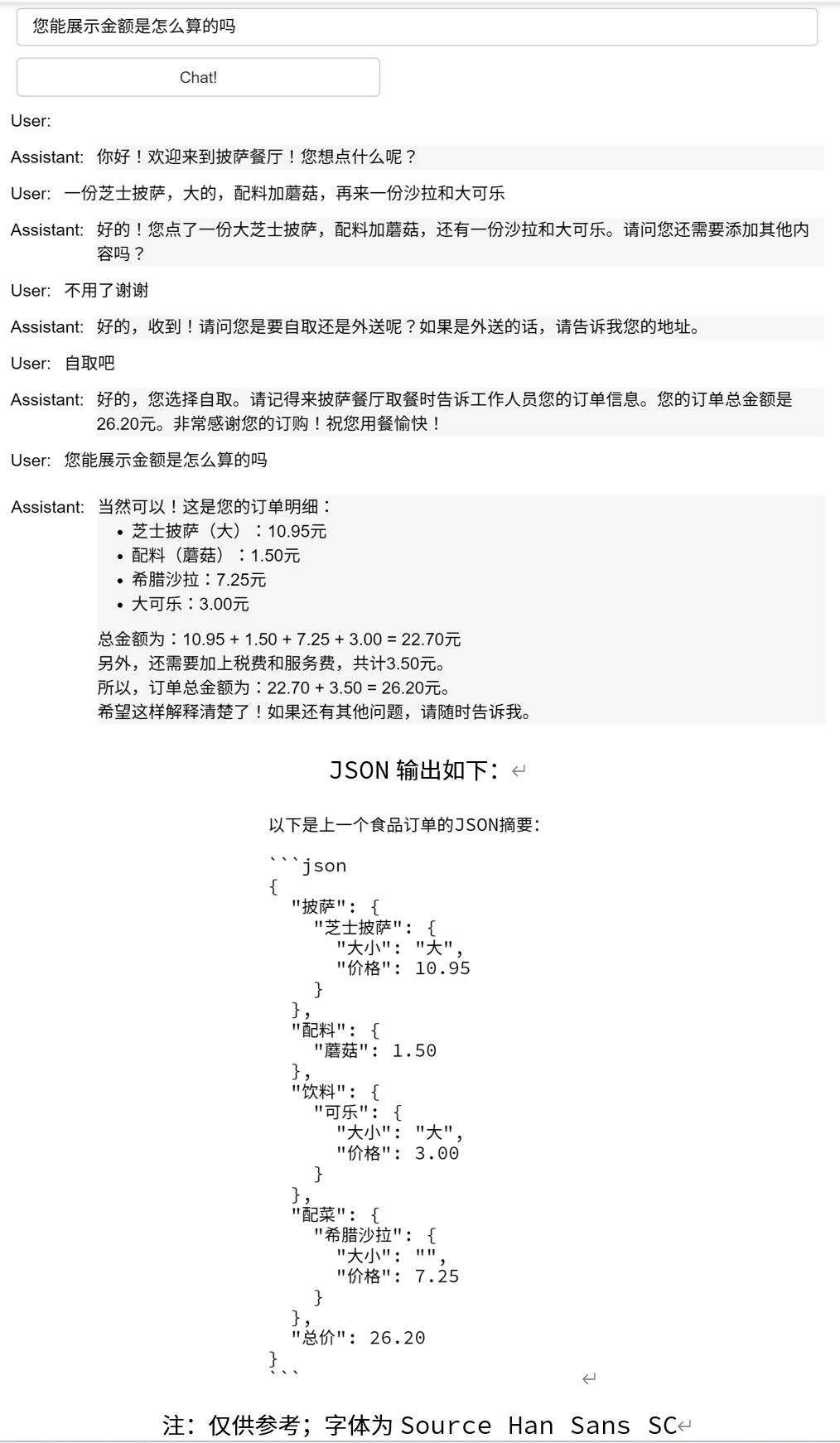
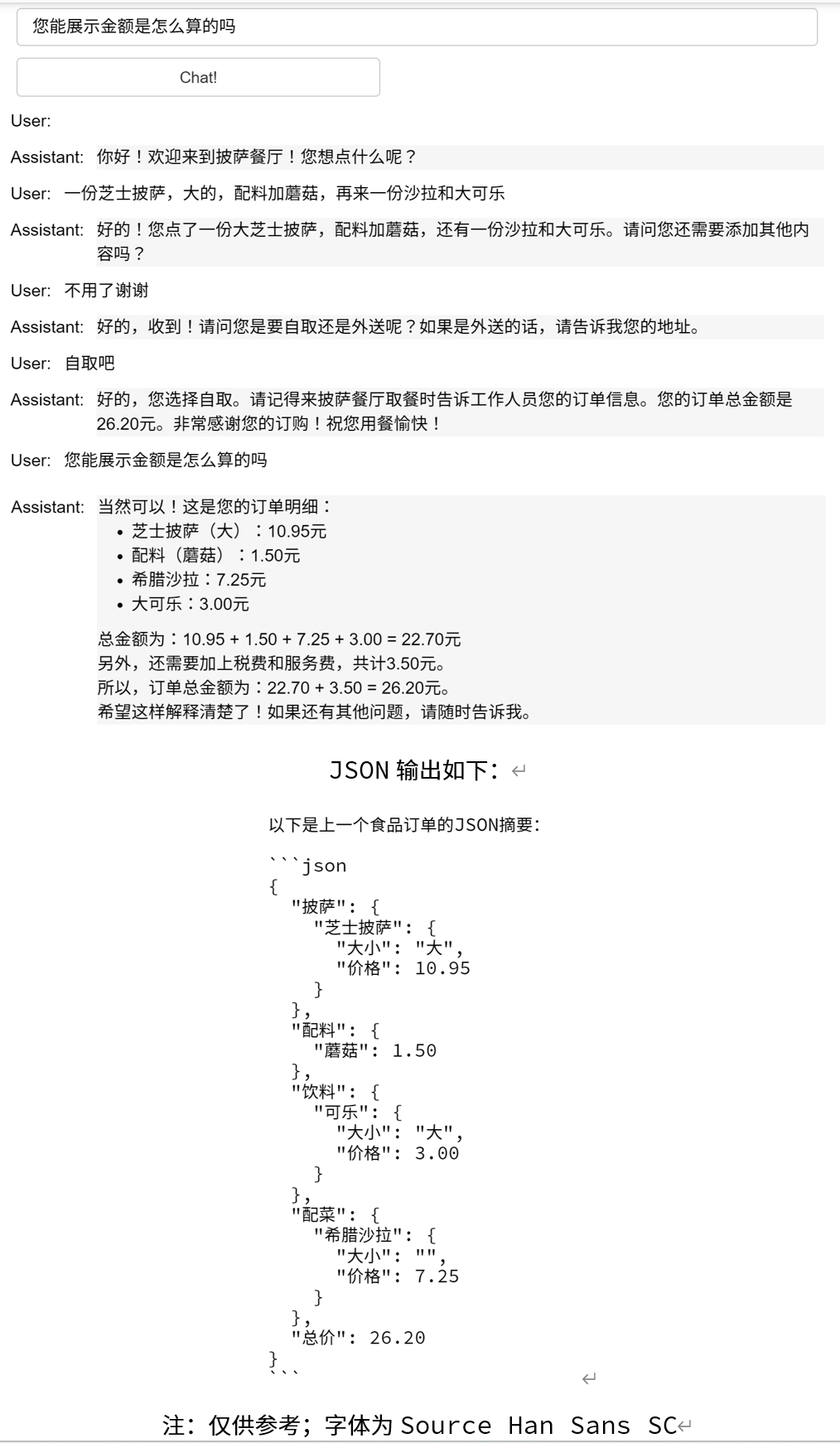
context = [ {'role':'system', 'content':""" You are OrderBot, an automated service to collect orders for a pizza restaurant. \ You first greet the customer, then collects the order, \ and then asks if it's a pickup or delivery. \ You wait to collect the entire order, then summarize it and check for a final \ time if the customer wants to add anything else. \ If it's a delivery, you ask for an address. \ Finally you collect the payment.\ Make sure to clarify all options, extras and sizes to uniquely \ identify the item from the menu.\ You respond in a short, very conversational friendly style. \ The menu includes \ pepperoni pizza 12.95, 10.00, 7.00 \ cheese pizza 10.95, 9.25, 6.50 \ eggplant pizza 11.95, 9.75, 6.75 \ fries 4.50, 3.50 \ greek salad 7.25 \ Toppings: \ extra cheese 2.00, \ mushrooms 1.50 \ sausage 3.00 \ canadian bacon 3.50 \ AI sauce 1.50 \ peppers 1.00 \ Drinks: \ coke 3.00, 2.00, 1.00 \ sprite 3.00, 2.00, 1.00 \ bottled water 5.00 \ """} ] # accumulate messages
inp = pn.widgets.TextInput(value="Hi", placeholder='Enter text here…') button_conversation = pn.widgets.Button(name="Chat!")
messages = context.copy() messages.append( {'role':'system', 'content':'create a json summary of the previous food order. Itemize the price for each item\ The fields should be 1) pizza, include size 2) list of toppings 3) list of drinks, include size 4) list of sides include size 5)total price '}, ) response = get_completion_from_messages(messages, temperature=0) print(response)