引言 上一节我们借助 GLFW 为游戏引擎创建窗口事件,今天我们来看一看层堆栈以及我们该如何使用它们。
每当我向人们谈论层次时,我通常最终都将其与类似 Photoshop 这样的东西比较,但显然它不像游戏引擎那样具有交互性,我们可以把其视为 Photoshop 中的一层,拥有一个有序列表(通常情况是栈)。
它们不仅决定图形绘制的顺序,也包含引擎中的事件、更新逻辑等等,所以在我们的引擎具有运行功能(基于while循环),这种循环不断重复到循环被终止。我们可以视为该层堆栈内的一层,就像可以打开图层一样在 Photoshop 中关闭,然后将其隐藏或禁用就可以了。同样的,只要启用了图层类型,我们就可以在这里进行同样的操作:通过游戏循环,各层将按照其实际顺序进行更新。
层实现 我们新建了 Layer.h 头文件:
1 2 3 4 5 6 7 8 9 10 11 12 13 14 15 16 17 18 19 20 21 22 23 24 #pragma once #include "Core.h" #include "Events/Event.h" namespace Infinite { class INFINITE_API Layer { public : Layer (const std::string& name = "Layer" ); virtual ~Layer (); virtual void OnAttach () virtual void OnDetach () virtual void OnUpdate () virtual void OnEvent (Event& event) inline const std::string& GetName () const return m_DebugName; } protected : std::string m_DebugName; }; }
这是一个非常简单的实现,我们在更新(OnUpdate())和事件(OnEvent())做了分离。
除此之外这里还有一个非常重要的功能是禁用层的功能,此功能将在之后实现,我们暂时不想把事情复杂化,当然在您自己实现时需要这个 bool 值让该层不会被更新。
而在 Layer.cpp 中,我们包含空的构造函数和析构函数:
1 2 3 4 5 6 7 8 9 10 11 12 13 14 15 16 #include "ifnpch.h" #include "Layer.h" namespace Infinite { Layer::Layer (const std::string& debugName) : m_DebugName (debugName) { } Layer::~Layer () { } }
堆栈实现 堆栈实现要稍微复杂一点,LayerStack.h 我们使用向量 vector 封装():
1 2 3 4 5 6 7 8 9 10 11 12 13 14 15 16 17 18 19 20 21 22 23 24 25 26 27 28 29 #pragma once #include "Core.h" #include "Layer.h" #include <vector> namespace Infinite { class INFINITE_API LayerStack { public : LayerStack (); ~LayerStack (); void PushLayer (Layer* layer) void PushOverlay (Layer* layer) void PopLayer (Layer* layer) void PopOverlay (Layer* layer) std::vector<Layer*>::iterator begin () { return m_Layers.begin (); } std::vector<Layer*>::iterator end () { return m_Layers.end (); } private : std::vector<Layer*> m_Layers; std::vector<Layer*>::iterator m_LayerInsert; }; }
使用 vector 是因为每帧都可能需要正向或者反向迭代,我们总是需要遍历,我们想要某种连续的数据存储。
接下来我们来看 LayerStack.spp
1 2 3 4 5 6 7 8 9 10 11 12 13 14 15 16 17 18 19 20 21 22 23 24 25 26 27 28 29 30 31 32 33 34 35 36 37 38 39 40 41 42 43 44 #include "ifnpch.h" #include "LayerStack.h" namespace Infinite { LayerStack::LayerStack () { m_LayerInsert = m_Layers.begin (); } LayerStack::~LayerStack () { for (Layer* layer : m_Layers) delete layer; } void LayerStack::PushLayer (Layer* layer) { m_LayerInsert = m_Layers.emplace (m_LayerInsert,layer); } void LayerStack::PushOverlay (Layer* overlay) { m_Layers.emplace_back (overlay); } void LayerStack::PopLayer (Layer* layer) { auto it = std::find (m_Layers.begin (),m_Layers.end (),layer); if (it != m_Layers.end ()) { m_Layers.erase (it); m_LayerInsert--; } } void LayerStack::PopOverlay (Layer* overlay) { auto it = std::find (m_Layers.begin (),m_Layers.end (),overlay); if (it != m_Layers.end ()) m_Layers.erase (it); } }
有趣的是我们弹出层时不会丢失它们,只有析构函数中调用 delete 才会销毁。应用程序拥有堆栈,基本的运行方式为将 Layer 分配给堆栈;当应用程序关闭时将被取消分配。
回到 Application.h 为我们的应用程序添加堆栈:
1
2
3
4
5
6
7
8
9
10
11
12
13
14
15
16
17
18
19
20
21
22
23
24
25
26
27
28
29
30
31
32
#pragma once #include "Core.h" +#include "Window.h" +#include "LayerStack.h" +#include "Events/Event.h" #include "Events/ApplicationEvent.h" namespace Infinite { class INFINITE_API Application { public: Application(); virtual ~Application(); void Run(); void OnEvent(Event& e); + void PushLayer(Layer* layer); + void PushOverlay(Layer* layer); private: bool OnWindowClose(WindowCloseEvent& e); std::unique_ptr<Window> m_Window; bool m_Running = true; + LayerStack m_LayerStack; }; //To be define in CLIENT Application* CreateApplication(); }
我们添加了一些需要的头文件和刚刚创建的堆栈。接着我们实现一下声明的函数:
1
2
3
4
5
6
7
8
9
10
11
12
13
14
15
16
17
18
19
20
21
22
23
24
25
26
27
28
29
30
31
32
33
34
35
36
37
38
39
40
41
42
43
44
45
46
47
48
49
50
51
52
53
54
55
56
57
58
59
60
61
62
63
64
65
66
#include "ifnpch.h" #include "Application.h" #include "Events/ApplicationEvent.h" #include "Log.h" #include <GLFW/glfw3.h> namespace Infinite { #define BIND_EVENT_FN(x) std::bind(&Application::x, this, std::placeholders::_1) Application::Application() { m_Window = std::unique_ptr<Window>(Window::Create()); m_Window->SetEventCallback(BIND_EVENT_FN(OnEvent)); } Application::~Application() {} + void Application::PushLayer(Layer* layer) + { + m_LayerStack.PushLayer(layer); + } + void Application::PushOverlay(Layer* layer) + { + m_LayerStack.PushOverlay(layer); + } void Application::OnEvent(Event& e) { EventDispatcher dispatcher(e); dispatcher.Dispatch<WindowCloseEvent>(BIND_EVENT_FN(OnWindowClose)); + for (auto it = m_LayerStack.end(); it != m_LayerStack.begin();) + { + (*--it)->OnEvent(e); + if (e.Handled) + break; + } } void Application::Run() { while (m_Running) { glClearColor(1, 0, 1, 1); glClear(GL_COLOR_BUFFER_BIT); + for (Layer* layer : m_LayerStack) + layer->OnUpdate(); m_Window->OnUpdate(); } } bool Application::OnWindowClose(WindowCloseEvent& e) { m_Running = false; return true; } }
预生成文件 1 2 3 4 5 6 7 8 9 10 11 12 13 14 15 16 17 18 19 20 21 22 23 24 25 26 27 28 29 30 31 32 33 34 35 36 37 38 39 40 41 42 43 44 45 46 47 48 49 50 51 52 53 54 55 56 57 58 59 60 61 62 63 64 65 66 67 68 69 70 71 72 73 74 75 76 77 78 79 80 81 82 83 84 85 86 87 88 89 90 91 92 93 94 95 96 97 98 99 100 101 102 103 104 105 106 107 108 109 110 111 112 113 114 115 116 117 118 119 120 121 122 123 124 125 126 127 128 129 130 131 132 133 134 workspace "Infinite" architecture "x64" startproject "Sandbox" configurations { "Debug", "Release", "Dist" } outputdir = "%{cfg.buildcfg}-%{cfg.system}-%{cfg.architecture}" -- Include directories relative to root folder (solution directory) IncludeDir = {} IncludeDir["GLFW"] = "Infinite/vendor/GLFW/include" include "Infinite/vendor/GLFW" project "Infinite" location "Infinite" kind "SharedLib" language "C++" targetdir ("bin/" .. outputdir .. "/%{prj.name}") objdir ("bin-int/" .. outputdir .. "/%{prj.name}") pchheader "ifnpch.h" pchsource "Infinite/src/ifnpch.cpp" files { "%{prj.name}/src/**.h", "%{prj.name}/src/**.cpp" } includedirs { "%{prj.name}/src", "%{prj.name}/vendor/spdlog/include", "%{IncludeDir.GLFW}" } links { "GLFW", "opengl32.lib" } filter "system:windows" cppdialect "C++17" staticruntime "On" systemversion "latest" defines { "IFN_PLATFORM_WINDOWS", "IFN_BUILD_DLL" } postbuildcommands { ("{COPY} %{cfg.buildtarget.relpath} ../bin/" .. outputdir .. "/Sandbox") } filter "configurations:Debug" defines "IFN_DEBUG" + buildoptions "/MDd" symbols "On" filter "configurations:Release" defines "IFN_RELEASE" + buildoptions "/MD" optimize "On" filter "configurations:Dist" defines "IFN_DIST" + buildoptions "/MD" optimize "On" project "Sandbox" location "Sandbox" kind "ConsoleApp" language "C++" targetdir ("bin/" .. outputdir .. "/%{prj.name}") objdir ("bin-int/" .. outputdir .. "/%{prj.name}") files { "%{prj.name}/src/**.h", "%{prj.name}/src/**.cpp" } includedirs { "Infinite/vendor/spdlog/include", "Infinite/src/Infinite", "Infinite/src/Events" } links { "Infinite" } filter "system:windows" cppdialect "C++17" staticruntime "On" systemversion "latest" defines { "IFN_PLATFORM_WINDOWS" } filter "configurations:Debug" defines "IFN_DEBUG" buildoptions "/MDd" symbols "On" filter "configurations:Release" defines "IFN_RELEASE" buildoptions "/MD" optimize "On" filter "configurations:Dist" defines "IFN_DIST" buildoptions "/MD" optimize "On"
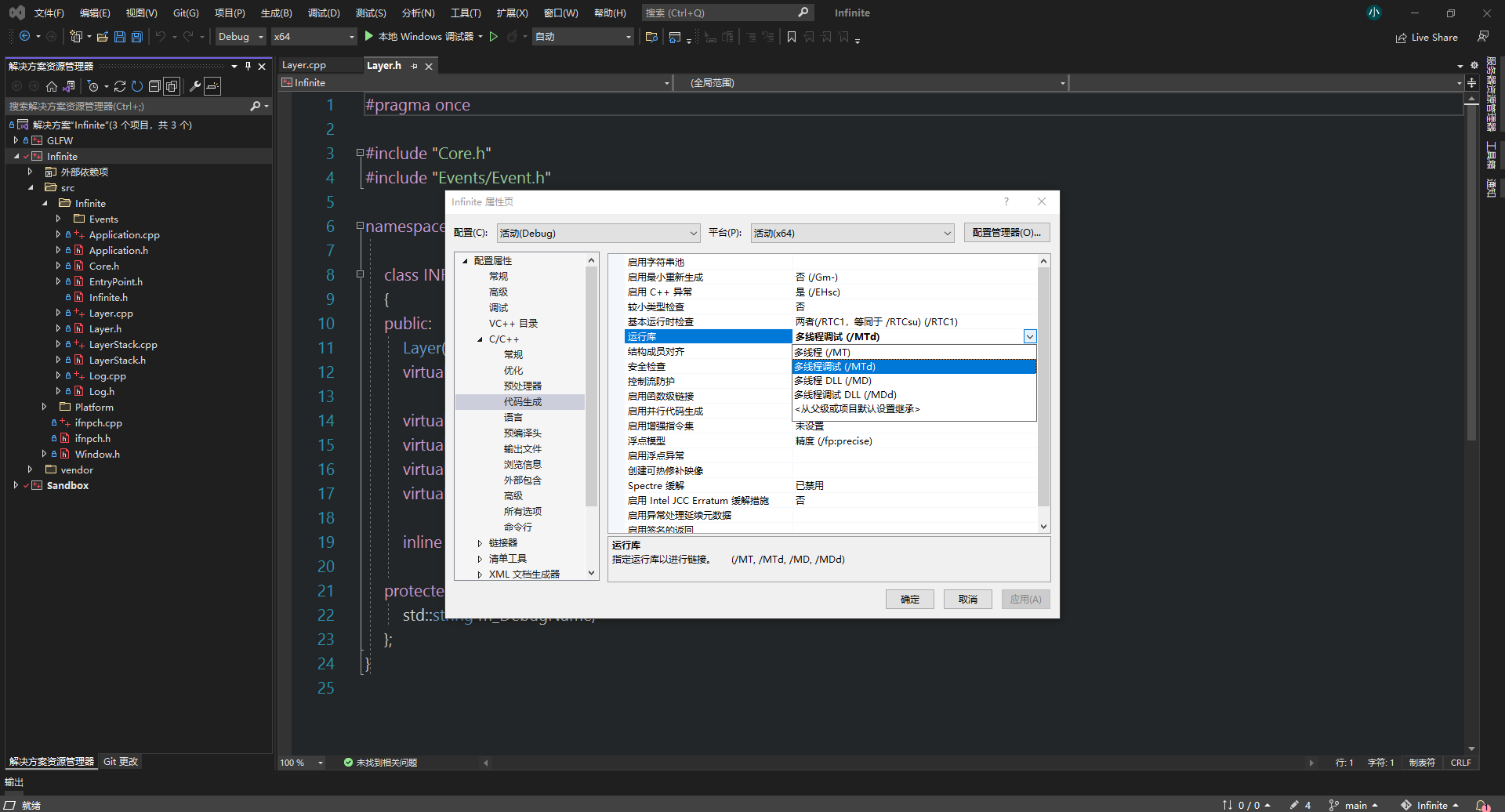
我们需要确保构建的动态链接库链接到实际的 dll。在 VisualStudio 中的 C++ 代码生成中的运行库默认设置多线程调试:
沙盒应用 最后我们在沙盒 Sandbox.cpp 中创建一个示例层 ExampleLayer 作为测试:
1
2
3
4
5
6
7
8
9
10
11
12
13
14
15
16
17
18
19
20
21
22
23
24
25
26
27
28
29
30
31
32
33
34
35
#include <Infinite.h> +class ExampleLayer : public Infinite::Layer +{ +public: + ExampleLayer() + : Layer("Example") + { + + } void OnUpdate() override { + IFN_INFO("ExampleLayer::Update"); } void OnEvent(Infinite::Event& event) override { IFN_TRACE("{0}",event); } }; class Sandbox : public Infinite::Application { public: Sandbox() { + PushLayer(new ExampleLayer()); } ~Sandbox() {} }; Infinite::Application* Infinite::CreateApplication() { return new Sandbox(); }
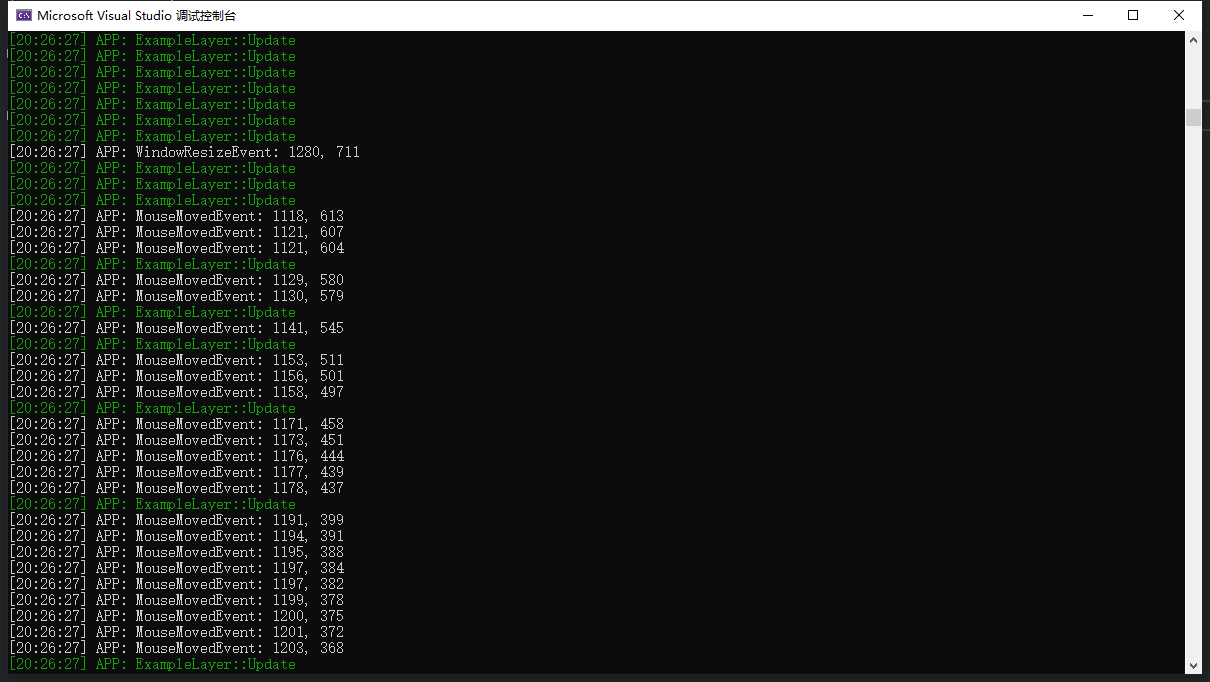
调试