使用 LangChain 访问个人数据

引言

本部分的主要内容包括:加载并切割文档;向量数据库与词向量;检索与问答;聊天等。

简介 Introduction

简介

欢迎来到《第四部分:使用 LangChain 访问个人数据》!

本课程基于 LangChain 创始人哈里森·蔡斯 (Harrison Chase)与 Deeplearning.ai 合作开发的 《LangChain Chat With your Data》课程,将介绍如何利用 LangChain 框架,使语言模型访问并应用用户自有数据的强大能力。

背景

大语言模型(Large Language Model, LLM), 比如ChatGPT, 可以回答许多不同的问题。但是大语言模型的知识来源于其训练数据集,并没有用户的信息(比如用户的个人数据,公司的自有数据),也没有最新发生时事的信息(在大模型数据训练后发表的文章或者新闻)。因此大模型能给出的答案比较受限。

如果能够让大模型在训练数据集的基础上,利用我们自有数据中的信息来回答我们的问题,那便能够得到更有用的答案。

课程基本内容

LangChain 是用于构建大模型应用程序的开源框架,有 Python 和 JavaScript 两个不同版本的包。它由模块化的组件构成,可单独使用也可链式组合实现端到端应用。

LangChain的组件包括:

  • 提示(Prompts):使模型执行操作的方式。
  • 模型(Models):大语言模型、对话模型,文本表示模型。目前包含多个模型的集成。
  • 索引(Indexes):获取数据的方式,可以与模型结合使用。
  • 链(Chains):端到端功能实现。
  • 代理(Agents):使用模型作为推理引擎

本课程将介绍使用 LangChain 的典型场景——基于自有数据的对话系统。我们首先学习如何使用 LangChain 的文档加载器 (Document Loader)从不同数据源加载文档。然后,我们学习如何将这些文档切割为具有语意的段落。这步看起来简单,不同的处理可能会影响颇大。接下来,我们讲解语义搜索(Semantic search)与信息检索的方法,获取用户问题相关的参考文档。该方法很简单,但是在某些情况下可能无法使用。我们将分析这些情况并给出解决方案。最后,我们介绍如何使用检索得到的文档,来让大语言模型(LLM)来回答关于文档的问题。

整个流程涵盖数据导入、信息检索与问答生成等关键环节。读者既可以学习各个组件的用法,也可以整体实践构建对话系统的思路。如果你想要先了解关于 LangChain 的基础知识,可以学习《LangChain for LLM Application Development》部分的内容。

本单元将帮助你掌握利用自有数据的语言模型应用开发技能。让我们开始探索个性化对话系统的魅力吧!

文档加载 Document Loading

用户个人数据可以以多种形式呈现:PDF 文档、视频、网页等。基于 LangChain 提供给 LLM 访问用户个人数据的能力,首先要加载并处理用户的多样化、非结构化个人数据。在本章,我们首先介绍如何加载文档(包括文档、视频、网页等),这是访问个人数据的第一步。

让我们先从 PDF 文档开始。

PDF 文档

首先,我们将从以下链接加载一个PDF文档。这是 DataWhale 提供的开源教程,名为《Fantastic Matplotlib》。值得注意的是,在英文版本中,吴恩达教授使用的是他2009年的机器学习课程字幕文件作为示例。为了更适合中文读者,我们选择了上述中文教程作为示例。不过,在英文原版代码中,你仍可以找到吴恩达教授的机器学习课程文件作为参考。后续的代码实践也会遵循这一调整。

注意,要运行以下代码,你需要安装第三方库 pypdf:

1
!pip install -q pypdf
加载PDF文档

首先,我们将利用 PyPDFLoader 来对 PDF 文件进行读取和加载。

1
2
3
4
5
6
7
from langchain.document_loaders import PyPDFLoader

# 创建一个 PyPDFLoader Class 实例,输入为待加载的pdf文档路径
loader = PyPDFLoader("docs/matplotlib/第一回:Matplotlib初相识.pdf")

# 调用 PyPDFLoader Class 的函数 load对pdf文件进行加载
pages = loader.load()
探索加载的数据

一旦文档被加载,它会被存储在名为pages的变量里。此外,pages的数据结构是一个List类型。为了确认其类型,我们可以借助Python内建的type函数来查看pages的确切数据类型。

1
print(type(pages))
1
<class 'list'>

通过输出 pages 的长度,我们可以轻松地了解该PDF文件包含的总页数。

1
print(len(pages))
1
3

page变量中,每一个元素都代表一个文档,它们的数据类型是langchain.schema.document.Document

1
2
page = pages[0]
print(type(page))
1
<class 'langchain.schema.document.Document'>

langchain.schema.document.Document类型包含两个属性:

  1. page_content:包含该文档页面的内容。
1
print(page.page_content[0:500])
1
2
3
4
5
6
7
8
9
10
11
第⼀回:Matplotlib 初相识
⼀、认识matplotlib
Matplotlib 是⼀个 Python 2D 绘图库,能够以多种硬拷⻉格式和跨平台的交互式环境⽣成出版物质量的图形,⽤来绘制各种静态,动态,
交互式的图表。
Matplotlib 可⽤于 Python 脚本, Python 和 IPython Shell 、 Jupyter notebook , Web 应⽤程序服务器和各种图形⽤户界⾯⼯具包等。
Matplotlib 是 Python 数据可视化库中的泰⽃,它已经成为 python 中公认的数据可视化⼯具,我们所熟知的 pandas 和 seaborn 的绘图接⼝
其实也是基于 matplotlib 所作的⾼级封装。
为了对matplotlib 有更好的理解,让我们从⼀些最基本的概念开始认识它,再逐渐过渡到⼀些⾼级技巧中。
⼆、⼀个最简单的绘图例⼦
Matplotlib 的图像是画在 figure (如 windows , jupyter 窗体)上的,每⼀个 figure ⼜包含了⼀个或多个 axes (⼀个可以指定坐标系的⼦区
域)。最简单的创建 figure
  1. meta_data:为文档页面相关的描述性数据。
1
print(page.metadata)
1
{'source': 'docs/matplotlib/第一回:Matplotlib初相识.pdf', 'page': 0}

YouTube音频

在第一部分的内容,我们已经探讨了如何加载 PDF 文档。在这部分的内容中,对于给定的 YouTube 视频链接,我们会详细讨论:

  • 利用langchain加载工具,为指定的 YouTube 视频链接下载对应的音频至本地
  • 通过OpenAIWhisperPaser工具,将这些音频文件转化为可读的文本内容

注意,要运行以下代码,你需要安装如下两个第三方库:

1
2
!pip -q install yt_dlp
!pip -q install pydub
加载Youtube音频文档

首先,我们将构建一个 GenericLoader 实例来对 Youtube 视频的下载到本地并加载。

1
2
3
4
5
6
7
8
9
10
11
12
13
14
15
16
17
18
from langchain.document_loaders.generic import GenericLoader
from langchain.document_loaders.parsers import OpenAIWhisperParser
from langchain.document_loaders.blob_loaders.youtube_audio import YoutubeAudioLoader

url="https://www.youtube.com/watch?v=_PHdzsQaDgw"
save_dir="docs/youtube-zh/"

# 创建一个 GenericLoader Class 实例
loader = GenericLoader(
#将链接url中的Youtube视频的音频下载下来,存在本地路径save_dir
YoutubeAudioLoader([url],save_dir),

#使用OpenAIWhisperPaser解析器将音频转化为文本
OpenAIWhisperParser()
)

# 调用 GenericLoader Class 的函数 load对视频的音频文件进行加载
pages = loader.load()
1
2
3
4
5
6
7
8
9
10
11
12
13
14
15
[youtube] Extracting URL: https://www.youtube.com/watch?v=_PHdzsQaDgw
[youtube] _PHdzsQaDgw: Downloading webpage
[youtube] _PHdzsQaDgw: Downloading ios player API JSON
[youtube] _PHdzsQaDgw: Downloading android player API JSON
[youtube] _PHdzsQaDgw: Downloading m3u8 information


WARNING: [youtube] Failed to download m3u8 information: HTTP Error 429: Too Many Requests


[info] _PHdzsQaDgw: Downloading 1 format(s): 140
[download] docs/youtube-zh//【2023年7月最新】ChatGPT注册教程,国内详细注册流程,支持中文使用,chatgpt 中国怎么用?.m4a has already been downloaded
[download] 100% of 7.72MiB
[ExtractAudio] Not converting audio docs/youtube-zh//【2023年7月最新】ChatGPT注册教程,国内详细注册流程,支持中文使用,chatgpt 中国怎么用?.m4a; file is already in target format m4a
Transcribing part 1!
探索加载的数据

Youtube 音频文件加载得到的变量同上文类似,此处不再一一解释,通过类似代码可以展示加载数据:

1
2
3
4
5
6
7
print("Type of pages: ", type(pages))
print("Length of pages: ", len(pages))

page = pages[0]
print("Type of page: ", type(page))
print("Page_content: ", page.page_content[:500])
print("Meta Data: ", page.metadata)
1
2
3
4
5
Type of pages:  <class 'list'>
Length of pages: 1
Type of page: <class 'langchain.schema.document.Document'>
Page_content: 大家好,欢迎来到我的频道 今天我们来介绍如何注册ChetGBT账号 之前我有介绍过一期如何注册ChetGBT账号 但是还是会有一些朋友在注册过程当中 遇到了一些问题 今天我们再来详细介绍最新的注册方法 我们先打开这个网站 这个网站的网址我会放到视频下方的评论区 大家可以直接点击打开 这个网站是需要翻墙才能打开 建议使用全局模式翻墙打开 可以选择台湾,新加坡,日本,美国节点 不要选择香港节点 我这里使用的是台湾节点 这个翻墙软件如果大家需要的话 我也会共享在视频的下方 另外浏览器需要开启无痕模式打开 这个就是打开新的无痕模式窗口 我们可以按快捷键,Ctrl键加Shift键加N 可以打开新的无痕模式窗口 然后用无痕模式窗口来打开这个网站 然后点击这里 然后会出现这个登录注册界面 如果没有显示这个界面 显示的是拒绝访问 那么就表示你使用的节点可能有问题 我们需要切换其他的节点 我们可以这样切换其他的节点 能够正常打开这个页面 表示节点是没问题的 我们可以点击注册 这里需要填一个邮箱 然后点击继续 然后需要输入密码 再点击继续 然后会出现这个提示 我们需要去收一封邮件 刷新一下 邮件已经收到了
Meta Data: {'source': 'docs/youtube-zh/【2023年7月最新】ChatGPT注册教程,国内详细注册流程,支持中文使用,chatgpt 中国怎么用?.m4a', 'chunk': 0}

网页文档

在第二部分,我们对于给定的 YouTube 视频链接 (URL),使用 LangChain 加载器将视频的音频下载到本地,然后使用 OpenAIWhisperPaser 解析器将音频转化为文本。

本部分,我们将研究如何处理网页链接(URLs)。为此,我们会以 GitHub 上的一个markdown格式文档为例,学习如何对其进行加载。

加载网页文档

首先,我们将构建一个WebBaseLoader实例来对网页进行加载。

1
2
3
4
5
6
7
8
9
10
11
12
13
from langchain.document_loaders import WebBaseLoader


# 创建一个 WebBaseLoader Class 实例
url = "https://github.com/datawhalechina/d2l-ai-solutions-manual/blob/master/docs/README.md"
header = {'User-Agent': 'python-requests/2.27.1',
'Accept-Encoding': 'gzip, deflate, br',
'Accept': '*/*',
'Connection': 'keep-alive'}
loader = WebBaseLoader(web_path=url,header_template=header)

# 调用 WebBaseLoader Class 的函数 load对文件进行加载
pages = loader.load()
探索加载的数据

同理我们通过上文代码可以展示加载数据:

1
2
3
4
5
6
7
print("Type of pages: ", type(pages))
print("Length of pages: ", len(pages))

page = pages[0]
print("Type of page: ", type(page))
print("Page_content: ", page.page_content[:500])
print("Meta Data: ", page.metadata)
1
2
3
4
5
Type of pages:  <class 'list'>
Length of pages: 1
Type of page: <class 'langchain.schema.document.Document'>
Page_content: {"payload":{"allShortcutsEnabled":false,"fileTree":{"docs":{"items":[{"name":"ch02","path":"docs/ch02","contentType":"directory"},{"name":"ch03","path":"docs/ch03","contentType":"directory"},{"name":"ch05","path":"docs/ch05","contentType":"directory"},{"name":"ch06","path":"docs/ch06","contentType":"directory"},{"name":"ch08","path":"docs/ch08","contentType":"directory"},{"name":"ch09","path":"docs/ch09","contentType":"directory"},{"name":"ch10","path":"docs/ch10","contentType":"directory"},{"na
Meta Data: {'source': 'https://github.com/datawhalechina/d2l-ai-solutions-manual/blob/master/docs/README.md'}

可以看到上面的文档内容包含许多冗余的信息。通常来讲,我们需要进行对这种数据进行进一步处理(Post Processing)。

1
2
3
4
import json
convert_to_json = json.loads(page.page_content)
extracted_markdown = convert_to_json['payload']['blob']['richText']
print(extracted_markdown)
1
2
3
4
5
6
7
8
9
10
11
12
13
14
15
16
17
18
19
20
21
22
23
24
25
26
27
28
动手学深度学习习题解答 {docsify-ignore-all}
李沐老师的《动手学深度学习》是入门深度学习的经典书籍,这本书基于深度学习框架来介绍深度学习,书中代码可以做到“所学即所用”。对于一般的初学者来说想要把书中课后习题部分独立解答还是比较困难。本项目对《动手学深度学习》习题部分进行解答,作为该书的习题手册,帮助初学者快速理解书中内容。
使用说明
动手学深度学习习题解答,主要完成了该书的所有习题,并提供代码和运行之后的截图,里面的内容是以深度学习的内容为前置知识,该习题解答的最佳使用方法是以李沐老师的《动手学深度学习》为主线,并尝试完成课后习题,如果遇到不会的,再来查阅习题解答。
如果觉得解答不详细,可以点击这里提交你希望补充推导或者习题编号,我们看到后会尽快进行补充。
选用的《动手学深度学习》版本


书名:动手学深度学习(PyTorch版)
著者:阿斯顿·张、[美]扎卡里 C. 立顿、李沐、[德]亚历山大·J.斯莫拉
译者:何孝霆、瑞潮儿·胡
出版社:人民邮电出版社
版次:2023年2月第1版

项目结构
codes----------------------------------------------习题代码
docs-----------------------------------------------习题解答
notebook-------------------------------------------习题解答JupyterNotebook格式
requirements.txt-----------------------------------运行环境依赖包

关注我们

扫描下方二维码关注公众号:Datawhale


  Datawhale,一个专注于AI领域的学习圈子。初衷是for the learner,和学习者一起成长。目前加入学习社群的人数已经数千人,组织了机器学习,深度学习,数据分析,数据挖掘,爬虫,编程,统计学,Mysql,数据竞赛等多个领域的内容学习,微信搜索公众号Datawhale可以加入我们。
LICENSE
本作品采用知识共享署名-非商业性使用-相同方式共享 4.0 国际许可协议进行许可。

Notion文档

加载Notion Markdown文档

首先,我们将使用NotionDirectoryLoader来对Notion Markdown文档进行加载。

1
2
3
from langchain.document_loaders import NotionDirectoryLoader
loader = NotionDirectoryLoader("docs/Notion_DB")
pages = loader.load()
探索加载的数据

同理,使用上文代码:

1
2
3
4
5
6
7
print("Type of pages: ", type(pages))
print("Length of pages: ", len(pages))

page = pages[0]
print("Type of page: ", type(page))
print("Page_content: ", page.page_content[:500])
print("Meta Data: ", page.metadata)
1
2
3
4
5
6
7
8
9
10
11
12
13
14
15
16
17
Type of pages:  <class 'list'>
Length of pages: 51
Type of page: <class 'langchain.schema.document.Document'>
Page_content: # #letstalkaboutstress

Let’s talk about stress. Too much stress.

We know this can be a topic.

So let’s get this conversation going.

[Intro: two things you should know](#letstalkaboutstress%2064040a0733074994976118bbe0acc7fb/Intro%20two%20things%20you%20should%20know%20b5fd0c5393a9498b93396e79fe71e8bf.md)

[What is stress](#letstalkaboutstress%2064040a0733074994976118bbe0acc7fb/What%20is%20stress%20b198b685ed6a474ab14f6fafff7004b6.md)

[When is there too much stress?](#letstalkaboutstress%2
Meta Data: {'source': 'docs/Notion_DB/#letstalkaboutstress 64040a0733074994976118bbe0acc7fb.md'}

英文版

加载 PDF 文档
1
2
3
4
5
6
7
from langchain.document_loaders import PyPDFLoader

# 创建一个 PyPDFLoader Class 实例,输入为待加载的pdf文档路径
loader = PyPDFLoader("docs/cs229_lectures/MachineLearning-Lecture01.pdf")

# 调用 PyPDFLoader Class 的函数 load对pdf文件进行加载
pages = loader.load()
探索加载的数据
1
2
3
4
5
6
7
print("Type of pages: ", type(pages))
print("Length of pages: ", len(pages))

page = pages[0]
print("Type of page: ", type(page))
print("Page_content: ", page.page_content[:500])
print("Meta Data: ", page.metadata)
1
2
3
4
5
6
7
8
9
10
11
Type of pages:  <class 'list'>
Length of pages: 22
Type of page: <class 'langchain.schema.document.Document'>
Page_content: MachineLearning-Lecture01
Instructor (Andrew Ng): Okay. Good morning. Welcome to CS229, the machine
learning class. So what I wanna do today is ju st spend a little time going over the logistics
of the class, and then we'll start to talk a bit about machine learning.
By way of introduction, my name's Andrew Ng and I'll be instru ctor for this class. And so
I personally work in machine learning, and I' ve worked on it for about 15 years now, and
I actually think that machine learning i
Meta Data: {'source': 'docs/cs229_lectures/MachineLearning-Lecture01.pdf', 'page': 0}
加载 Youtube 音频
1
2
3
4
5
6
7
8
9
10
11
12
13
14
15
16
17
18
19
20
# 注:由于该视频较长,容易出现网络问题,此处没有运行,读者可自行运行探索

from langchain.document_loaders.generic import GenericLoader
from langchain.document_loaders.parsers import OpenAIWhisperParser
from langchain.document_loaders.blob_loaders.youtube_audio import YoutubeAudioLoader

url="https://www.youtube.com/watch?v=jGwO_UgTS7I"
save_dir="docs/youtube/"

# 创建一个 GenericLoader Class 实例
loader = GenericLoader(
#将链接url中的Youtube视频的音频下载下来,存在本地路径save_dir
YoutubeAudioLoader([url],save_dir),

#使用OpenAIWhisperPaser解析器将音频转化为文本
OpenAIWhisperParser()
)

# 调用 GenericLoader Class 的函数 load对视频的音频文件进行加载
docs = loader.load()
探索加载的数据
1
2
3
4
5
6
7
print("Type of pages: ", type(pages))
print("Length of pages: ", len(pages))

page = pages[0]
print("Type of page: ", type(page))
print("Page_content: ", page.page_content[:500])
print("Meta Data: ", page.metadata)
加载网页文档
1
2
3
4
5
6
7
8
9
10
11
12
13
from langchain.document_loaders import WebBaseLoader


# 创建一个 WebBaseLoader Class 实例
url = "https://github.com/basecamp/handbook/blob/master/37signals-is-you.md"
header = {'User-Agent': 'python-requests/2.27.1',
'Accept-Encoding': 'gzip, deflate, br',
'Accept': '*/*',
'Connection': 'keep-alive'}
loader = WebBaseLoader(web_path=url,header_template=header)

# 调用 WebBaseLoader Class 的函数 load对文件进行加载
pages = loader.load()
探索加载的数据
1
2
3
4
5
6
7
print("Type of pages: ", type(pages))
print("Length of pages: ", len(pages))

page = pages[0]
print("Type of page: ", type(page))
print("Page_content: ", page.page_content[:500])
print("Meta Data: ", page.metadata)
1
2
3
4
5
Type of pages:  <class 'list'>
Length of pages: 1
Type of page: <class 'langchain.schema.document.Document'>
Page_content: {"payload":{"allShortcutsEnabled":false,"fileTree":{"":{"items":[{"name":"37signals-is-you.md","path":"37signals-is-you.md","contentType":"file"},{"name":"LICENSE.md","path":"LICENSE.md","contentType":"file"},{"name":"README.md","path":"README.md","contentType":"file"},{"name":"benefits-and-perks.md","path":"benefits-and-perks.md","contentType":"file"},{"name":"code-of-conduct.md","path":"code-of-conduct.md","contentType":"file"},{"name":"faq.md","path":"faq.md","contentType":"file"},{"name":"ge
Meta Data: {'source': 'https://github.com/basecamp/handbook/blob/master/37signals-is-you.md'}

进行进一步处理

1
2
3
4
import json
convert_to_json = json.loads(page.page_content)
extracted_markdown = convert_to_json['payload']['blob']['richText']
print(extracted_markdown)
1
2
3
4
5
6
37signals Is You
Everyone working at 37signals represents 37signals. When a customer gets a response from Merissa on support, Merissa is 37signals. When a customer reads a tweet by Eron that our systems are down, Eron is 37signals. In those situations, all the other stuff we do to cultivate our best image is secondary. What’s right in front of someone in a time of need is what they’ll remember.
That’s what we mean when we say marketing is everyone’s responsibility, and that it pays to spend the time to recognize that. This means avoiding the bullshit of outage language and bending our policies, not just lending your ears. It means taking the time to get the writing right and consider how you’d feel if you were on the other side of the interaction.
The vast majority of our customers come from word of mouth and much of that word comes from people in our audience. This is an audience we’ve been educating and entertaining for 20 years and counting, and your voice is part of us now, whether you like it or not! Tell us and our audience what you have to say!
This goes for tools and techniques as much as it goes for prose. 37signals not only tries to out-teach the competition, but also out-share and out-collaborate. We’re prolific open source contributors through Ruby on Rails, Trix, Turbolinks, Stimulus, and many other projects. Extracting the common infrastructure that others could use as well is satisfying, important work, and we should continue to do that.
It’s also worth mentioning that joining 37signals can be all-consuming. We’ve seen it happen. You dig 37signals, so you feel pressure to contribute, maybe overwhelmingly so. The people who work here are some of the best and brightest in our industry, so the self-imposed burden to be exceptional is real. But here’s the thing: stop it. Settle in. We’re glad you love this job because we all do too, but at the end of the day it’s a job. Do your best work, collaborate with your team, write, read, learn, and then turn off your computer and play with your dog. We’ll all be better for it.
加载 Notion 文档
1
2
3
from langchain.document_loaders import NotionDirectoryLoader
loader = NotionDirectoryLoader("docs/Notion_DB")
pages = loader.load()
探索加载的数据
1
2
3
4
5
6
7
print("Type of pages: ", type(pages))
print("Length of pages: ", len(pages))

page = pages[0]
print("Type of page: ", type(page))
print("Page_content: ", page.page_content[:500])
print("Meta Data: ", page.metadata)
1
2
3
4
5
6
7
8
9
10
11
12
13
14
15
16
17
Type of pages:  <class 'list'>
Length of pages: 51
Type of page: <class 'langchain.schema.document.Document'>
Page_content: # #letstalkaboutstress

Let’s talk about stress. Too much stress.

We know this can be a topic.

So let’s get this conversation going.

[Intro: two things you should know](#letstalkaboutstress%2064040a0733074994976118bbe0acc7fb/Intro%20two%20things%20you%20should%20know%20b5fd0c5393a9498b93396e79fe71e8bf.md)

[What is stress](#letstalkaboutstress%2064040a0733074994976118bbe0acc7fb/What%20is%20stress%20b198b685ed6a474ab14f6fafff7004b6.md)

[When is there too much stress?](#letstalkaboutstress%2
Meta Data: {'source': 'docs/Notion_DB/#letstalkaboutstress 64040a0733074994976118bbe0acc7fb.md'}

文档分割 Splitting

在上一章中,我们刚刚讨论了如何将文档加载到标准格式中,现在我们要谈论如何将它们分割成较小的块。这听起来可能很简单,但其中有很多微妙之处会对后续工作产生重要影响。

为什么要进行文档分割

  1. 模型大小和内存限制:GPT 模型,特别是大型版本如 GPT-3 或 GPT-4 ,具有数十亿甚至上百亿的参数。为了在一次前向传播中处理这么多的参数,需要大量的计算能力和内存。但是,大多数硬件设备(例如 GPU 或 TPU )有内存限制。文档分割使模型能够在这些限制内工作。
  2. 计算效率:处理更长的文本序列需要更多的计算资源。通过将长文档分割成更小的块,可以更高效地进行计算。
  3. 序列长度限制:GPT 模型有一个固定的最大序列长度,例如2048个 token 。这意味着模型一次只能处理这么多 token 。对于超过这个长度的文档,需要进行分割才能被模型处理。
  4. 更好的泛化:通过在多个文档块上进行训练,模型可以更好地学习和泛化到各种不同的文本样式和结构。
  5. 数据增强:分割文档可以为训练数据提供更多的样本。例如,一个长文档可以被分割成多个部分,并分别作为单独的训练样本。

需要注意的是,虽然文档分割有其优点,但也可能导致一些上下文信息的丢失,尤其是在分割点附近。因此,如何进行文档分割是一个需要权衡的问题。

若仅按照单一字符进行文本分割,很容易使文本的语义信息丧失,这样在回答问题时可能会出现偏差。因此,为了确保语义的准确性,我们应该尽量将文本分割为包含完整语义的段落或单元。

文档分割方式

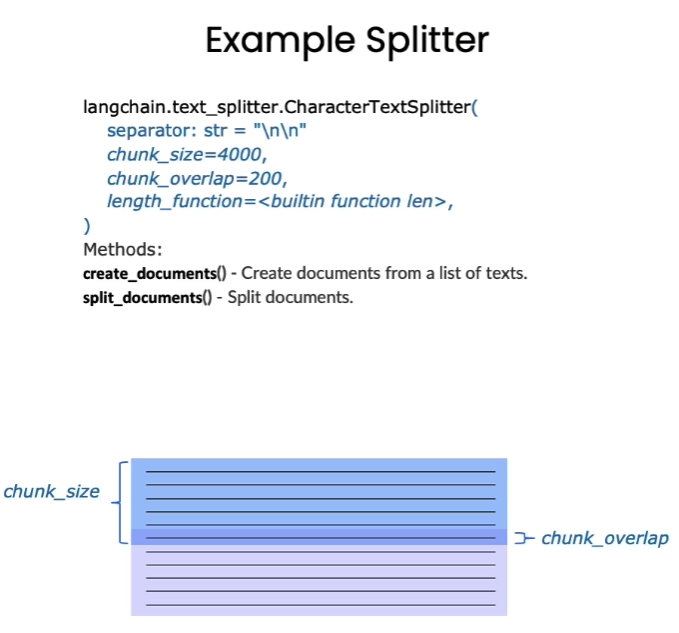
Langchain 中文本分割器都根据 chunk_size (块大小)和 chunk_overlap (块与块之间的重叠大小)进行分割。

  • chunk_size 指每个块包含的字符或 Token (如单词、句子等)的数量

  • chunk_overlap 指两个块之间共享的字符数量,用于保持上下文的连贯性,避免分割丢失上下文信息

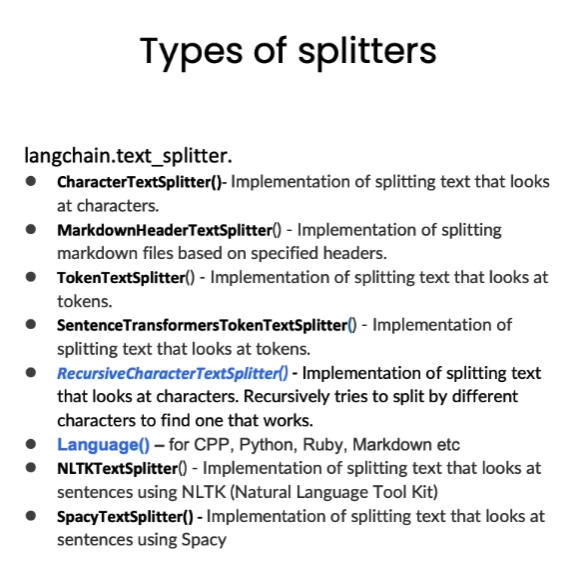
Langchain提供多种文档分割方式,区别在怎么确定块与块之间的边界、块由哪些字符/token组成、以及如何测量块大小

基于字符分割

如何进行文本分割,往往与我们的任务类型息息相关。当我们拆分代码时,这种相关性变得尤为突出。因此,我们引入了一个语言文本分割器,其中包含各种为 Python、Ruby、C 等不同编程语言设计的分隔符。在对这些文档进行分割时,必须充分考虑各种编程语言之间的差异。

我们将从基于字符的分割开始探索,借助 LangChain 提供的 RecursiveCharacterTextSplitterCharacterTextSplitter 工具来实现此目标。

CharacterTextSplitter 是字符文本分割,分隔符的参数是单个的字符串;RecursiveCharacterTextSplitter 是递归字符文本分割,将按不同的字符递归地分割(按照这个优先级[“\n\n”, “\n”, “ “, “”]),这样就能尽量把所有和语义相关的内容尽可能长时间地保留在同一位置。因此,RecursiveCharacterTextSplitterCharacterTextSplitter 对文档切割得更加碎片化

RecursiveCharacterTextSplitter 需要关注的是如下4个参数:

  • separators - 分隔符字符串数组
  • chunk_size - 每个文档的字符数量限制
  • chunk_overlap - 两份文档重叠区域的长度
  • length_function - 长度计算函数
短句分割
1
2
3
4
5
6
7
8
9
10
11
12
13
14
15
16
17
# 导入文本分割器
from langchain.text_splitter import RecursiveCharacterTextSplitter, CharacterTextSplitter

chunk_size = 20 #设置块大小
chunk_overlap = 10 #设置块重叠大小

# 初始化递归字符文本分割器
r_splitter = RecursiveCharacterTextSplitter(
chunk_size=chunk_size,
chunk_overlap=chunk_overlap
)
# 初始化字符文本分割器
c_splitter = CharacterTextSplitter(
chunk_size=chunk_size,
chunk_overlap=chunk_overlap
)

接下来我们对比展示两个字符文本分割器的效果。

1
2
3
text = "在AI的研究中,由于大模型规模非常大,模型参数很多,在大模型上跑完来验证参数好不好训练时间成本很高,所以一般会在小模型上做消融实验来验证哪些改进是有效的再去大模型上做实验。"  #测试文本
r_splitter.split_text(text)

1
2
3
4
5
6
7
8
['在AI的研究中,由于大模型规模非常大,模',
'大模型规模非常大,模型参数很多,在大模型',
'型参数很多,在大模型上跑完来验证参数好不',
'上跑完来验证参数好不好训练时间成本很高,',
'好训练时间成本很高,所以一般会在小模型上',
'所以一般会在小模型上做消融实验来验证哪些',
'做消融实验来验证哪些改进是有效的再去大模',
'改进是有效的再去大模型上做实验。']

可以看到,分割结果中,第二块是从“大模型规模非常大,模”开始的,刚好是我们设定的块重叠大小

1
2
3
#字符文本分割器
c_splitter.split_text(text)

1
['在AI的研究中,由于大模型规模非常大,模型参数很多,在大模型上跑完来验证参数好不好训练时间成本很高,所以一般会在小模型上做消融实验来验证哪些改进是有效的再去大模型上做实验。']

可以看到字符分割器没有分割这个文本,因为字符文本分割器默认以换行符为分隔符,因此需要设置“,”为分隔符。

1
2
3
4
5
6
7
8
# 设置空格分隔符
c_splitter = CharacterTextSplitter(
chunk_size=chunk_size,
chunk_overlap=chunk_overlap,
separator=','
)
c_splitter.split_text(text)

1
2
3
4
5
6
7
8
9
10
Created a chunk of size 23, which is longer than the specified 20


['在AI的研究中,由于大模型规模非常大',
'由于大模型规模非常大,模型参数很多',
'在大模型上跑完来验证参数好不好训练时间成本很高',
'所以一般会在小模型上做消融实验来验证哪些改进是有效的再去大模型上做实验。']

设置“,”为分隔符后,分割效果与递归字符文本分割器类似。

可以看到出现了提示”Created a chunk of size 23, which is longer than the specified 20”,意思是“创建了一个长度为23的块,这比指定的20要长。”。这是因为CharacterTextSplitter优先使用我们自定义的分隔符进行分割,所以在长度上会有较小的差距

长文本分割

接下来,我们来尝试对长文本进行分割。

1
2
3
4
5
6
7
8
9
10
11
# 中文版
some_text = """在编写文档时,作者将使用文档结构对内容进行分组。 \
这可以向读者传达哪些想法是相关的。 例如,密切相关的想法\
是在句子中。 类似的想法在段落中。 段落构成文档。 \n\n\
段落通常用一个或两个回车符分隔。 \
回车符是您在该字符串中看到的嵌入的“反斜杠 n”。 \
句子末尾有一个句号,但也有一个空格。\
并且单词之间用空格分隔"""

print(len(some_text))

1
177

我们使用以上长文本作为示例。

1
2
3
4
5
6
7
8
9
10
11
12
13
14
15
16
17
18

c_splitter = CharacterTextSplitter(
chunk_size=80,
chunk_overlap=0,
separator=' '
)

'''
对于递归字符分割器,依次传入分隔符列表,分别是双换行符、单换行符、空格、空字符,
因此在分割文本时,首先会采用双分换行符进行分割,同时依次使用其他分隔符进行分割
'''

r_splitter = RecursiveCharacterTextSplitter(
chunk_size=80,
chunk_overlap=0,
separators=["\n\n", "\n", " ", ""]
)

字符分割器结果:

1
c_splitter.split_text(some_text)
1
2
['在编写文档时,作者将使用文档结构对内容进行分组。 这可以向读者传达哪些想法是相关的。 例如,密切相关的想法 是在句子中。 类似的想法在段落中。 段落构成文档。',
'段落通常用一个或两个回车符分隔。 回车符是您在该字符串中看到的嵌入的“反斜杠 n”。 句子末尾有一个句号,但也有一个空格。 并且单词之间用空格分隔']

递归字符分割器效果:

1
2
r_splitter.split_text(some_text)

1
2
3
4
['在编写文档时,作者将使用文档结构对内容进行分组。     这可以向读者传达哪些想法是相关的。 例如,密切相关的想法    是在句子中。 类似的想法在段落中。',
'段落构成文档。',
'段落通常用一个或两个回车符分隔。 回车符是您在该字符串中看到的嵌入的“反斜杠 n”。 句子末尾有一个句号,但也有一个空格。',
'并且单词之间用空格分隔']

如果需要按照句子进行分隔,则还要用正则表达式添加一个句号分隔符

1
2
3
4
5
6
7
r_splitter = RecursiveCharacterTextSplitter(
chunk_size=30,
chunk_overlap=0,
separators=["\n\n", "\n", "(?<=\。 )", " ", ""]
)
r_splitter.split_text(some_text)

1
2
3
4
5
6
7
8
['在编写文档时,作者将使用文档结构对内容进行分组。',
'这可以向读者传达哪些想法是相关的。',
'例如,密切相关的想法 是在句子中。',
'类似的想法在段落中。 段落构成文档。',
'段落通常用一个或两个回车符分隔。',
'回车符是您在该字符串中看到的嵌入的“反斜杠 n”。',
'句子末尾有一个句号,但也有一个空格。',
'并且单词之间用空格分隔']

这就是递归字符文本分割器名字中“递归”的含义,总的来说,我们更建议在通用文本中使用递归字符文本分割器

基于 Token 分割

很多 LLM 的上下文窗口长度限制是按照 Token 来计数的。因此,以 LLM 的视角,按照 Token 对文本进行分隔,通常可以得到更好的结果。
通过一个实例理解基于字符分割和基于 Token 分割的区别

1
2
3
4
5
6
7
8
# 使用token分割器进行分割,
# 将块大小设为1,块重叠大小设为0,相当于将任意字符串分割成了单个Token组成的列
from langchain.text_splitter import TokenTextSplitter
text_splitter = TokenTextSplitter(chunk_size=1, chunk_overlap=0)
text = "foo bar bazzyfoo"
text_splitter.split_text(text)
# 注:目前 LangChain 基于 Token 的分割器还不支持中文

1
['foo', ' bar', ' b', 'az', 'zy', 'foo']

可以看出token长度和字符长度不一样,token通常为4个字符

分割Markdown文档

分割一个自定义 Markdown 文档

分块的目的是把具有上下文的文本放在一起,我们可以通过使用指定分隔符来进行分隔,但有些类型的文档(例如 Markdown )本身就具有可用于分割的结构(如标题)。

Markdown 标题文本分割器会根据标题或子标题来分割一个 Markdown 文档,并将标题作为元数据添加到每个块中

1
2
3
4
5
6
7
8
9
10
11
12
# 定义一个Markdown文档

from langchain.document_loaders import NotionDirectoryLoader#Notion加载器
from langchain.text_splitter import MarkdownHeaderTextSplitter#markdown分割器

markdown_document = """# Title\n\n \
## 第一章\n\n \
李白乘舟将欲行\n\n 忽然岸上踏歌声\n\n \
### Section \n\n \
桃花潭水深千尺 \n\n
## 第二章\n\n \
不及汪伦送我情"""

我们以上述文本作为 Markdown 文档的示例,上述文本格式遵循了 Markdown 语法,如读者对该语法不了解,可以简单查阅该教程 :Markdown 教程

1
2
3
4
5
6
7
8
9
10
11
12
13
14
15
16
17
# 定义想要分割的标题列表和名称
headers_to_split_on = [
("#", "Header 1"),
("##", "Header 2"),
("###", "Header 3"),
]

markdown_splitter = MarkdownHeaderTextSplitter(
headers_to_split_on=headers_to_split_on
)#message_typemessage_type
md_header_splits = markdown_splitter.split_text(markdown_document)

print("第一个块")
print(md_header_splits[0])
print("第二个块")
print(md_header_splits[1])

1
2
3
4
第一个块
page_content='李白乘舟将欲行 \n忽然岸上踏歌声' metadata={'Header 1': 'Title', 'Header 2': '第一章'}
第二个块
page_content='桃花潭水深千尺' metadata={'Header 1': 'Title', 'Header 2': '第一章', 'Header 3': 'Section'}

可以看到,每个块都包含了页面内容和元数据,元数据中记录了该块所属的标题和子标题。

分割数据库中的 Markdown 文档

在上一章中,我们尝试了 Notion 数据库的加载,Notion 文档就是一个 Markdown 文档。我们在此处加载 Notion 数据库中的文档并进行分割。

1
2
3
4
5
6
7
8
9
10
11
12
13
14
15
16
17
18
#加载数据库的内容
loader = NotionDirectoryLoader("docs/Notion_DB")
docs = loader.load()
txt = ' '.join([d.page_content for d in docs])#拼接文档

headers_to_split_on = [
("#", "Header 1"),
("##", "Header 2"),
]
#加载文档分割器
markdown_splitter = MarkdownHeaderTextSplitter(
headers_to_split_on=headers_to_split_on
)

md_header_splits = markdown_splitter.split_text(txt)#分割文本内容

print(md_header_splits[0])#分割结果

1
page_content='Let’s talk about stress. Too much stress.  \nWe know this can be a topic.  \nSo let’s get this conversation going.  \n[Intro: two things you should know](#letstalkaboutstress%2064040a0733074994976118bbe0acc7fb/Intro%20two%20things%20you%20should%20know%20b5fd0c5393a9498b93396e79fe71e8bf.md)  \n[What is stress](#letstalkaboutstress%2064040a0733074994976118bbe0acc7fb/What%20is%20stress%20b198b685ed6a474ab14f6fafff7004b6.md)  \n[When is there too much stress?](#letstalkaboutstress%2064040a0733074994976118bbe0acc7fb/When%20is%20there%20too%20much%20stress%20dc135b9a86a843cbafd115aa128c5c90.md)  \n[What can I do](#letstalkaboutstress%2064040a0733074994976118bbe0acc7fb/What%20can%20I%20do%2009c1b13703ef42d4a889e2059c5b25fe.md)  \n[What can Blendle do?](#letstalkaboutstress%2064040a0733074994976118bbe0acc7fb/What%20can%20Blendle%20do%20618ab89df4a647bf96e7b432af82779f.md)  \n[Good reads](#letstalkaboutstress%2064040a0733074994976118bbe0acc7fb/Good%20reads%20e817491d84d549f886af972e0668192e.md)  \nGo to **#letstalkaboutstress** on slack to chat about this topic' metadata={'Header 1': '#letstalkaboutstress'}

英文版

短句分割
1
2
3
4
5
6
7
8
9
10
11
12
13
14
15
16
#导入文本分割器
from langchain.text_splitter import RecursiveCharacterTextSplitter, CharacterTextSplitter

chunk_size = 26 #设置块大小
chunk_overlap = 4 #设置块重叠大小

#初始化文本分割器
r_splitter = RecursiveCharacterTextSplitter(
chunk_size=chunk_size,
chunk_overlap=chunk_overlap
)
c_splitter = CharacterTextSplitter(
chunk_size=chunk_size,
chunk_overlap=chunk_overlap
)

递归字符分割器效果

1
2
3
text = "a b c d e f g h i j k l m n o p q r s t u v w x y z"#测试文本
r_splitter.split_text(text)

1
['a b c d e f g h i j k l m', 'l m n o p q r s t u v w x', 'w x y z']
1
len(" l m n o p q r s t u v w x")
1
25

字符分割器效果

1
2
3
#字符文本分割器
c_splitter.split_text(text)

1
['a b c d e f g h i j k l m n o p q r s t u v w x y z']

设置空格为分隔符的字符分割器

1
2
3
4
5
6
7
8
# 设置空格分隔符
c_splitter = CharacterTextSplitter(
chunk_size=chunk_size,
chunk_overlap=chunk_overlap,
separator=' '
)
c_splitter.split_text(text)

1
['a b c d e f g h i j k l m', 'l m n o p q r s t u v w x', 'w x y z']
长文本分割
1
2
3
4
5
6
7
8
9
10
11
12
13
14
15
16
17
18
19
20
21
22
23
24
25
26
27
28
# 递归分割长段落
some_text = """When writing documents, writers will use document structure to group content. \
This can convey to the reader, which idea's are related. For example, closely related ideas \
are in sentances. Similar ideas are in paragraphs. Paragraphs form a document. \n\n \
Paragraphs are often delimited with a carriage return or two carriage returns. \
Carriage returns are the "backslash n" you see embedded in this string. \
Sentences have a period at the end, but also, have a space.\
and words are separated by space."""


c_splitter = CharacterTextSplitter(
chunk_size=450,
chunk_overlap=0,
separator=' '
)

'''
对于递归字符分割器,依次传入分隔符列表,分别是双换行符、单换行符、空格、空字符,
因此在分割文本时,首先会采用双分换行符进行分割,同时依次使用其他分隔符进行分割
'''

r_splitter = RecursiveCharacterTextSplitter(
chunk_size=450,
chunk_overlap=0,
separators=["\n\n", "\n", " ", ""]
)


字符分割器效果:

1
c_splitter.split_text(some_text)
1
2
['When writing documents, writers will use document structure to group content. This can convey to the reader, which idea\'s are related. For example, closely related ideas are in sentances. Similar ideas are in paragraphs. Paragraphs form a document. \n\n Paragraphs are often delimited with a carriage return or two carriage returns. Carriage returns are the "backslash n" you see embedded in this string. Sentences have a period at the end, but also,',
'have a space.and words are separated by space.']

递归字符分割器效果:

1
2
3
#分割结果
r_splitter.split_text(some_text)

1
2
["When writing documents, writers will use document structure to group content. This can convey to the reader, which idea's are related. For example, closely related ideas are in sentances. Similar ideas are in paragraphs. Paragraphs form a document.",
'Paragraphs are often delimited with a carriage return or two carriage returns. Carriage returns are the "backslash n" you see embedded in this string. Sentences have a period at the end, but also, have a space.and words are separated by space.']

增加按句子分割的效果:

1
2
3
4
5
6
7
r_splitter = RecursiveCharacterTextSplitter(
chunk_size=150,
chunk_overlap=0,
separators=["\n\n", "\n", "(?<=\. )", " ", ""]
)
r_splitter.split_text(some_text)

1
2
3
4
5
["When writing documents, writers will use document structure to group content. This can convey to the reader, which idea's are related.",
'For example, closely related ideas are in sentances. Similar ideas are in paragraphs. Paragraphs form a document.',
'Paragraphs are often delimited with a carriage return or two carriage returns.',
'Carriage returns are the "backslash n" you see embedded in this string.',
'Sentences have a period at the end, but also, have a space.and words are separated by space.']
基于 Token 分割
1
2
3
4
5
6
7
# 使用token分割器进行分割,
# 将块大小设为1,块重叠大小设为0,相当于将任意字符串分割成了单个Token组成的列
from langchain.text_splitter import TokenTextSplitter
text_splitter = TokenTextSplitter(chunk_size=1, chunk_overlap=0)
text1 = "foo bar bazzyfoo"
text_splitter.split_text(text1)

1
['foo', ' bar', ' b', 'az', 'zy', 'foo']
分割自定义 Markdown 文档
1
2
3
4
5
6
7
8
9
10
11
12
13
14
15
16
17
18
19
20
21
22
23
24
25
26
27
# 定义一个Markdown文档

from langchain.document_loaders import NotionDirectoryLoader#Notion加载器
from langchain.text_splitter import MarkdownHeaderTextSplitter#markdown分割器

markdown_document = """# Title\n\n \
## Chapter 1\n\n \
Hi this is Jim\n\n Hi this is Joe\n\n \
### Section \n\n \
Hi this is Lance \n\n
## Chapter 2\n\n \
Hi this is Molly"""

# 初始化Markdown标题文本分割器,分割Markdown文档
markdown_splitter = MarkdownHeaderTextSplitter(
headers_to_split_on=headers_to_split_on
)
md_header_splits = markdown_splitter.split_text(markdown_document)

print("The first chunk")
print(md_header_splits[0])
# Document(page_content='Hi this is Jim \nHi this is Joe', metadata={'Header 1': 'Title', 'Header 2': 'Chapter 1'})
print("The second chunk")
print(md_header_splits[1])
# Document(page_content='Hi this is Lance', metadata={'Header 1': 'Title', 'Header 2': 'Chapter 1', 'Header 3': 'Section'})


1
2
3
4
The first chunk
page_content='Hi this is Jim \nHi this is Joe \n### Section \nHi this is Lance' metadata={'Header 1': 'Title', 'Header 2': 'Chapter 1'}
The second chunk
page_content='Hi this is Molly' metadata={'Header 1': 'Title', 'Header 2': 'Chapter 2'}
分割数据库中的 Markdown 文档
1
2
3
4
5
6
7
8
9
10
11
12
13
14
15
16
17
18
#加载数据库的内容
loader = NotionDirectoryLoader("docs/Notion_DB")
docs = loader.load()
txt = ' '.join([d.page_content for d in docs])#拼接文档

headers_to_split_on = [
("#", "Header 1"),
("##", "Header 2"),
]
#加载文档分割器
markdown_splitter = MarkdownHeaderTextSplitter(
headers_to_split_on=headers_to_split_on
)

md_header_splits = markdown_splitter.split_text(txt)#分割文本内容

print(md_header_splits[0])#分割结果

1
page_content='Let’s talk about stress. Too much stress.  \nWe know this can be a topic.  \nSo let’s get this conversation going.  \n[Intro: two things you should know](#letstalkaboutstress%2064040a0733074994976118bbe0acc7fb/Intro%20two%20things%20you%20should%20know%20b5fd0c5393a9498b93396e79fe71e8bf.md)  \n[What is stress](#letstalkaboutstress%2064040a0733074994976118bbe0acc7fb/What%20is%20stress%20b198b685ed6a474ab14f6fafff7004b6.md)  \n[When is there too much stress?](#letstalkaboutstress%2064040a0733074994976118bbe0acc7fb/When%20is%20there%20too%20much%20stress%20dc135b9a86a843cbafd115aa128c5c90.md)  \n[What can I do](#letstalkaboutstress%2064040a0733074994976118bbe0acc7fb/What%20can%20I%20do%2009c1b13703ef42d4a889e2059c5b25fe.md)  \n[What can Blendle do?](#letstalkaboutstress%2064040a0733074994976118bbe0acc7fb/What%20can%20Blendle%20do%20618ab89df4a647bf96e7b432af82779f.md)  \n[Good reads](#letstalkaboutstress%2064040a0733074994976118bbe0acc7fb/Good%20reads%20e817491d84d549f886af972e0668192e.md)  \nGo to **#letstalkaboutstress** on slack to chat about this topic' metadata={'Header 1': '#letstalkaboutstress'}

检索 Retrieval

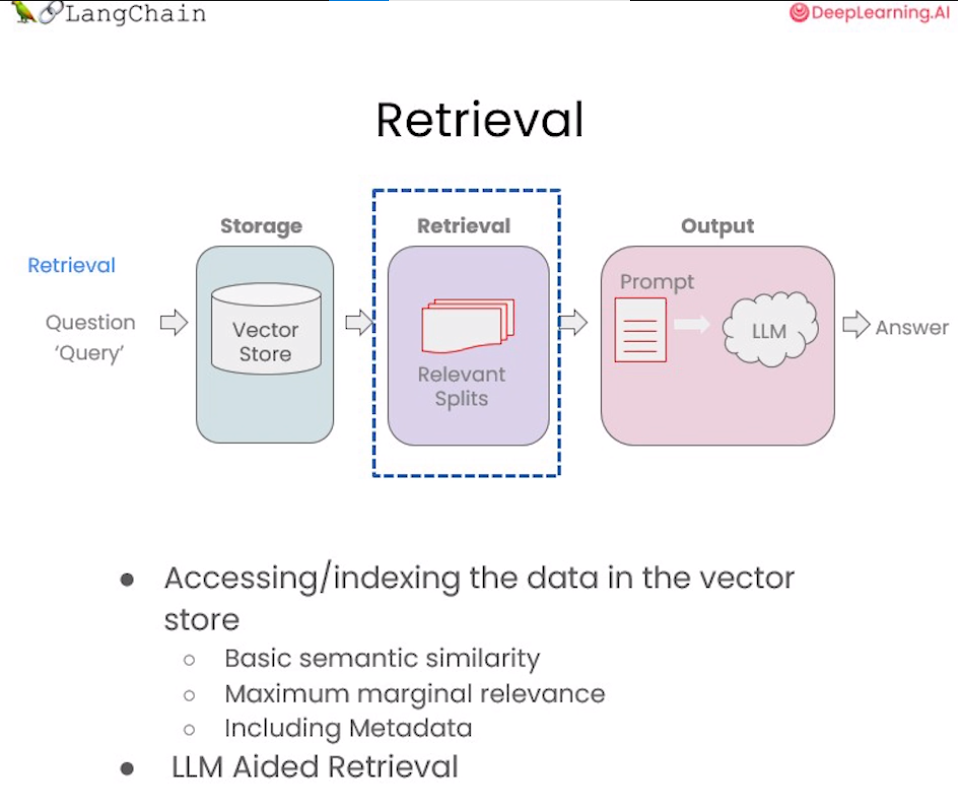
在构建检索增强生成 (RAG) 系统时,信息检索是核心环节。检索模块负责对用户查询进行分析,从知识库中快速定位相关文档或段落,为后续的语言生成提供信息支持。检索是指根据用户的问题去向量数据库中搜索与问题相关的文档内容,当我们访问和查询向量数据库时可能会运用到如下几种技术:

  • 基本语义相似度(Basic semantic similarity)
  • 最大边际相关性(Maximum marginal relevance,MMR)
  • 过滤元数据
  • LLM辅助检索

使用基本的相似性搜索大概能解决你80%的相关检索工作,但对于那些相似性搜索失败的边缘情况该如何解决呢?这一章节我们将介绍几种检索方法,以及解决检索边缘情况的技巧,让我们一起开始学习吧!

向量数据库检索

本章节需要使用lark包,若环境中未安装过此包,请运行以下命令安装:

1
!pip install -Uq lark
相似性检索(Similarity Search)

以我们的流程为例,前面课程已经存储了向量数据库(VectorDB),包含各文档的语义向量表示。首先将上节课所保存的向量数据库(VectorDB)加载进来:

1
2
3
4
5
6
7
8
9
10
11
12
13
from langchain.vectorstores import Chroma
from langchain.embeddings.openai import OpenAIEmbeddings

persist_directory_chinese = 'docs/chroma/matplotlib/'

embedding = OpenAIEmbeddings()

vectordb_chinese = Chroma(
persist_directory=persist_directory_chinese,
embedding_function=embedding
)

print(vectordb_chinese._collection.count())
1
27

下面我们来实现一下语义的相似度搜索,我们把三句话存入向量数据库Chroma中,然后我们提出问题让向量数据库根据问题来搜索相关答案:

1
2
3
4
5
texts_chinese = [
"""毒鹅膏菌(Amanita phalloides)具有大型且引人注目的地上(epigeous)子实体(basidiocarp)""",
"""一种具有大型子实体的蘑菇是毒鹅膏菌(Amanita phalloides)。某些品种全白。""",
"""A. phalloides,又名死亡帽,是已知所有蘑菇中最有毒的一种。""",
]

我们可以看到前两句都是描述的是一种叫“鹅膏菌”的菌类,包括它们的特征:有较大的子实体,第三句描述的是“鬼笔甲”,一种已知的最毒的蘑菇,它的特征就是:含有剧毒。对于这个例子,我们将创建一个小数据库,我们可以作为一个示例来使用。

1
smalldb_chinese = Chroma.from_texts(texts_chinese, embedding=embedding)
1
100%|██████████| 1/1 [00:00<00:00,  1.51it/s]

下面是我们对于这个示例所提出的问题:

1
question_chinese = "告诉我关于具有大型子实体的全白色蘑菇的信息"

现在,让针对上面问题进行相似性搜索,设置 k=2 ,只返回两个最相关的文档。

1
smalldb_chinese.similarity_search(question_chinese, k=2)
1
2
[Document(page_content='一种具有大型子实体的蘑菇是毒鹅膏菌(Amanita phalloides)。某些品种全白。', metadata={}),
Document(page_content='毒鹅膏菌(Amanita phalloides)具有大型且引人注目的地上(epigeous)子实体(basidiocarp)', metadata={})]

我们现在可以看到,向量数据库返回了 2 个文档,就是我们存入向量数据库中的第一句和第二句。这里我们很明显的就可以看到 chroma 的 similarity_search(相似性搜索) 方法可以根据问题的语义去数据库中搜索与之相关性最高的文档,也就是搜索到了第一句和第二句的文本。但这似乎还存在一些问题,因为第一句和第二句的含义非常接近,他们都是描述“鹅膏菌”及其“子实体”的,所以假如只返回其中的一句就足以满足要求了,如果返回两句含义非常接近的文本感觉是一种资源的浪费。下面我们来看一下 max_marginal_relevance_search 的搜索结果。

解决多样性:最大边际相关性(MMR)

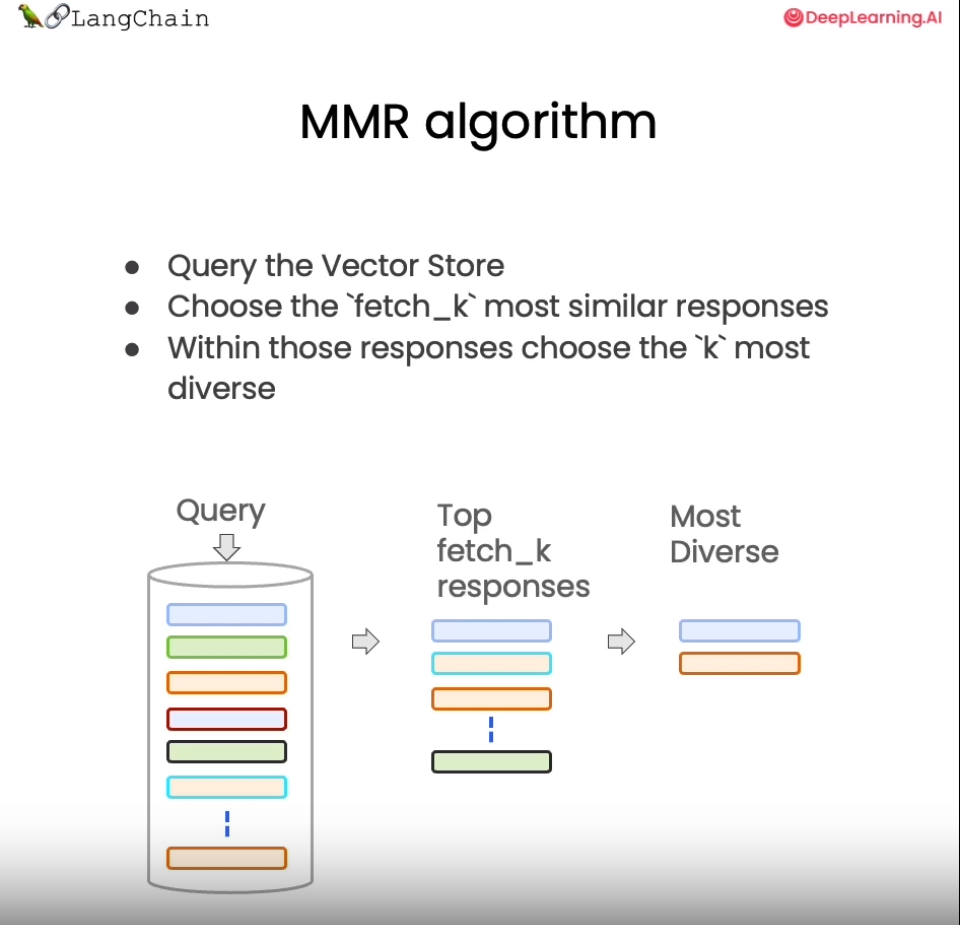
最大边际相关模型 (MMR,Maximal Marginal Relevance) 是实现多样性检索的常用算法。

MMR 的基本思想是同时考量查询与文档的相关度,以及文档之间的相似度。相关度确保返回结果对查询高度相关,相似度则鼓励不同语义的文档被包含进结果集。具体来说,它计算每个候选文档与查询的相关度,并减去与已经选入结果集的文档的相似度。这样更不相似的文档会有更高的得分。

总之,MMR 是解决检索冗余问题、提供多样性结果的一种简单高效的算法。它平衡了相关性和多样性,适用于对多样信息需求较强的应用场景。

我们来看一个利用 MMR 从蘑菇知识库中检索信息的示例。首先加载有关蘑菇的文档,然后运行 MMR 算法,设置 fetch_k 参数,用来告诉向量数据库我们最终需要 k 个结果返回。fetch_k=3 ,也就是我们最初获取 3 个文档,k=2 表示返回最不同的 2 个文档。

1
smalldb_chinese.max_marginal_relevance_search(question_chinese,k=2, fetch_k=3)
1
2
[Document(page_content='一种具有大型子实体的蘑菇是毒鹅膏菌(Amanita phalloides)。某些品种全白。', metadata={}),
Document(page_content='A. phalloides,又名死亡帽,是已知所有蘑菇中最有毒的一种。', metadata={})]

这里我们看到 max_marginal_relevance_search(最大边际相关搜索) 返回了第二和第三句的文本,尽管第三句与我们的问题的相关性不太高,但是这样的结果其实应该是更加的合理,因为第一句和第二句文本本来就有着相似的含义,所以只需要返回其中的一句就可以了,另外再返回一个与问题相关性弱一点的答案(第三句文本),这样似乎增强了答案的多样性,相信用户也会更加偏爱

还记得在上一节中我们介绍了两种向量数据在查询时的失败场景吗?当向量数据库中存在相同的文档时,而用户的问题又与这些重复的文档高度相关时,向量数据库会出现返回重复文档的情况。现在我们就可以运用Langchain的 max_marginal_relevance_search 来解决这个问题:

我们首先看看前两个文档,只看前几个字符,可以看到它们是相同的。

1
2
3
4
5
6
7
8
question_chinese = "Matplotlib是什么?"
docs_ss_chinese = vectordb_chinese.similarity_search(question_chinese,k=3)

print("docs[0]: ")
print(docs_ss_chinese[0].page_content[:100])
print()
print("docs[1]: ")
print(docs_ss_chinese[1].page_content[:100])
1
2
3
4
5
6
7
8
9
docs[0]: 
第⼀回:Matplotlib 初相识
⼀、认识matplotlib
Matplotlib 是⼀个 Python 2D 绘图库,能够以多种硬拷⻉格式和跨平台的交互式环境⽣成出版物质量的图形,⽤来绘制各种

docs[1]:
第⼀回:Matplotlib 初相识
⼀、认识matplotlib
Matplotlib 是⼀个 Python 2D 绘图库,能够以多种硬拷⻉格式和跨平台的交互式环境⽣成出版物质量的图形,⽤来绘制各种

这里如果我们使用相似查询,会得到两个重复的结果,读者可以自己尝试一下,这里不再展示。我们可以使用 MMR 得到不一样的结果。

1
docs_mmr_chinese = vectordb_chinese.max_marginal_relevance_search(question_chinese,k=3)

当我们运行 MMR 后得到结果时,我们可以看到第一个与之前的相同,因为那是最相似的。

1
print(docs_mmr_chinese[0].page_content[:100])
1
2
3
第⼀回:Matplotlib 初相识
⼀、认识matplotlib
Matplotlib 是⼀个 Python 2D 绘图库,能够以多种硬拷⻉格式和跨平台的交互式环境⽣成出版物质量的图形,⽤来绘制各种

但是当我们进行到第二个时,我们可以看到它是不同的。

它在回应中获得了一些多样性。

1
print(docs_mmr_chinese[1].page_content[:100])
1
2
3
By Datawhale 数据可视化开源⼩组
© Copyright © Copyright 2021.y轴分为左右两个,因此 tick1 对应左侧的轴; tick2 对应右侧的轴。
x轴分为上下两个

从以上结果中可以看到,向量数据库返回了 2 篇完全不同的文档,这是因为我们使用的是 MMR 搜索,它把搜索结果中相似度很高的文档做了过滤,所以它保留了结果的相关性又同时兼顾了结果的多样性。

解决特殊性:使用元数据

在上一节课中,关于失败的应用场景我们还提出了一个问题,是询问了关于文档中某一讲的问题,但得到的结果中也包括了来自其他讲的结果。这是我们所不希望看到的结果,之所以产生这样的结果是因为当我们向向量数据库提出问题时,数据库并没有很好的理解问题的语义,所以返回的结果不如预期。要解决这个问题,我们可以通过过滤元数据的方式来实现精准搜索,当前很多向量数据库都支持对元数据(metadata)的操作:

metadata为每个嵌入的块(embedded chunk)提供上下文。

1
question_chinese = "他们在第二讲中对Figure说了些什么?"  

现在,我们以手动的方式来解决这个问题,我们会指定一个元数据过滤器filter

1
2
3
4
5
docs_chinese = vectordb_chinese.similarity_search(
question_chinese,
k=3,
filter={"source":"docs/matplotlib/第二回:艺术画笔见乾坤.pdf"}
)

接下来,我们可以看到结果都来自对应的章节

1
2
3
for d in docs_chinese:
print(d.metadata)

1
2
3
{'source': 'docs/matplotlib/第二回:艺术画笔见乾坤.pdf', 'page': 9}
{'source': 'docs/matplotlib/第二回:艺术画笔见乾坤.pdf', 'page': 10}
{'source': 'docs/matplotlib/第二回:艺术画笔见乾坤.pdf', 'page': 0}

当然,我们不能每次都采用手动的方式来解决这个问题,这会显得不够智能。下一小节中,我们将展示通过LLM来解决这个问题。

解决特殊性:在元数据中使用自查询检索器(LLM辅助检索)

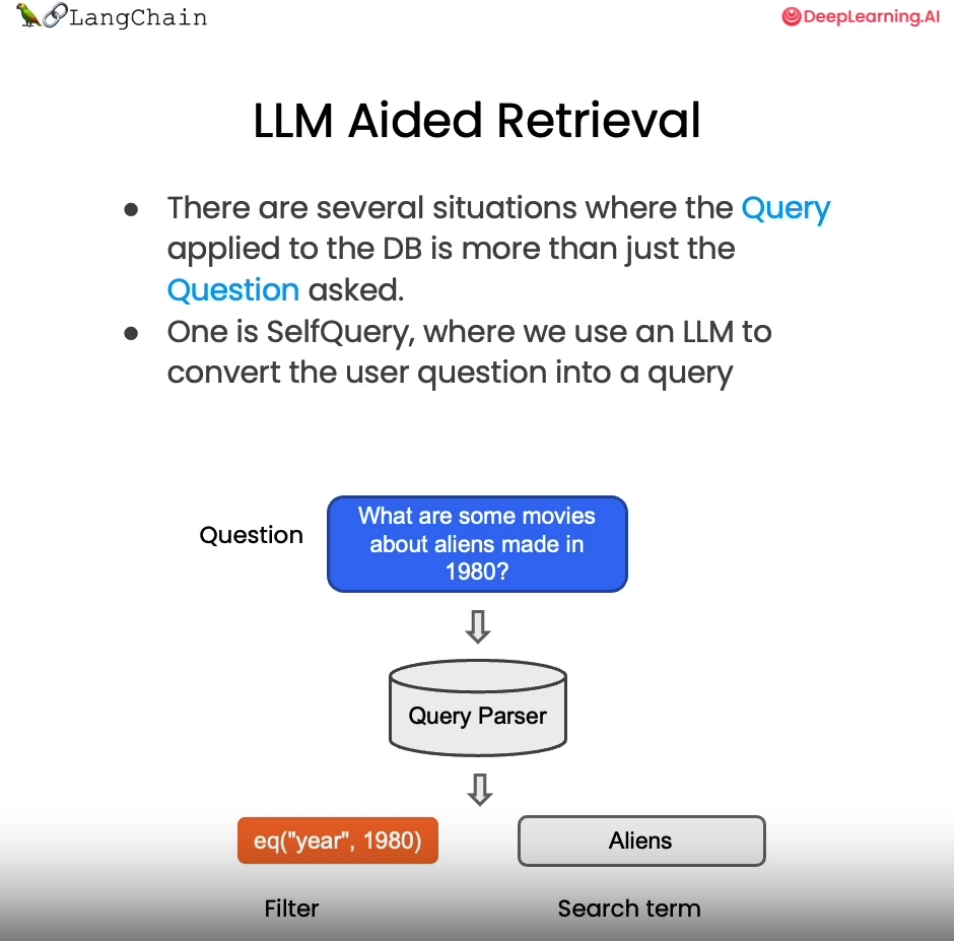
在上例中,我们手动设置了过滤参数 filter 来过滤指定文档。但这种方式不够智能,需要人工指定过滤条件。如何自动从用户问题中提取过滤信息呢?

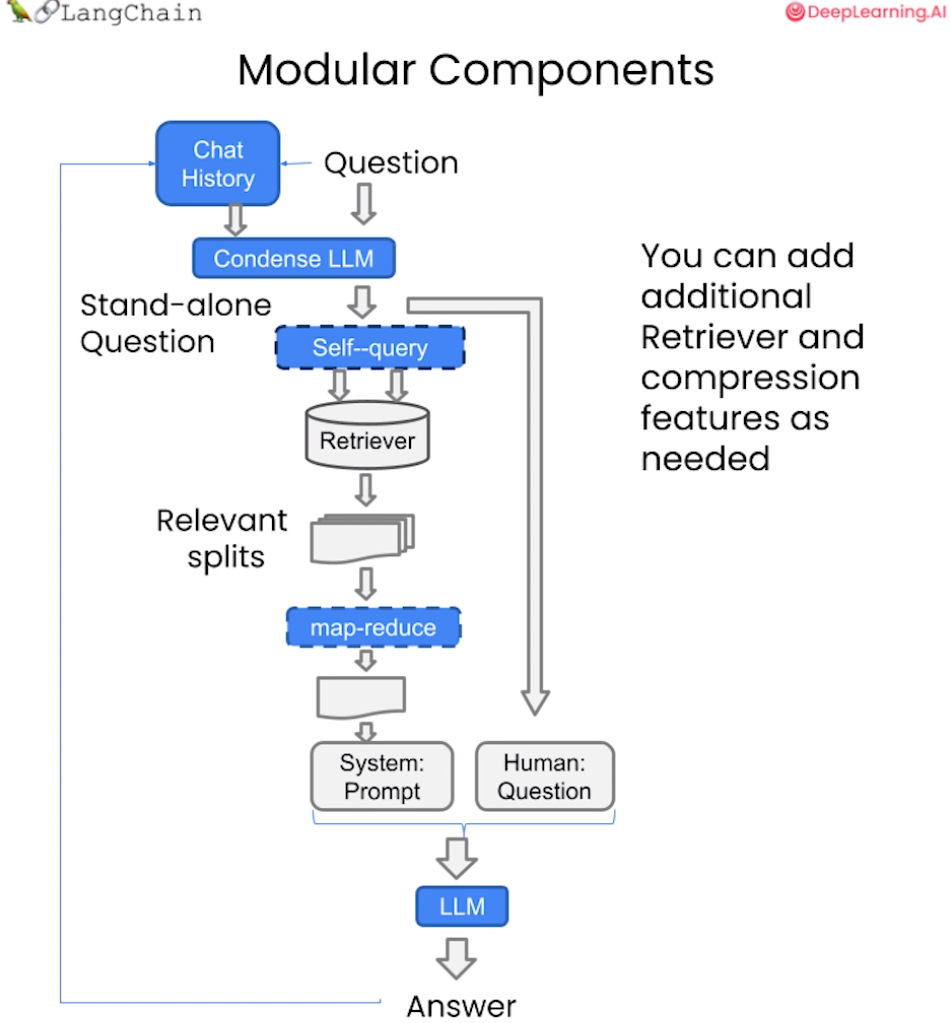
LangChain提供了SelfQueryRetriever模块,它可以通过语言模型从问题语句中分析出:

  1. 向量搜索的查询字符串(search term)

  2. 过滤文档的元数据条件(Filter)

以“除了维基百科,还有哪些健康网站”为例,SelfQueryRetriever可以推断出“除了维基百科”表示需要过滤的条件,即排除维基百科的文档。

它使用语言模型自动解析语句语义,提取过滤信息,无需手动设置。这种基于理解的元数据过滤更加智能方便,可以自动处理更复杂的过滤逻辑。

掌握利用语言模型实现自动化过滤的技巧,可以大幅降低构建针对性问答系统的难度。这种自抽取查询的方法使检索更加智能和动态。

其原理如下图所示:

下面我们就来实现一下LLM辅助检索:

1
2
3
4
5
from langchain.llms import OpenAI
from langchain.retrievers.self_query.base import SelfQueryRetriever
from langchain.chains.query_constructor.base import AttributeInfo

llm = OpenAI(temperature=0)

这里我们首先定义了 metadata_field_info_chinese ,它包含了元数据的过滤条件 sourcepage , 其中 source 的作用是告诉 LLM 我们想要的数据来自于哪里, page 告诉 LLM 我们需要提取相关的内容在原始文档的哪一页。有了 metadata_field_info_chinese 信息后,LLM会自动从用户的问题中提取出上图中的 Filter 和 Search term 两项,然后向量数据库基于这两项去搜索相关的内容。下面我们看一下查询结果:

1
2
3
4
5
6
7
8
9
10
11
12
13
14
15
16
17
18
19
20
21
22
23
metadata_field_info_chinese = [
AttributeInfo(
name="source",
description="The lecture the chunk is from, should be one of `docs/matplotlib/第一回:Matplotlib初相识.pdf`, `docs/matplotlib/第二回:艺术画笔见乾坤.pdf`, or `docs/matplotlib/第三回:布局格式定方圆.pdf`",
type="string",
),
AttributeInfo(
name="page",
description="The page from the lecture",
type="integer",
),
]

document_content_description_chinese = "Matplotlib 课堂讲义"
retriever_chinese = SelfQueryRetriever.from_llm(
llm,
vectordb_chinese,
document_content_description_chinese,
metadata_field_info_chinese,
verbose=True
)

question_chinese = "他们在第二讲中对Figure做了些什么?"

当你第一次执行下一行时,你会收到关于predict_and_parse已被弃用的警告。 这可以安全地忽略。

1
docs_chinese = retriever_chinese.get_relevant_documents(question_chinese)
1
2
3
4
5
/root/autodl-tmp/env/gpt/lib/python3.10/site-packages/langchain/chains/llm.py:275: UserWarning: The predict_and_parse method is deprecated, instead pass an output parser directly to LLMChain.
warnings.warn(


query='Figure' filter=Comparison(comparator=<Comparator.EQ: 'eq'>, attribute='source', value='docs/matplotlib/第二回:艺术画笔见乾坤.pdf') limit=None

打印可以看到查询结果,基于子查询检索器,我们检索到的结果都是在第二回的文档中:

1
2
for d in docs_chinese:
print(d.metadata)
1
2
3
4
{'source': 'docs/matplotlib/第二回:艺术画笔见乾坤.pdf', 'page': 9}
{'source': 'docs/matplotlib/第二回:艺术画笔见乾坤.pdf', 'page': 10}
{'source': 'docs/matplotlib/第二回:艺术画笔见乾坤.pdf', 'page': 0}
{'source': 'docs/matplotlib/第二回:艺术画笔见乾坤.pdf', 'page': 6}
其他技巧:压缩

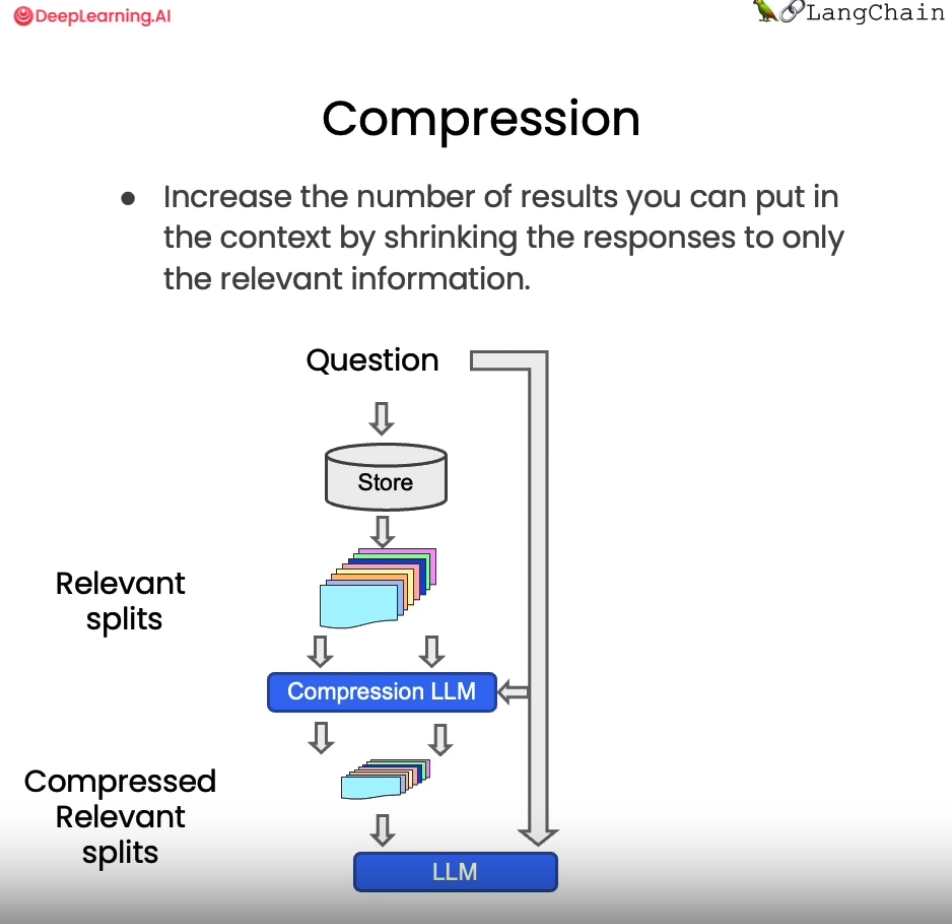
在使用向量检索获取相关文档时,直接返回整个文档片段可能带来资源浪费,因为实际相关的只是文档的一小部分。为改进这一点,LangChain提供了一种“压缩”检索机制。其工作原理是,先使用标准向量检索获得候选文档,然后基于查询语句的语义,使用语言模型压缩这些文档,只保留与问题相关的部分。例如,对“蘑菇的营养价值”这个查询,检索可能返回整篇有关蘑菇的长文档。经压缩后,只提取文档中与“营养价值”相关的句子。

从上图中我们看到,当向量数据库返回了所有与问题相关的所有文档块的全部内容后,会有一个Compression LLM来负责对这些返回的文档块的内容进行压缩,所谓压缩是指仅从文档块中提取出和用户问题相关的内容,并舍弃掉那些不相关的内容。

1
2
3
4
5
6
7
8
9
10
11
12
13
14
15
16
17
18
from langchain.retrievers import ContextualCompressionRetriever
from langchain.retrievers.document_compressors import LLMChainExtractor

def pretty_print_docs(docs):
print(f"\n{'-' * 100}\n".join([f"Document {i+1}:\n\n" + d.page_content for i, d in enumerate(docs)]))

llm = OpenAI(temperature=0)
compressor = LLMChainExtractor.from_llm(llm) # 压缩器

compression_retriever_chinese = ContextualCompressionRetriever(
base_compressor=compressor,
base_retriever=vectordb_chinese.as_retriever()
)
# 对源文档进行压缩

question_chinese = "Matplotlib是什么?"
compressed_docs_chinese = compression_retriever_chinese.get_relevant_documents(question_chinese)
pretty_print_docs(compressed_docs_chinese)
1
2
3
4
5
6
7
Document 1:

Matplotlib 是⼀个 Python 2D 绘图库,能够以多种硬拷⻉格式和跨平台的交互式环境⽣成出版物质量的图形,⽤来绘制各种静态,动态,交互式的图表。
----------------------------------------------------------------------------------------------------
Document 2:

Matplotlib 是⼀个 Python 2D 绘图库,能够以多种硬拷⻉格式和跨平台的交互式环境⽣成出版物质量的图形,⽤来绘制各种静态,动态,交互式的图表。

在上面的代码中我们定义了一个 LLMChainExtractor ,它是一个压缩器,它负责从向量数据库返回的文档块中提取相关信息,然后我们还定义了 ContextualCompressionRetriever ,它有两个参数:base_compressor 和 base_retriever,其中 base_compressor 是我们前面定义的 LLMChainExtractor 的实例,base_retriever是早前定义的 vectordb 产生的检索器。

现在当我们提出问题后,查看结果文档,我们可以看到两件事。

  1. 它们比正常文档短很多
  2. 仍然有一些重复的东西,这是因为在底层我们使用的是语义搜索算法。

从上述例子中,我们可以发现这种压缩可以有效提升输出质量,同时节省通过长文档带来的计算资源浪费,降低成本。上下文相关的压缩检索技术,使得到的支持文档更严格匹配问题需求,是提升问答系统效率的重要手段。读者可以在实际应用中考虑这一技术。

结合各种技术

为了去掉结果中的重复文档,我们在从向量数据库创建检索器时,可以将搜索类型设置为 MMR 。然后我们可以重新运行这个过程,可以看到我们返回的是一个过滤过的结果集,其中不包含任何重复的信息。

1
2
3
4
5
6
7
8
compression_retriever_chinese = ContextualCompressionRetriever(
base_compressor=compressor,
base_retriever=vectordb_chinese.as_retriever(search_type = "mmr")
)

question_chinese = "Matplotlib是什么?"
compressed_docs_chinese = compression_retriever_chinese.get_relevant_documents(question_chinese)
pretty_print_docs(compressed_docs_chinese)
1
2
3
Document 1:

Matplotlib 是⼀个 Python 2D 绘图库,能够以多种硬拷⻉格式和跨平台的交互式环境⽣成出版物质量的图形,⽤来绘制各种静态,动态,交互式的图表。

其他类型的检索

值得注意的是,vetordb 并不是唯一一种检索文档的工具。LangChain 还提供了其他检索文档的方式,例如:TF-IDFSVM

1
2
3
4
5
6
7
8
9
10
11
12
13
14
15
16
17
18
from langchain.retrievers import SVMRetriever
from langchain.retrievers import TFIDFRetriever
from langchain.document_loaders import PyPDFLoader
from langchain.text_splitter import RecursiveCharacterTextSplitter

# 加载PDF
loader_chinese = PyPDFLoader("docs/matplotlib/第一回:Matplotlib初相识.pdf")
pages_chinese = loader_chinese.load()
all_page_text_chinese = [p.page_content for p in pages_chinese]
joined_page_text_chinese = " ".join(all_page_text_chinese)

# 分割文本
text_splitter_chinese = RecursiveCharacterTextSplitter(chunk_size = 1500,chunk_overlap = 150)
splits_chinese = text_splitter_chinese.split_text(joined_page_text_chinese)

# 检索
svm_retriever = SVMRetriever.from_texts(splits_chinese, embedding)
tfidf_retriever = TFIDFRetriever.from_texts(splits_chinese)

这里我们定义了 SVMRetriever ,和 TFIDFRetriever 两个检索器,接下来我们分别测试 TF-IDF 检索以及 SVM 检索的效果:

1
2
3
question_chinese = "这门课的主要主题是什么?" 
docs_svm_chinese = svm_retriever.get_relevant_documents(question_chinese)
print(docs_svm_chinese[0])
1
page_content='fig, ax = plt.subplots()  \n# step4 绘制图像,  这⼀模块的扩展参考第⼆章进⼀步学习\nax.plot(x, y, label=\'linear\')  \n# step5 添加标签,⽂字和图例,这⼀模块的扩展参考第四章进⼀步学习\nax.set_xlabel(\'x label\') \nax.set_ylabel(\'y label\') \nax.set_title("Simple Plot")  \nax.legend() ;\n思考题\n请思考两种绘图模式的优缺点和各⾃适合的使⽤场景\n在第五节绘图模板中我们是以 OO 模式作为例⼦展示的,请思考并写⼀个 pyplot 绘图模式的简单模板' metadata={}

可以看出,SVM 检索的效果要差于 VectorDB。

1
2
3
question_chinese = "Matplotlib是什么?"
docs_tfidf_chinese = tfidf_retriever.get_relevant_documents(question_chinese)
print(docs_tfidf_chinese[0])
1
page_content='fig, ax = plt.subplots()  \n# step4 绘制图像,  这⼀模块的扩展参考第⼆章进⼀步学习\nax.plot(x, y, label=\'linear\')  \n# step5 添加标签,⽂字和图例,这⼀模块的扩展参考第四章进⼀步学习\nax.set_xlabel(\'x label\') \nax.set_ylabel(\'y label\') \nax.set_title("Simple Plot")  \nax.legend() ;\n思考题\n请思考两种绘图模式的优缺点和各⾃适合的使⽤场景\n在第五节绘图模板中我们是以 OO 模式作为例⼦展示的,请思考并写⼀个 pyplot 绘图模式的简单模板' metadata={}

同样,TF-IDF 检索的效果也不尽如人意。

总结

今天的课程涵盖了向量检索的多项新技术,让我们快速回顾关键要点:

  1. MMR 算法可以实现兼具相关性与多样性的检索结果,避免信息冗余。

  2. 定义元数据字段可以进行针对性过滤,提升匹配准确率。

  3. SelfQueryRetriever 模块通过语言模型自动分析语句,提取查询字符串与过滤条件,无需手动设置,使检索更智能。

  4. ContextualCompressionRetriever 实现压缩检索,仅返回与问题相关的文档片段,可以大幅提升效率并节省计算资源。

  5. 除向量检索外,还简要介绍了基于 SVM 和 TF-IDF 的检索方法。

这些技术为我们构建可交互的语义搜索模块提供了重要支持。熟练掌握各检索算法的适用场景,将大大增强问答系统的智能水平。希望本节的教程能够对大家有所帮助!

英文版

相似性检索
1
2
3
4
5
6
7
8
9
10
11
from langchain.vectorstores import Chroma
from langchain.embeddings.openai import OpenAIEmbeddings

persist_directory = 'docs/chroma/cs229_lectures/'

embedding = OpenAIEmbeddings()
vectordb = Chroma(
persist_directory=persist_directory,
embedding_function=embedding
)
print(vectordb._collection.count())
1
209

简单示例

1
2
3
4
5
6
7
8
9
10
11
12
13
14
texts = [
"""The Amanita phalloides has a large and imposing epigeous (aboveground) fruiting body (basidiocarp).""",
"""A mushroom with a large fruiting body is the Amanita phalloides. Some varieties are all-white.""",
"""A. phalloides, a.k.a Death Cap, is one of the most poisonous of all known mushrooms.""",
]

smalldb = Chroma.from_texts(texts, embedding=embedding)

question = "Tell me about all-white mushrooms with large fruiting bodies"

print("相似性检索:")
print(smalldb.similarity_search(question, k=2))
print("MMR 检索:")
print(smalldb_chinese.max_marginal_relevance_search(question,k=2, fetch_k=3))
1
2
3
4
5
6
7
  0%|          | 0/1 [00:00<?, ?it/s]100%|██████████| 1/1 [00:00<00:00,  2.55it/s]


相似性检索:
[Document(page_content='A mushroom with a large fruiting body is the Amanita phalloides. Some varieties are all-white.', metadata={}), Document(page_content='The Amanita phalloides has a large and imposing epigeous (aboveground) fruiting body (basidiocarp).', metadata={})]
MMR 检索:
[Document(page_content='一种具有大型子实体的蘑菇是毒鹅膏菌(Amanita phalloides)。某些品种全白。', metadata={}), Document(page_content='A. phalloides,又名死亡帽,是已知所有蘑菇中最有毒的一种。', metadata={})]
最大边际相关性
1
2
3
4
5
6
7
8
9
10
11
12
13
14
15
16
17
18
19
question = "what did they say about matlab?"
docs_ss = vectordb.similarity_search(question,k=3)

print("相似性检索:")
print("docs[0]: ")
print(docs_ss[0].page_content[:100])
print()
print("docs[1]: ")
print(docs_ss[1].page_content[:100])
print()

docs_mmr = vectordb.max_marginal_relevance_search(question,k=3)
print("MMR 检索:")
print("mmr[0]: ")
print(docs_mmr[0].page_content[:100])
print()
print("MMR 检索:")
print("mmr[1]: ")
print(docs_mmr[1].page_content[:100])
1
2
3
4
5
6
7
8
9
10
11
12
13
14
15
16
17
18
相似性检索:
docs[0]:
those homeworks will be done in either MATLA B or in Octave, which is sort of — I
know some people

docs[1]:
those homeworks will be done in either MATLA B or in Octave, which is sort of — I
know some people

MMR 检索:
mmr[0]:
those homeworks will be done in either MATLA B or in Octave, which is sort of — I
know some people

MMR 检索:
mmr[1]:
algorithm then? So what’s different? How come I was making all that noise earlier about
least squa
使用元数据
1
2
3
4
5
6
7
8
9
10
question = "what did they say about regression in the third lecture?"

docs = vectordb.similarity_search(
question,
k=3,
filter={"source":"docs/cs229_lectures/MachineLearning-Lecture03.pdf"}
)

for d in docs:
print(d.metadata)
1
2
3
{'source': 'docs/cs229_lectures/MachineLearning-Lecture03.pdf', 'page': 0}
{'source': 'docs/cs229_lectures/MachineLearning-Lecture03.pdf', 'page': 14}
{'source': 'docs/cs229_lectures/MachineLearning-Lecture03.pdf', 'page': 4}
使用自查询检索器
1
2
3
4
5
6
7
8
9
10
11
12
13
14
15
16
17
18
19
20
21
22
23
24
25
26
27
28
29
30
31
32
33
34
from langchain.llms import OpenAI
from langchain.retrievers.self_query.base import SelfQueryRetriever
from langchain.chains.query_constructor.base import AttributeInfo

llm = OpenAI(temperature=0)

metadata_field_info = [
AttributeInfo(
name="source",
description="The lecture the chunk is from, should be one of `docs/cs229_lectures/MachineLearning-Lecture01.pdf`, `docs/cs229_lectures/MachineLearning-Lecture02.pdf`, or `docs/cs229_lectures/MachineLearning-Lecture03.pdf`",
type="string",
),
AttributeInfo(
name="page",
description="The page from the lecture",
type="integer",
),
]

document_content_description = "Lecture notes"
retriever = SelfQueryRetriever.from_llm(
llm,
vectordb,
document_content_description,
metadata_field_info,
verbose=True
)

question = "what did they say about regression in the third lecture?"

docs = retriever.get_relevant_documents(question)

for d in docs:
print(d.metadata)
1
2
3
4
5
6
7
8
9
/root/autodl-tmp/env/gpt/lib/python3.10/site-packages/langchain/chains/llm.py:275: UserWarning: The predict_and_parse method is deprecated, instead pass an output parser directly to LLMChain.
warnings.warn(


query='regression' filter=Comparison(comparator=<Comparator.EQ: 'eq'>, attribute='source', value='docs/cs229_lectures/MachineLearning-Lecture03.pdf') limit=None
{'source': 'docs/cs229_lectures/MachineLearning-Lecture03.pdf', 'page': 14}
{'source': 'docs/cs229_lectures/MachineLearning-Lecture03.pdf', 'page': 0}
{'source': 'docs/cs229_lectures/MachineLearning-Lecture03.pdf', 'page': 10}
压缩
1
2
3
4
5
6
7
8
9
10
11
12
13
14
15
16
17
from langchain.retrievers import ContextualCompressionRetriever
from langchain.retrievers.document_compressors import LLMChainExtractor

def pretty_print_docs(docs):
print(f"\n{'-' * 100}\n".join([f"Document {i+1}:\n\n" + d.page_content for i, d in enumerate(docs)]))

llm = OpenAI(temperature=0)
compressor = LLMChainExtractor.from_llm(llm) # 压缩器

compression_retriever = ContextualCompressionRetriever(
base_compressor=compressor,
base_retriever=vectordb.as_retriever()
)

question = "what did they say about matlab?"
compressed_docs = compression_retriever.get_relevant_documents(question)
pretty_print_docs(compressed_docs)
1
2
3
4
5
6
7
8
9
10
11
12
13
14
15
Document 1:

"MATLAB is I guess part of the programming language that makes it very easy to write codes using matrices, to write code for numerical routines, to move data around, to plot data. And it's sort of an extremely easy to learn tool to use for implementing a lot of learning algorithms."
----------------------------------------------------------------------------------------------------
Document 2:

"MATLAB is I guess part of the programming language that makes it very easy to write codes using matrices, to write code for numerical routines, to move data around, to plot data. And it's sort of an extremely easy to learn tool to use for implementing a lot of learning algorithms."
----------------------------------------------------------------------------------------------------
Document 3:

"And the student said, "Oh, it was the MATLAB." So for those of you that don't know MATLAB yet, I hope you do learn it. It's not hard, and we'll actually have a short MATLAB tutorial in one of the discussion sections for those of you that don't know it."
----------------------------------------------------------------------------------------------------
Document 4:

"And the student said, "Oh, it was the MATLAB." So for those of you that don't know MATLAB yet, I hope you do learn it. It's not hard, and we'll actually have a short MATLAB tutorial in one of the discussion sections for those of you that don't know it."
结合各种技术
1
2
3
4
5
6
7
8
compression_retriever = ContextualCompressionRetriever(
base_compressor=compressor,
base_retriever=vectordb.as_retriever(search_type = "mmr")
)

question = "what did they say about matlab?"
compressed_docs = compression_retriever.get_relevant_documents(question)
pretty_print_docs(compressed_docs)
1
2
3
4
5
6
7
Document 1:

"MATLAB is I guess part of the programming language that makes it very easy to write codes using matrices, to write code for numerical routines, to move data around, to plot data. And it's sort of an extremely easy to learn tool to use for implementing a lot of learning algorithms."
----------------------------------------------------------------------------------------------------
Document 2:

"And the student said, "Oh, it was the MATLAB." So for those of you that don't know MATLAB yet, I hope you do learn it. It's not hard, and we'll actually have a short MATLAB tutorial in one of the discussion sections for those of you that don't know it."
其他类型的检索
1
2
3
4
5
6
7
8
9
10
11
12
13
14
15
16
17
18
19
20
21
22
23
24
25
26
27
28
29
30
from langchain.retrievers import SVMRetriever
from langchain.retrievers import TFIDFRetriever
from langchain.document_loaders import PyPDFLoader
from langchain.text_splitter import RecursiveCharacterTextSplitter

# 加载PDF
loader = PyPDFLoader("docs/cs229_lectures/MachineLearning-Lecture01.pdf")
pages = loader.load()
all_page_text = [p.page_content for p in pages]
joined_page_text = " ".join(all_page_text)

# 分割文本
text_splitter = RecursiveCharacterTextSplitter(chunk_size = 1500,chunk_overlap = 150)
splits = text_splitter.split_text(joined_page_text)

# 检索
svm_retriever = SVMRetriever.from_texts(splits, embedding)
tfidf_retriever = TFIDFRetriever.from_texts(splits)

question = "What are major topics for this class?" # 这门课的主要主题是什么?
print("SVM:")
docs_svm = svm_retriever.get_relevant_documents(question)
print(docs_svm[0])

question = "what did they say about matlab?"
print("TF-IDF:")
docs_tfidf = tfidf_retriever.get_relevant_documents(question)
print(docs_tfidf[0])


1
2
3
4
SVM:
page_content="let me just check what questions you have righ t now. So if there are no questions, I'll just \nclose with two reminders, which are after class today or as you start to talk with other \npeople in this class, I just encourage you again to start to form project partners, to try to \nfind project partners to do your project with. And also, this is a good time to start forming \nstudy groups, so either talk to your friends or post in the newsgroup, but we just \nencourage you to try to star t to do both of those today, okay? Form study groups, and try \nto find two other project partners. \nSo thank you. I'm looking forward to teaching this class, and I'll see you in a couple of \ndays. [End of Audio] \nDuration: 69 minutes" metadata={}
TF-IDF:
page_content="Saxena and Min Sun here did, wh ich is given an image like this, right? This is actually a \npicture taken of the Stanford campus. You can apply that sort of cl ustering algorithm and \ngroup the picture into regions. Let me actually blow that up so that you can see it more \nclearly. Okay. So in the middle, you see the lines sort of groupi ng the image together, \ngrouping the image into [inaudible] regions. \nAnd what Ashutosh and Min did was they then applied the learning algorithm to say can \nwe take this clustering and us e it to build a 3D model of the world? And so using the \nclustering, they then had a lear ning algorithm try to learn what the 3D structure of the \nworld looks like so that they could come up with a 3D model that you can sort of fly \nthrough, okay? Although many people used to th ink it's not possible to take a single \nimage and build a 3D model, but using a lear ning algorithm and that sort of clustering \nalgorithm is the first step. They were able to. \nI'll just show you one more example. I like this because it's a picture of Stanford with our \nbeautiful Stanford campus. So again, taking th e same sort of clustering algorithms, taking \nthe same sort of unsupervised learning algor ithm, you can group the pixels into different \nregions. And using that as a pre-processing step, they eventually built this sort of 3D model of Stanford campus in a single picture. You can sort of walk into the ceiling, look" metadata={}

问答 Question Answering

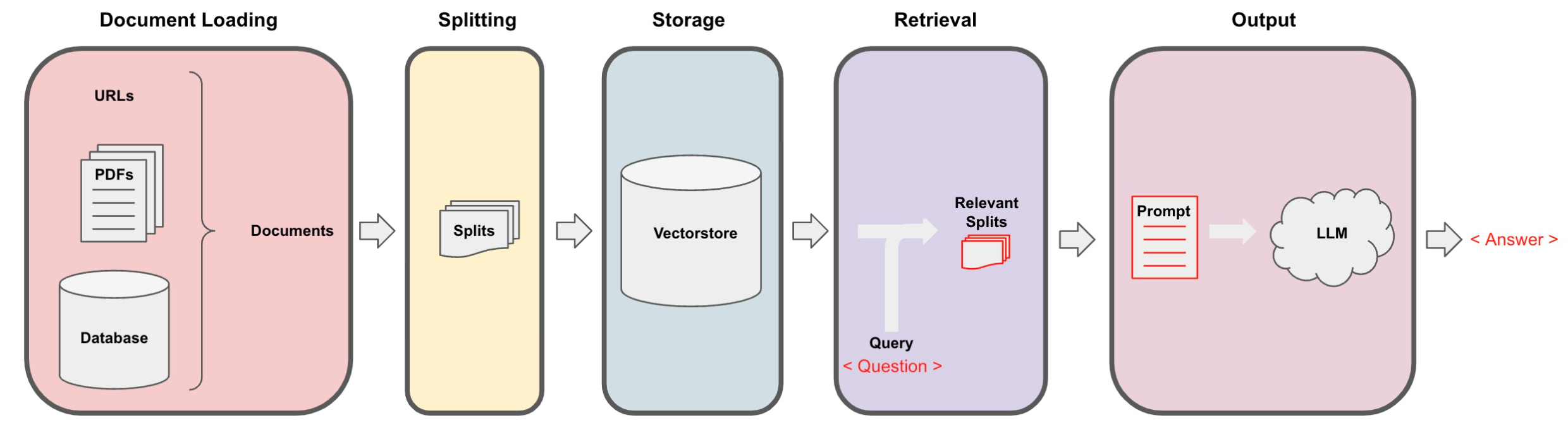
Langchain 在实现与外部数据对话的功能时需要经历下面的5个阶段,它们分别是:Document Loading->Splitting->Storage->Retrieval->Output,如下图所示:

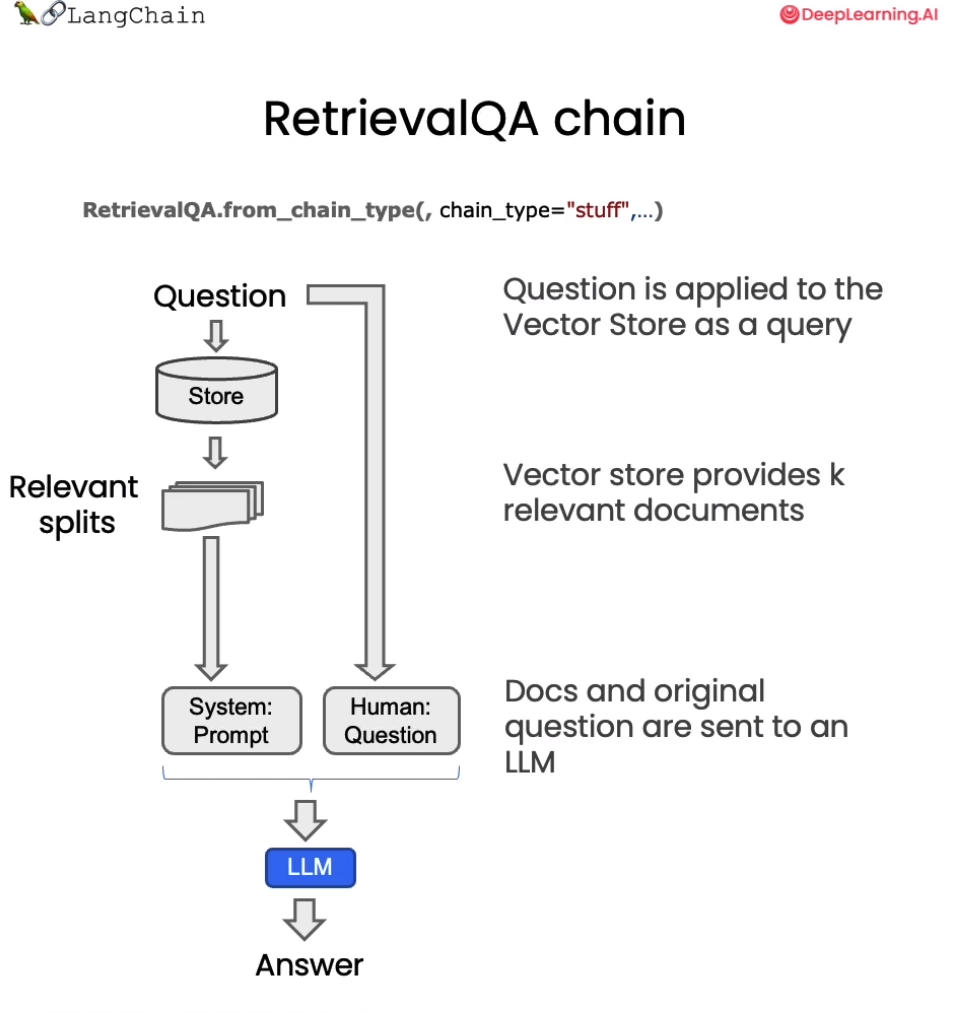
我们已经完成了整个存储和获取,获取了相关的切分文档之后,现在我们需要将它们传递给语言模型,以获得答案。这个过程的一般流程如下:首先问题被提出,然后我们查找相关的文档,接着将这些切分文档和系统提示一起传递给语言模型,并获得答案。

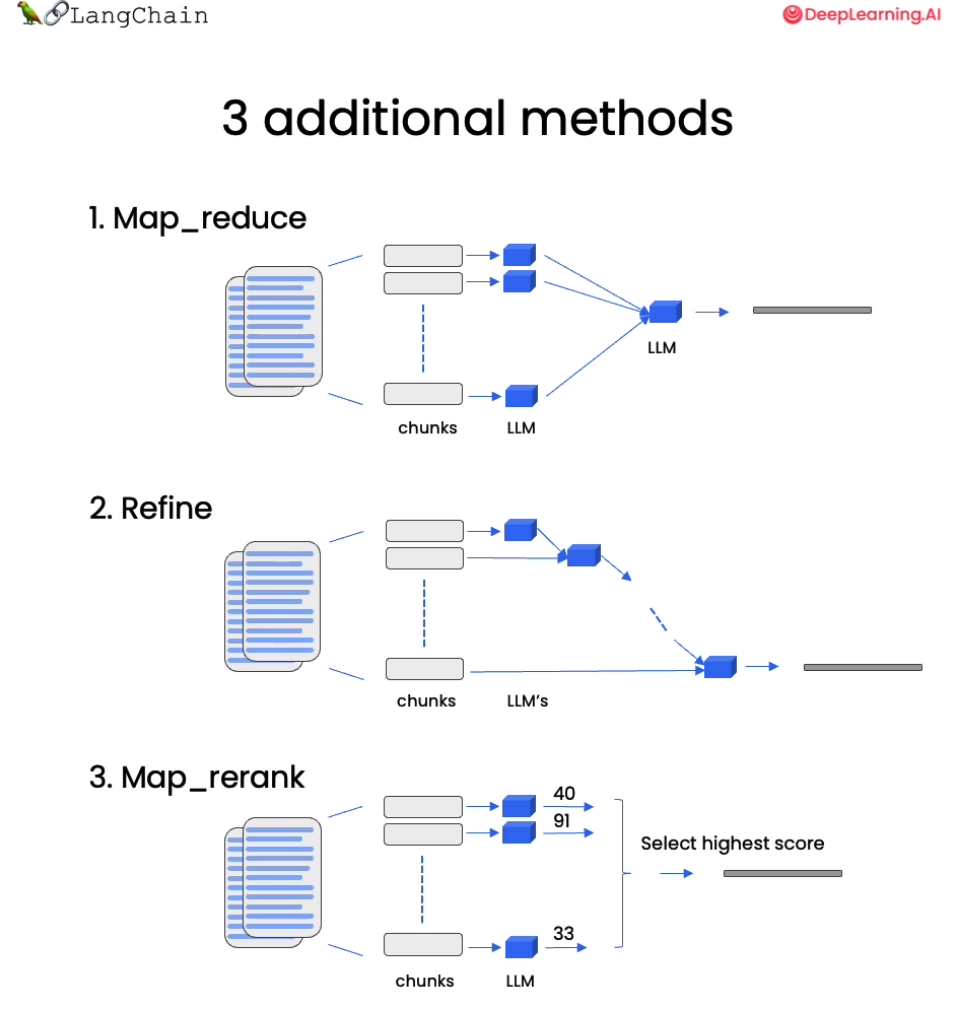
默认情况下,我们将所有的文档切片都传递到同一个上下文窗口中,即同一次语言模型调用中。然而,有一些不同的方法可以解决这个问题,它们都有优缺点。大部分优点来自于有时可能会有很多文档,但你简单地无法将它们全部传递到同一个上下文窗口中。MapReduce、Refine 和 MapRerank 是三种方法,用于解决这个短上下文窗口的问题。我们将在该课程中进行简要介绍。

在上一章,我们已经讨论了如何检索与给定问题相关的文档。下一步是获取这些文档,拿到原始问题,将它们一起传递给语言模型,并要求它回答这个问题。在本节中,我们将详细介绍这一过程,以及完成这项任务的几种不同方法。

在2023年9月2日之后,GPT-3.5 API 会进行更新,因此此处需要进行一个时间判断

1
2
3
4
5
6
7
import datetime
current_date = datetime.datetime.now().date()
if current_date < datetime.date(2023, 9, 2):
llm_name = "gpt-3.5-turbo-0301"
else:
llm_name = "gpt-3.5-turbo"
print(llm_name)
1
gpt-3.5-turbo-0301

加载向量数据库

首先我们加载之前已经进行持久化的向量数据库:

1
2
3
4
5
6
7
from langchain.vectorstores import Chroma
from langchain.embeddings.openai import OpenAIEmbeddings
persist_directory = 'docs/chroma/matplotlib/'
embedding = OpenAIEmbeddings()
vectordb = Chroma(persist_directory=persist_directory, embedding_function=embedding)

print(vectordb._collection.count())
1
27

我们可以测试一下对于一个提问进行向量检索。如下代码会在向量数据库中根据相似性进行检索,返回给你 k 个文档。

1
2
3
question = "这节课的主要话题是什么"
docs = vectordb.similarity_search(question,k=3)
len(docs)
1
3

构造检索式问答链

基于 LangChain,我们可以构造一个使用 GPT3.5 进行问答的检索式问答链,这是一种通过检索步骤进行问答的方法。我们可以通过传入一个语言模型和一个向量数据库来创建它作为检索器。然后,我们可以用问题作为查询调用它,得到一个答案。

1
2
3
4
5
6
7
8
9
10
11
12
13
14
15
16
17
18
# 使用 ChatGPT3.5,温度设置为0
from langchain.chat_models import ChatOpenAI
# 导入检索式问答链
from langchain.chains import RetrievalQA

llm = ChatOpenAI(model_name=llm_name, temperature=0)

# 声明一个检索式问答链
qa_chain = RetrievalQA.from_chain_type(
llm,
retriever=vectordb.as_retriever()
)

# 可以以该方式进行检索问答
question = "这节课的主要话题是什么"
result = qa_chain({"query": question})

print(result["result"])
1
这节课的主要话题是介绍 Matplotlib,一个 Python 2D 绘图库,能够以多种硬拷贝格式和跨平台的交互式环境生成出版物质量的图形,用来绘制各种静态,动态,交互式的图表。同时,也介绍了 Matplotlib 的基本概念和最简单的绘图例子,以及 Figure 的组成和 Axis 的属性。

深入探究检索式问答链

在获取与问题相关的文档后,我们需要将文档和原始问题一起输入语言模型,生成回答。默认是合并所有文档,一次性输入模型。但存在上下文长度限制的问题,若相关文档量大,难以一次将全部输入模型。针对这一问题,本章将介绍 MapReduce 、Refine 和 MapRerank 三种策略。

  • MapReduce 通过多轮检索与问答实现长文档处理
  • Refine 让模型主动请求信息
  • MapRerank 则通过问答质量调整文档顺序。

三种策略各有优劣 MapReduce 分批处理长文档,Refine 实现可交互问答,MapRerank 优化信息顺序,掌握这些技巧,可以应对语言模型的上下文限制,解决长文档问答困难,提升问答覆盖面。

通过上述代码,我们可以实现一个简单的检索式问答链。接下来,让我们深入其中的细节,看看在这个检索式问答链中,LangChain 都做了些什么。

基于模板的检索式问答链

我们首先定义了一个提示模板。它包含一些关于如何使用下面的上下文片段的说明,然后有一个上下文变量的占位符。

1
2
3
4
5
6
7
8
9
# 中文版
from langchain.prompts import PromptTemplate

# Build prompt
template = """使用以下上下文片段来回答最后的问题。如果你不知道答案,只需说不知道,不要试图编造答案。答案最多使用三个句子。尽量简明扼要地回答。在回答的最后一定要说"感谢您的提问!"
{context}
问题:{question}
有用的回答:"""
QA_CHAIN_PROMPT = PromptTemplate.from_template(template)

接着我们基于该模板来构建检索式问答链:

1
2
3
4
5
6
7
# Run chain
qa_chain = RetrievalQA.from_chain_type(
llm,
retriever=vectordb.as_retriever(),
return_source_documents=True,
chain_type_kwargs={"prompt": QA_CHAIN_PROMPT}
)

构建出的检索式问答链使用方法同上:

1
2
3
question = "这门课会学习 Python 吗"
result = qa_chain({"query": question})
print(result["result"])
1
根据上下文,这门课程主要是关于 Matplotlib 数据可视化库的使用和基础知识的介绍,Python 是使用 Matplotlib 的编程语言,因此在学习过程中会涉及到 Python 的使用。但是这门课程的重点是 Matplotlib,而不是 Python 语言本身。感谢您的提问!

可以查看其检索到的源文档:

1
print(result["source_documents"][0])
1
page_content='第⼀回:Matplotlib 初相识\n⼀、认识matplotlib\nMatplotlib 是⼀个 Python 2D 绘图库,能够以多种硬拷⻉格式和跨平台的交互式环境⽣成出版物质量的图形,⽤来绘制各种静态,动态,\n交互式的图表。\nMatplotlib 可⽤于 Python 脚本, Python 和 IPython Shell 、 Jupyter notebook , Web 应⽤程序服务器和各种图形⽤户界⾯⼯具包等。\nMatplotlib 是 Python 数据可视化库中的泰⽃,它已经成为 python 中公认的数据可视化⼯具,我们所熟知的 pandas 和 seaborn 的绘图接⼝\n其实也是基于 matplotlib 所作的⾼级封装。\n为了对matplotlib 有更好的理解,让我们从⼀些最基本的概念开始认识它,再逐渐过渡到⼀些⾼级技巧中。\n⼆、⼀个最简单的绘图例⼦\nMatplotlib 的图像是画在 figure (如 windows , jupyter 窗体)上的,每⼀个 figure ⼜包含了⼀个或多个 axes (⼀个可以指定坐标系的⼦区\n域)。最简单的创建 figure 以及 axes 的⽅式是通过 pyplot.subplots命令,创建 axes 以后,可以使⽤ Axes.plot绘制最简易的折线图。\nimport matplotlib.pyplot as plt\nimport matplotlib as mpl\nimport numpy as np\nfig, ax = plt.subplots()  # 创建⼀个包含⼀个 axes 的 figure\nax.plot([1, 2, 3, 4], [1, 4, 2, 3]);  # 绘制图像\nTrick: 在jupyter notebook 中使⽤ matplotlib 时会发现,代码运⾏后⾃动打印出类似 <matplotlib.lines.Line2D at 0x23155916dc0>\n这样⼀段话,这是因为 matplotlib 的绘图代码默认打印出最后⼀个对象。如果不想显示这句话,有以下三种⽅法,在本章节的代码示例\n中你能找到这三种⽅法的使⽤。\n\x00. 在代码块最后加⼀个分号 ;\n\x00. 在代码块最后加⼀句 plt.show()\n\x00. 在绘图时将绘图对象显式赋值给⼀个变量,如将 plt.plot([1, 2, 3, 4]) 改成 line =plt.plot([1, 2, 3, 4])\n和MATLAB 命令类似,你还可以通过⼀种更简单的⽅式绘制图像, matplotlib.pyplot⽅法能够直接在当前 axes 上绘制图像,如果⽤户\n未指定axes , matplotlib 会帮你⾃动创建⼀个。所以上⾯的例⼦也可以简化为以下这⼀⾏代码。\nline =plt.plot([1, 2, 3, 4], [1, 4, 2, 3]) \n三、Figure 的组成\n现在我们来深⼊看⼀下 figure 的组成。通过⼀张 figure 解剖图,我们可以看到⼀个完整的 matplotlib 图像通常会包括以下四个层级,这些\n层级也被称为容器( container ),下⼀节会详细介绍。在 matplotlib 的世界中,我们将通过各种命令⽅法来操纵图像中的每⼀个部分,\n从⽽达到数据可视化的最终效果,⼀副完整的图像实际上是各类⼦元素的集合。\nFigure:顶层级,⽤来容纳所有绘图元素' metadata={'source': 'docs/matplotlib/第一回:Matplotlib初相识.pdf', 'page': 0}

这种方法非常好,因为它只涉及对语言模型的一次调用。然而,它也有局限性,即如果文档太多,可能无法将它们全部适配到上下文窗口中。我们可以使用另一种技术来对文档进行问答,即 MapReduce 技术。

基于 MapReduce 的检索式问答链

在 MapReduce 技术中,首先将每个独立的文档单独发送到语言模型以获取原始答案。然后,这些答案通过最终对语言模型的一次调用组合成最终的答案。虽然这样涉及了更多对语言模型的调用,但它的优势在于可以处理任意数量的文档。

1
2
3
4
5
6
7
8
9
10
qa_chain_mr = RetrievalQA.from_chain_type(
llm,
retriever=vectordb.as_retriever(),
chain_type="map_reduce"
)

question = "这门课会学习 Python 吗"
result = qa_chain_mr({"query": question})

print(result["result"])
1
无法确定,给出的文本并没有提到这门课是否会学习 Python。

当我们将之前的问题通过这个链进行运行时,我们可以看到这种方法的两个问题。第一,速度要慢得多。第二,结果实际上更差。根据给定文档的这一部分,对这个问题并没有明确的答案。这可能是因为它是基于每个文档单独回答的。因此,如果信息分布在两个文档之间,它并没有在同一上下文中获取到所有的信息。

1
2
3
4
#import os
#os.environ["LANGCHAIN_TRACING_V2"] = "true"
#os.environ["LANGCHAIN_ENDPOINT"] = "https://api.langchain.plus"
#os.environ["LANGCHAIN_API_KEY"] = "..." # replace dots with your api key

我们可导入上述环境变量,然后探寻 MapReduce 文档链的细节。例如,上述演示中,我们实际上涉及了四个单独的对语言模型的调用。在运行完每个文档后,它们会在最终链式中组合在一起,即 Stuffed Documents 链,将所有这些回答合并到最终的调用中。

基于 Refine 的检索式问答链

我们还可以将链式类型设置为 Refine ,这是一种新的链式策略。Refine 文档链类似于 MapReduce ,对于每一个文档,会调用一次 LLM。但改进之处在于,最终输入语言模型的 Prompt 是一个序列,将之前的回复与新文档组合在一起,并请求得到改进后的响应。因此,这是一种类似于 RNN 的概念,增强了上下文信息,从而解决信息分布在不同文档的问题。

例如第一次调用,Prompt 包含问题与文档 A ,语言模型生成初始回答。第二次调用,Prompt 包含第一次回复、文档 B ,请求模型更新回答,以此类推。

1
2
3
4
5
6
7
8
qa_chain_mr = RetrievalQA.from_chain_type(
llm,
retriever=vectordb.as_retriever(),
chain_type="refine"
)
question = "这门课会学习 Python 吗"
result = qa_chain_mr({"query": question})
print(result["result"])
1
2
3
4
5
6
7
8
Refined answer:

The course is about learning Matplotlib, a Python 2D plotting library used for creating publication-quality figures in various formats and platforms. Matplotlib can be used in Python scripts, IPython Shell, Jupyter notebook, web application servers, and various graphical user interface toolkits. The course will cover basic concepts of Matplotlib and gradually transition to advanced techniques. The course will also cover the components of a Matplotlib figure, including the Figure, Axes, and various sub-elements. The course will provide a general plotting template that can be used to create various types of plots. The template follows the Object-Oriented (OO) mode of Matplotlib, but the course will also cover the pyplot mode. Therefore, the course will involve learning Python and Matplotlib for data visualization using both OO and pyplot modes.

In terms of the advantages and disadvantages of the two modes, the OO mode is more flexible and powerful, allowing for more customization and control over the plot elements. However, it requires more code and can be more complex for beginners. On the other hand, the pyplot mode is simpler and easier to use, but it may not provide as much flexibility and control as the OO mode. The pyplot mode is more suitable for quick and simple plots, while the OO mode is more suitable for complex and customized plots.

Here is an example of a simple pyplot mode plotting template:

import matplotlib.pyplot as plt
import numpy as np

# Step 1: Prepare data
x = np.linspace(0, 2, 100)
y = x**2

# Step 2: Plot data
plt.plot(x, y)

# Step 3: Customize plot
plt.xlabel('x label')
plt.ylabel('y label')
plt.title('Simple Plot')

# Step 4: Show plot
plt.show()
1
2

This template can be used to create a simple plot with x and y labels and a title. Additional customization can be added using various pyplot functions.

你会注意到,这个结果比 MapReduce 链的结果要好。这是因为使用 Refine 文档链通过累积上下文,使语言模型能渐进地完善答案,而不是孤立处理每个文档。这种策略可以有效解决信息分散带来的语义不完整问题。但是请注意,由于 LangChain 内部的限制,定义为 Refine 的问答链会默认返回英文作为答案。

实验:状态记录

让我们在这里做一个实验。我们将创建一个 QA 链,使用默认的 stuff 。让我们问一个问题,这门课会学习 Python 吗?它会回答,学习 Python 是这门课程的前提之一。

1
2
3
4
5
6
7
8
qa_chain = RetrievalQA.from_chain_type(
llm,
retriever=vectordb.as_retriever()
)

question = "这门课会学习 Python 吗?"
result = qa_chain({"query": question})
print(result["result"])
1
是的,这门课程会涉及到 Python 编程语言的使用,特别是在数据可视化方面。因此,学习 Python 是这门课程的前提之一。

我们将追问,为什么需要这一前提?然后我们得到了一个答案:“这一前提介绍了 Matplotlib 是什么以及它的基本概念,包括 Figure、Axes、Artist 等,这些是 Matplotlib 绘图的基础,了解这些概念可以帮助用户更好地理解 Matplotlib 的使用方法和绘图原理。因此,在学习 Matplotlib 之前,了解这些基本概念是非常必要的。”这与之前问有关 Python 的问题毫不相关。

1
2
3
question = "为什么需要这一前提"
result = qa_chain({"query": question})
result["result"]
1
'这一前提介绍了Matplotlib是什么以及它的基本概念,包括Figure、Axes、Artist等,这些是Matplotlib绘图的基础,了解这些概念可以帮助用户更好地理解Matplotlib的使用方法和绘图原理。因此,在学习Matplotlib之前,了解这些基本概念是非常必要的。'

基本上,我们使用的链式(chain)没有任何状态的概念。它不记得之前的问题或之前的答案。为了实现这一点,我们需要引入内存,这是我们将在下一节中讨论的内容。

英文版

加载向量数据库
1
2
3
4
5
6
7
from langchain.vectorstores import Chroma
from langchain.embeddings.openai import OpenAIEmbeddings
persist_directory = 'docs/chroma/cs229_lectures/'
embedding = OpenAIEmbeddings()
vectordb = Chroma(persist_directory=persist_directory, embedding_function=embedding)

print(vectordb._collection.count())
1
209

向量检索

1
2
3
question = "What are major topics for this class?"
docs = vectordb.similarity_search(question,k=3)
print(len(docs))
1
3
构造检索式问答链
1
2
3
4
5
6
7
8
9
10
11
12
13
14
15
16
17
18
# 使用 ChatGPT3.5,温度设置为0
from langchain.chat_models import ChatOpenAI
# 导入检索式问答链
from langchain.chains import RetrievalQA

llm = ChatOpenAI(model_name=llm_name, temperature=0)

# 声明一个检索式问答链
qa_chain = RetrievalQA.from_chain_type(
llm,
retriever=vectordb.as_retriever()
)

# 可以以该方式进行检索问答
question = "What are major topics for this class?"
result = qa_chain({"query": question})

print(result["result"])
1
The context does not provide a clear answer to this question.
基于模板的检索式问答链
1
2
3
4
5
6
7
8
9
10
11
12
13
14
15
16
17
18
19
20
21
22
23
from langchain.prompts import PromptTemplate

# Build prompt
template = """Use the following pieces of context to answer the question at the end. If you don't know the answer, just say that you don't know, don't try to make up an answer. Use three sentences maximum. Keep the answer as concise as possible. Always say "thanks for asking!" at the end of the answer.
{context}
Question: {question}
Helpful Answer:"""
QA_CHAIN_PROMPT = PromptTemplate.from_template(template)

# Run chain
qa_chain = RetrievalQA.from_chain_type(
llm,
retriever=vectordb.as_retriever(),
return_source_documents=True,
chain_type_kwargs={"prompt": QA_CHAIN_PROMPT}
)

question = "Is probability a class topic?"
result = qa_chain({"query": question})
print("ANswering:")
print(result["result"])
print("Source document: ")
print(result["source_documents"][0])
1
2
3
4
ANswering:
Yes, probability is assumed to be a prerequisite for this class. The instructor assumes familiarity with basic probability and statistics, and will go over some of the prerequisites in the discussion sections as a refresher course. Thanks for asking!
Source document:
page_content="of this class will not be very program ming intensive, although we will do some \nprogramming, mostly in either MATLAB or Octa ve. I'll say a bit more about that later. \nI also assume familiarity with basic proba bility and statistics. So most undergraduate \nstatistics class, like Stat 116 taught here at Stanford, will be more than enough. I'm gonna \nassume all of you know what ra ndom variables are, that all of you know what expectation \nis, what a variance or a random variable is. And in case of some of you, it's been a while \nsince you've seen some of this material. At some of the discussion sections, we'll actually \ngo over some of the prerequisites, sort of as a refresher course under prerequisite class. \nI'll say a bit more about that later as well. \nLastly, I also assume familiarity with basi c linear algebra. And again, most undergraduate \nlinear algebra courses are more than enough. So if you've taken courses like Math 51, \n103, Math 113 or CS205 at Stanford, that would be more than enough. Basically, I'm \ngonna assume that all of you know what matrix es and vectors are, that you know how to \nmultiply matrices and vectors and multiply matrix and matrices, that you know what a matrix inverse is. If you know what an eigenvect or of a matrix is, that'd be even better. \nBut if you don't quite know or if you're not qu ite sure, that's fine, too. We'll go over it in \nthe review sections." metadata={'source': 'docs/cs229_lectures/MachineLearning-Lecture01.pdf', 'page': 4}
基于 MapReduce 的检索式问答链
1
2
3
4
5
6
7
8
9
10
qa_chain_mr = RetrievalQA.from_chain_type(
llm,
retriever=vectordb.as_retriever(),
chain_type="map_reduce"
)

question = "Is probability a class topic?"
result = qa_chain_mr({"query": question})

print(result["result"])
1
There is no clear answer to this question based on the given portion of the document. The document mentions statistics and algebra as topics that may be covered, but it does not explicitly state whether probability is a class topic.
基于 Refine 的检索式问答链
1
2
3
4
5
6
7
8
qa_chain_mr = RetrievalQA.from_chain_type(
llm,
retriever=vectordb.as_retriever(),
chain_type="refine"
)
question = "Is probability a class topic?"
result = qa_chain_mr({"query": question})
print(result["result"])
1
The topic of probability is assumed to be a prerequisite and not a main topic of the class. The instructor assumes that students are familiar with basic probability and statistics, including random variables, expectation, variance, and basic linear algebra. The class will cover learning algorithms, including a discussion on overfitting and the probabilistic interpretation of linear regression. The instructor will use this probabilistic interpretation to derive the first classification algorithm, which will be discussed in the class. The classification problem involves predicting a discrete value, such as in medical diagnosis or housing sales. The class will not be very programming-intensive, but some programming will be done in MATLAB or Octave. The instructor will provide a refresher course on the prerequisites in some of the discussion sections. Additionally, the discussion sections will be used to cover extensions for the material taught in the main lectures, as machine learning is a vast field with many topics to explore.
实验
1
2
3
4
5
6
7
8
9
10
11
12
13
14
qa_chain = RetrievalQA.from_chain_type(
llm,
retriever=vectordb.as_retriever()
)

question = "Is probability a class topic?"
result = qa_chain({"query": question})
print("Q: ", question)
print("A: ", result["result"])

question = "why are those prerequesites needed?"
result = qa_chain({"query": question})
print("Q: ", question)
print("A: ", result["result"])
1
2
3
4
Q:  Is probability a class topic?
A: Yes, probability is a topic that will be assumed to be familiar to students in this class. The instructor assumes that students have a basic understanding of probability and statistics, and will go over some of the prerequisites as a refresher course in the discussion sections.
Q: why are those prerequesites needed?
A: The prerequisites are needed because in this class, the instructor assumes that all students have a basic knowledge of computer science and knowledge of basic computer skills and principles. This includes knowledge of big-O notation and linear algebra, which are important concepts in machine learning. Without this basic knowledge, it may be difficult for students to understand the material covered in the class.

聊天 Chat

回想一下检索增强生成 (retrieval augmented generation,RAG) 的整体工作流程:

我们已经接近完成一个功能性的聊天机器人了。我们讨论了文档加载切分存储检索。我们展示了如何使用检索 QA 链在 Q+A 中使用检索生成输出。

我们的机器人已经可以回答问题了,但还无法处理后续问题,无法进行真正的对话。在本章中,我们将解决这个问题。

我们现在将创建一个问答聊天机器人。它与之前非常相似,但我们将添加聊天历史的功能。这是您之前进行的任何对话或消息。这将使机器人在尝试回答问题时能够考虑到聊天历史的上下文。所以,如果您继续提问,它会知道您想谈论什么。

复现之前代码

以下代码是为了 openai LLM 版本备案,直至其被弃用(于 2023 年 9 月)。LLM 响应通常会有所不同,但在使用不同模型版本时,这种差异可能会更明显。

1
2
3
4
5
6
7
import datetime
current_date = datetime.datetime.now().date()
if current_date < datetime.date(2023, 9, 2):
llm_name = "gpt-3.5-turbo-0301"
else:
llm_name = "gpt-3.5-turbo"
print(llm_name)
1
gpt-3.5-turbo-0301

如果您想在 Lang Chain plus 平台上进行实验:

  • 前往 langchain plus 平台并注册

  • 从您的帐户设置创建 api 密钥

  • 在下面的代码中使用此 api 密钥

1
2
3
4
#import os
#os.environ["LANGCHAIN_TRACING_V2"] = "true"
#os.environ["LANGCHAIN_ENDPOINT"] = "https://api.langchain.plus"
#os.environ["LANGCHAIN_API_KEY"] = "..."

首先我们加载在前几节课创建的向量数据库,并测试一下:

1
2
3
4
5
6
7
8
9
10
11
12
13
# 加载向量库,其中包含了所有课程材料的 Embedding。
from langchain.vectorstores import Chroma
from langchain.embeddings.openai import OpenAIEmbeddings
import panel as pn # GUI
# pn.extension()

persist_directory = 'docs/chroma/matplotlib'
embedding = OpenAIEmbeddings()
vectordb = Chroma(persist_directory=persist_directory, embedding_function=embedding)

question = "这门课的主要内容是什么?"
docs = vectordb.similarity_search(question,k=3)
print(len(docs))
1
3

接着我们从 OpenAI 的 API 创建一个 LLM:

1
2
3
from langchain.chat_models import ChatOpenAI
llm = ChatOpenAI(model_name=llm_name, temperature=0)
llm.predict("你好")
1
'你好!有什么我可以帮助你的吗?'

再创建一个基于模板的检索链:

1
2
3
4
5
6
7
8
9
10
11
12
13
14
15
16
17
18
19
# 构建 prompt
from langchain.prompts import PromptTemplate
template = """使用以下上下文来回答最后的问题。如果你不知道答案,就说你不知道,不要试图编造答案。最多使用三句话。尽量使答案简明扼要。总是在回答的最后说“谢谢你的提问!”。
{context}
问题: {question}
有用的回答:"""
QA_CHAIN_PROMPT = PromptTemplate(input_variables=["context", "question"],template=template,)

# 运行 chain
from langchain.chains import RetrievalQA
question = "这门课的主题是什么?"
qa_chain = RetrievalQA.from_chain_type(llm,
retriever=vectordb.as_retriever(),
return_source_documents=True,
chain_type_kwargs={"prompt": QA_CHAIN_PROMPT})


result = qa_chain({"query": question})
print(result["result"])
1
这门课的主题是 Matplotlib 数据可视化库的初学者指南。

记忆(Memory)

现在让我们更进一步,添加一些记忆功能。

我们将使用 ConversationBufferMemory。它保存聊天消息历史记录的列表,这些历史记录将在回答问题时与问题一起传递给聊天机器人,从而将它们添加到上下文中。

需要注意的是,我们之前讨论的上下文检索等方法,在这里同样可用。

1
2
3
4
5
from langchain.memory import ConversationBufferMemory
memory = ConversationBufferMemory(
memory_key="chat_history", # 与 prompt 的输入变量保持一致。
return_messages=True # 将以消息列表的形式返回聊天记录,而不是单个字符串
)

对话检索链(ConversationalRetrievalChain)

对话检索链(ConversationalRetrievalChain)在检索 QA 链的基础上,增加了处理对话历史的能力。

它的工作流程是:

  1. 将之前的对话与新问题合并生成一个完整的查询语句。

  2. 在向量数据库中搜索该查询的相关文档。

  3. 获取结果后,存储所有答案到对话记忆区。

  4. 用户可在 UI 中查看完整的对话流程。

这种链式方式将新问题放在之前对话的语境中进行检索,可以处理依赖历史信息的查询。并保留所有信息在对话记忆中,方便追踪。

接下来让我们可以测试这个对话检索链的效果:

首先提出一个无历史的问题“这门课会学习 Python 吗?”,并查看回答。

1
2
3
4
5
6
7
8
9
10
11
from langchain.chains import ConversationalRetrievalChain
retriever=vectordb.as_retriever()
qa = ConversationalRetrievalChain.from_llm(
llm,
retriever=retriever,
memory=memory
)

question = "这门课会学习 Python 吗?"
result = qa({"question": question})
print(result['answer'])
1
是的,这门课程会涉及到 Python 编程语言的使用,特别是在数据可视化方面。因此,学习 Python 是这门课程的前提之一。

然后基于答案进行下一个问题“为什么这门课需要这个前提?”:

1
2
3
question = "为什么这门课需要这个前提?"
result = qa({"question": question})
print(result['answer'])
1
学习Python的前提是需要具备一定的计算机基础知识,包括但不限于计算机操作系统、编程语言基础、数据结构与算法等。此外,对于数据科学领域的学习,还需要具备一定的数学和统计学基础,如线性代数、微积分、概率论与数理统计等。

可以看到,虽然 LLM 的回答有些不对劲,但它准确地判断了这个前提的指代内容是学习 Python,也就是我们成功地传递给了它历史信息。这种持续学习和关联前后问题的能力,可大大增强问答系统的连续性和智能水平。

定义一个适用于您文档的聊天机器人

通过上述所学内容,我们可以通过以下代码来定义一个适用于私人文档的聊天机器人:

1
2
3
4
5
6
7
8
9
10
11
12
13
14
15
16
17
18
19
20
21
22
23
24
25
26
27
28
29
30
31
32
33
34
35
36
37
38
39
40
41
42
43
44
45
46
47
48
49
50
51
52
53
54
55
56
57
58
59
60
61
62
63
64
65
66
67
68
69
70
71
72
73
74
75
76
77
78
79
80
81
82
83
84
85
86
87
88
89
90
91
92
93
94
95
96
97
98
99
100
101
102
103
104
105
106
107
108
109
110
111
112
113
114
115
116
117
118
119
120
121
122
123
124
125
126
127
128
129
130
131
132
133
from langchain.embeddings.openai import OpenAIEmbeddings
from langchain.text_splitter import CharacterTextSplitter, RecursiveCharacterTextSplitter
from langchain.vectorstores import DocArrayInMemorySearch
from langchain.document_loaders import TextLoader
from langchain.chains import RetrievalQA, ConversationalRetrievalChain
from langchain.memory import ConversationBufferMemory
from langchain.chat_models import ChatOpenAI
from langchain.document_loaders import TextLoader
from langchain.document_loaders import PyPDFLoader
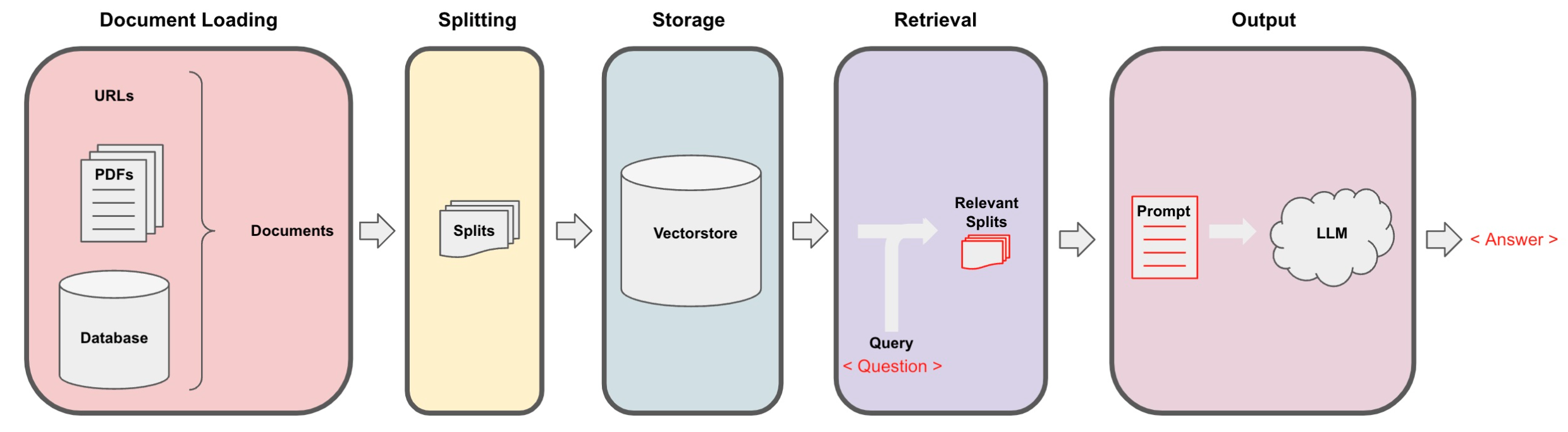
def load_db(file, chain_type, k):
"""
该函数用于加载 PDF 文件,切分文档,生成文档的嵌入向量,创建向量数据库,定义检索器,并创建聊天机器人实例。

参数:
file (str): 要加载的 PDF 文件路径。
chain_type (str): 链类型,用于指定聊天机器人的类型。
k (int): 在检索过程中,返回最相似的 k 个结果。

返回:
qa (ConversationalRetrievalChain): 创建的聊天机器人实例。
"""
# 载入文档
loader = PyPDFLoader(file)
documents = loader.load()
# 切分文档
text_splitter = RecursiveCharacterTextSplitter(chunk_size=1000, chunk_overlap=150)
docs = text_splitter.split_documents(documents)
# 定义 Embeddings
embeddings = OpenAIEmbeddings()
# 根据数据创建向量数据库
db = DocArrayInMemorySearch.from_documents(docs, embeddings)
# 定义检索器
retriever = db.as_retriever(search_type="similarity", search_kwargs={"k": k})
# 创建 chatbot 链,Memory 由外部管理
qa = ConversationalRetrievalChain.from_llm(
llm=ChatOpenAI(model_name=llm_name, temperature=0),
chain_type=chain_type,
retriever=retriever,
return_source_documents=True,
return_generated_question=True,
)
return qa

import panel as pn
import param

# 用于存储聊天记录、回答、数据库查询和回复
class cbfs(param.Parameterized):
chat_history = param.List([])
answer = param.String("")
db_query = param.String("")
db_response = param.List([])

def __init__(self, **params):
super(cbfs, self).__init__( **params)
self.panels = []
self.loaded_file = "docs/matplotlib/第一回:Matplotlib初相识.pdf"
self.qa = load_db(self.loaded_file,"stuff", 4)

# 将文档加载到聊天机器人中
def call_load_db(self, count):
"""
count: 数量
"""
if count == 0 or file_input.value is None: # 初始化或未指定文件 :
return pn.pane.Markdown(f"Loaded File: {self.loaded_file}")
else:
file_input.save("temp.pdf") # 本地副本
self.loaded_file = file_input.filename
button_load.button_style="outline"
self.qa = load_db("temp.pdf", "stuff", 4)
button_load.button_style="solid"
self.clr_history()
return pn.pane.Markdown(f"Loaded File: {self.loaded_file}")

# 处理对话链
def convchain(self, query):
"""
query: 用户的查询
"""
if not query:
return pn.WidgetBox(pn.Row('User:', pn.pane.Markdown("", width=600)), scroll=True)
result = self.qa({"question": query, "chat_history": self.chat_history})
self.chat_history.extend([(query, result["answer"])])
self.db_query = result["generated_question"]
self.db_response = result["source_documents"]
self.answer = result['answer']
self.panels.extend([
pn.Row('User:', pn.pane.Markdown(query, width=600)),
pn.Row('ChatBot:', pn.pane.Markdown(self.answer, width=600, style={'background-color': '#F6F6F6'}))
])
inp.value = '' # 清除时清除装载指示器
return pn.WidgetBox(*self.panels,scroll=True)

# 获取最后发送到数据库的问题
@param.depends('db_query ', )
def get_lquest(self):
if not self.db_query :
return pn.Column(
pn.Row(pn.pane.Markdown(f"Last question to DB:", styles={'background-color': '#F6F6F6'})),
pn.Row(pn.pane.Str("no DB accesses so far"))
)
return pn.Column(
pn.Row(pn.pane.Markdown(f"DB query:", styles={'background-color': '#F6F6F6'})),
pn.pane.Str(self.db_query )
)

# 获取数据库返回的源文件
@param.depends('db_response', )
def get_sources(self):
if not self.db_response:
return
rlist=[pn.Row(pn.pane.Markdown(f"Result of DB lookup:", styles={'background-color': '#F6F6F6'}))]
for doc in self.db_response:
rlist.append(pn.Row(pn.pane.Str(doc)))
return pn.WidgetBox(*rlist, width=600, scroll=True)

# 获取当前聊天记录
@param.depends('convchain', 'clr_history')
def get_chats(self):
if not self.chat_history:
return pn.WidgetBox(pn.Row(pn.pane.Str("No History Yet")), width=600, scroll=True)
rlist=[pn.Row(pn.pane.Markdown(f"Current Chat History variable", styles={'background-color': '#F6F6F6'}))]
for exchange in self.chat_history:
rlist.append(pn.Row(pn.pane.Str(exchange)))
return pn.WidgetBox(*rlist, width=600, scroll=True)

# 清除聊天记录
def clr_history(self,count=0):
self.chat_history = []
return

接着可以运行这个聊天机器人:

1
2
3
4
5
6
7
8
9
10
11
12
13
14
15
16
17
18
19
20
21
22
23
24
25
26
27
28
29
30
31
32
33
34
35
36
37
38
39
40
41
42
43
44
# 初始化聊天机器人
cb = cbfs()

# 定义界面的小部件
file_input = pn.widgets.FileInput(accept='.pdf') # PDF 文件的文件输入小部件
button_load = pn.widgets.Button(name="Load DB", button_type='primary') # 加载数据库的按钮
button_clearhistory = pn.widgets.Button(name="Clear History", button_type='warning') # 清除聊天记录的按钮
button_clearhistory.on_click(cb.clr_history) # 将清除历史记录功能绑定到按钮上
inp = pn.widgets.TextInput( placeholder='Enter text here…') # 用于用户查询的文本输入小部件

# 将加载数据库和对话的函数绑定到相应的部件上
bound_button_load = pn.bind(cb.call_load_db, button_load.param.clicks)
conversation = pn.bind(cb.convchain, inp)

jpg_pane = pn.pane.Image( './img/convchain.jpg')

# 使用 Panel 定义界面布局
tab1 = pn.Column(
pn.Row(inp),
pn.layout.Divider(),
pn.panel(conversation, loading_indicator=True, height=300),
pn.layout.Divider(),
)
tab2= pn.Column(
pn.panel(cb.get_lquest),
pn.layout.Divider(),
pn.panel(cb.get_sources ),
)
tab3= pn.Column(
pn.panel(cb.get_chats),
pn.layout.Divider(),
)
tab4=pn.Column(
pn.Row( file_input, button_load, bound_button_load),
pn.Row( button_clearhistory, pn.pane.Markdown("Clears chat history. Can use to start a new topic" )),
pn.layout.Divider(),
pn.Row(jpg_pane.clone(width=400))
)
# 将所有选项卡合并为一个仪表盘
dashboard = pn.Column(
pn.Row(pn.pane.Markdown('# ChatWithYourData_Bot')),
pn.Tabs(('Conversation', tab1), ('Database', tab2), ('Chat History', tab3),('Configure', tab4))
)
dashboard

以下截图展示了该机器人的运行情况:

您可以自由使用并修改上述代码,以添加自定义功能。例如,可以修改 load_db 函数和 convchain 方法中的配置,尝试不同的存储器模块和检索器模型。

此外,panelParam 这两个库提供了丰富的组件和小工具,可以用来扩展和增强图形用户界面。Panel 可以创建交互式的控制面板,Param 可以声明输入参数并生成控件。组合使用可以构建强大的可配置GUI。

您可以通过创造性地应用这些工具,开发出功能更丰富的对话系统和界面。自定义控件可以实现参数配置、可视化等高级功能。欢迎修改和扩展示例代码,开发出功能更强大、体验更佳的智能对话应用。

英文版

复习
1
2
3
4
5
6
7
8
9
10
11
12
13
14
# 加载向量库,其中包含了所有课程材料的 Embedding。
from langchain.vectorstores import Chroma
from langchain.embeddings.openai import OpenAIEmbeddings
import panel as pn # GUI
# pn.extension()

persist_directory = 'docs/chroma/cs229_lectures'
embedding = OpenAIEmbeddings()
vectordb = Chroma(persist_directory=persist_directory, embedding_function=embedding)

# 对向量库进行基本的相似度搜索
question = "What are major topics for this class?"
docs = vectordb.similarity_search(question,k=3)
print(len(docs))
1
3

创建一个 LLM

1
2
3
from langchain.chat_models import ChatOpenAI
llm = ChatOpenAI(model_name=llm_name, temperature=0)
llm.predict("Hello world!")
1
'Hello there! How can I assist you today?'

创建一个基于模板的检索链

1
2
3
4
5
6
7
8
9
10
11
12
13
14
15
16
17
18
19
20
# 初始化一个 prompt 模板,创建一个检索 QA 链,然后传入一个问题并得到一个结果。
# 构建 prompt
from langchain.prompts import PromptTemplate
template = """Use the following pieces of context to answer the question at the end. If you don't know the answer, just say that you don't know, don't try to make up an answer. Use three sentences maximum. Keep the answer as concise as possible. Always say "thanks for asking!" at the end of the answer.
{context}
Question: {question}
Helpful Answer:"""
QA_CHAIN_PROMPT = PromptTemplate(input_variables=["context", "question"],template=template,)

# 运行 chain
from langchain.chains import RetrievalQA
question = "Is probability a class topic?"
qa_chain = RetrievalQA.from_chain_type(llm,
retriever=vectordb.as_retriever(),
return_source_documents=True,
chain_type_kwargs={"prompt": QA_CHAIN_PROMPT})


result = qa_chain({"query": question})
print(result["result"])
1
Yes, probability is assumed to be a prerequisite for this class. The instructor assumes familiarity with basic probability and statistics, and will go over some of the prerequisites in the discussion sections as a refresher course. Thanks for asking!
记忆
1
2
3
4
5
from langchain.memory import ConversationBufferMemory
memory = ConversationBufferMemory(
memory_key="chat_history", # 与 prompt 的输入变量保持一致。
return_messages=True # 将以消息列表的形式返回聊天记录,而不是单个字符串
)
对话检索链
1
2
3
4
5
6
7
8
9
10
11
12
13
14
15
16
17
from langchain.chains import ConversationalRetrievalChain
retriever=vectordb.as_retriever()
qa = ConversationalRetrievalChain.from_llm(
llm,
retriever=retriever,
memory=memory
)

question = "Is probability a class topic?"
result = qa({"question": question})
print("Q: ", question)
print("A: ", result['answer'])

question = "why are those prerequesites needed?"
result = qa({"question": question})
print("Q: ", question)
print("A: ", result['answer'])
1
2
3
4
Q:  Is probability a class topic?
A: Yes, probability is a topic that will be assumed to be familiar to students in this class. The instructor assumes that students have familiarity with basic probability and statistics, and that most undergraduate statistics classes will be more than enough.
Q: why are those prerequesites needed?
A: The reason for requiring familiarity with basic probability and statistics as prerequisites for this class is that the class assumes that students already know what random variables are, what expectation is, what a variance or a random variable is. The class will not spend much time reviewing these concepts, so students are expected to have a basic understanding of them before taking the class.
定义一个聊天机器人
1
2
3
4
5
6
7
8
9
10
11
12
13
14
15
16
17
18
19
20
21
22
23
24
25
26
27
28
29
30
31
32
33
34
35
36
37
38
39
40
41
42
43
44
45
46
47
48
49
50
51
52
53
54
55
56
57
58
59
60
61
62
63
64
65
66
67
68
69
70
71
72
73
74
75
76
77
78
79
80
81
82
83
84
85
86
87
88
89
90
91
92
93
94
95
96
97
98
99
100
101
102
103
104
105
106
107
108
109
110
111
112
113
114
115
116
117
118
119
120
121
122
123
124
125
126
127
128
129
130
131
132
133
from langchain.embeddings.openai import OpenAIEmbeddings
from langchain.text_splitter import CharacterTextSplitter, RecursiveCharacterTextSplitter
from langchain.vectorstores import DocArrayInMemorySearch
from langchain.document_loaders import TextLoader
from langchain.chains import RetrievalQA, ConversationalRetrievalChain
from langchain.memory import ConversationBufferMemory
from langchain.chat_models import ChatOpenAI
from langchain.document_loaders import TextLoader
from langchain.document_loaders import PyPDFLoader
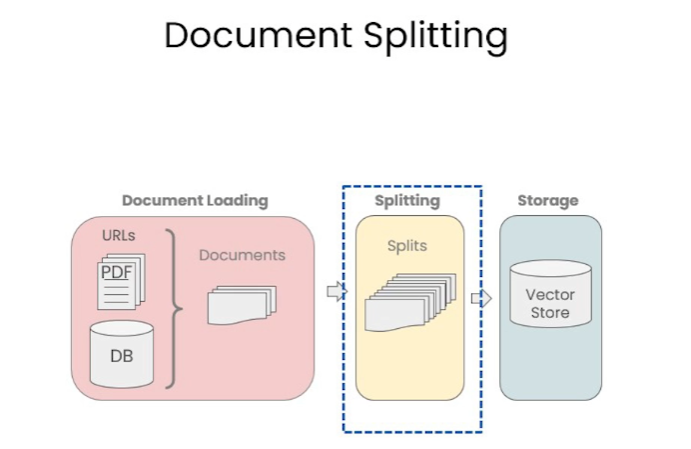
def load_db(file, chain_type, k):
"""
该函数用于加载 PDF 文件,切分文档,生成文档的嵌入向量,创建向量数据库,定义检索器,并创建聊天机器人实例。

参数:
file (str): 要加载的 PDF 文件路径。
chain_type (str): 链类型,用于指定聊天机器人的类型。
k (int): 在检索过程中,返回最相似的 k 个结果。

返回:
qa (ConversationalRetrievalChain): 创建的聊天机器人实例。
"""
# 载入文档
loader = PyPDFLoader(file)
documents = loader.load()
# 切分文档
text_splitter = RecursiveCharacterTextSplitter(chunk_size=1000, chunk_overlap=150)
docs = text_splitter.split_documents(documents)
# 定义 Embeddings
embeddings = OpenAIEmbeddings()
# 根据数据创建向量数据库
db = DocArrayInMemorySearch.from_documents(docs, embeddings)
# 定义检索器
retriever = db.as_retriever(search_type="similarity", search_kwargs={"k": k})
# 创建 chatbot 链,Memory 由外部管理
qa = ConversationalRetrievalChain.from_llm(
llm=ChatOpenAI(model_name=llm_name, temperature=0),
chain_type=chain_type,
retriever=retriever,
return_source_documents=True,
return_generated_question=True,
)
return qa

import panel as pn
import param

# 用于存储聊天记录、回答、数据库查询和回复
class cbfs(param.Parameterized):
chat_history = param.List([])
answer = param.String("")
db_query = param.String("")
db_response = param.List([])

def __init__(self, **params):
super(cbfs, self).__init__( **params)
self.panels = []
self.loaded_file = "docs/cs229_lectures/MachineLearning-Lecture01.pdf"
self.qa = load_db(self.loaded_file,"stuff", 4)

# 将文档加载到聊天机器人中
def call_load_db(self, count):
"""
count: 数量
"""
if count == 0 or file_input.value is None: # 初始化或未指定文件 :
return pn.pane.Markdown(f"Loaded File: {self.loaded_file}")
else:
file_input.save("temp.pdf") # 本地副本
self.loaded_file = file_input.filename
button_load.button_style="outline"
self.qa = load_db("temp.pdf", "stuff", 4)
button_load.button_style="solid"
self.clr_history()
return pn.pane.Markdown(f"Loaded File: {self.loaded_file}")

# 处理对话链
def convchain(self, query):
"""
query: 用户的查询
"""
if not query:
return pn.WidgetBox(pn.Row('User:', pn.pane.Markdown("", width=600)), scroll=True)
result = self.qa({"question": query, "chat_history": self.chat_history})
self.chat_history.extend([(query, result["answer"])])
self.db_query = result["generated_question"]
self.db_response = result["source_documents"]
self.answer = result['answer']
self.panels.extend([
pn.Row('User:', pn.pane.Markdown(query, width=600)),
pn.Row('ChatBot:', pn.pane.Markdown(self.answer, width=600, style={'background-color': '#F6F6F6'}))
])
inp.value = '' # 清除时清除装载指示器
return pn.WidgetBox(*self.panels,scroll=True)

# 获取最后发送到数据库的问题
@param.depends('db_query ', )
def get_lquest(self):
if not self.db_query :
return pn.Column(
pn.Row(pn.pane.Markdown(f"Last question to DB:", styles={'background-color': '#F6F6F6'})),
pn.Row(pn.pane.Str("no DB accesses so far"))
)
return pn.Column(
pn.Row(pn.pane.Markdown(f"DB query:", styles={'background-color': '#F6F6F6'})),
pn.pane.Str(self.db_query )
)

# 获取数据库返回的源文件
@param.depends('db_response', )
def get_sources(self):
if not self.db_response:
return
rlist=[pn.Row(pn.pane.Markdown(f"Result of DB lookup:", styles={'background-color': '#F6F6F6'}))]
for doc in self.db_response:
rlist.append(pn.Row(pn.pane.Str(doc)))
return pn.WidgetBox(*rlist, width=600, scroll=True)

# 获取当前聊天记录
@param.depends('convchain', 'clr_history')
def get_chats(self):
if not self.chat_history:
return pn.WidgetBox(pn.Row(pn.pane.Str("No History Yet")), width=600, scroll=True)
rlist=[pn.Row(pn.pane.Markdown(f"Current Chat History variable", styles={'background-color': '#F6F6F6'}))]
for exchange in self.chat_history:
rlist.append(pn.Row(pn.pane.Str(exchange)))
return pn.WidgetBox(*rlist, width=600, scroll=True)

# 清除聊天记录
def clr_history(self,count=0):
self.chat_history = []
return

创建聊天机器人
1
2
3
4
5
6
7
8
9
10
11
12
13
14
15
16
17
18
19
20
21
22
23
24
25
26
27
28
29
30
31
32
33
34
35
36
37
38
39
40
41
42
43
44
# 初始化聊天机器人
cb = cbfs()

# 定义界面的小部件
file_input = pn.widgets.FileInput(accept='.pdf') # PDF 文件的文件输入小部件
button_load = pn.widgets.Button(name="Load DB", button_type='primary') # 加载数据库的按钮
button_clearhistory = pn.widgets.Button(name="Clear History", button_type='warning') # 清除聊天记录的按钮
button_clearhistory.on_click(cb.clr_history) # 将清除历史记录功能绑定到按钮上
inp = pn.widgets.TextInput( placeholder='Enter text here…') # 用于用户查询的文本输入小部件

# 将加载数据库和对话的函数绑定到相应的部件上
bound_button_load = pn.bind(cb.call_load_db, button_load.param.clicks)
conversation = pn.bind(cb.convchain, inp)

jpg_pane = pn.pane.Image( './img/convchain.jpg')

# 使用 Panel 定义界面布局
tab1 = pn.Column(
pn.Row(inp),
pn.layout.Divider(),
pn.panel(conversation, loading_indicator=True, height=300),
pn.layout.Divider(),
)
tab2= pn.Column(
pn.panel(cb.get_lquest),
pn.layout.Divider(),
pn.panel(cb.get_sources ),
)
tab3= pn.Column(
pn.panel(cb.get_chats),
pn.layout.Divider(),
)
tab4=pn.Column(
pn.Row( file_input, button_load, bound_button_load),
pn.Row( button_clearhistory, pn.pane.Markdown("Clears chat history. Can use to start a new topic" )),
pn.layout.Divider(),
pn.Row(jpg_pane.clone(width=400))
)
# 将所有选项卡合并为一个仪表盘
dashboard = pn.Column(
pn.Row(pn.pane.Markdown('# ChatWithYourData_Bot')),
pn.Tabs(('Conversation', tab1), ('Database', tab2), ('Chat History', tab3),('Configure', tab4))
)
dashboard

总结 Summary

让我们快速回顾本部分的主要内容:

  1. 使用 LangChain 的多种文档加载器,从不同源导入各类数据。

  2. 将文档分割为语义完整的文本块,并讨论了其中的一些微妙之处。

  3. 为这些块创建了 Embedding,并将它们放入向量存储器中,并轻松实现语义搜索。

  4. 讨论了语义搜索的一些缺点,以及在某些边缘情况中可能会发生的搜索失败。

  5. 介绍多种高级检索算法,用于克服那些边缘情况。

  6. 与 LLMs 相结合,将检索结果与问题传递给 LLM ,生成对原始问题的答案。

  7. 对对话内容进行了补全,创建了一个完全功能的、端到端的聊天机器人。

通过学习本部分内容,我们已经掌握了如何使用 LangChain 框架,访问私有数据并建立个性化的问答系统。这是一个快速迭代的领域,希望您能持续关注新技术。

期待看到大家将知识应用到实践中,创造更多惊喜。让我们出发,继续探索语言模型和私有数据结合的无限可能!